AI-translated. Read the original in KoreanEmbedded slides, videos and images remain in their original language.
Working in the Monorepo
This document explains the rules and workflow you need to know before working in the client monorepo.
Project Organization
A monorepo manages multiple projects in one repository. It therefore contains many modules that reference one another as local library modules.
For more information, see Multirepo vs Monorepo.
Layer Structure
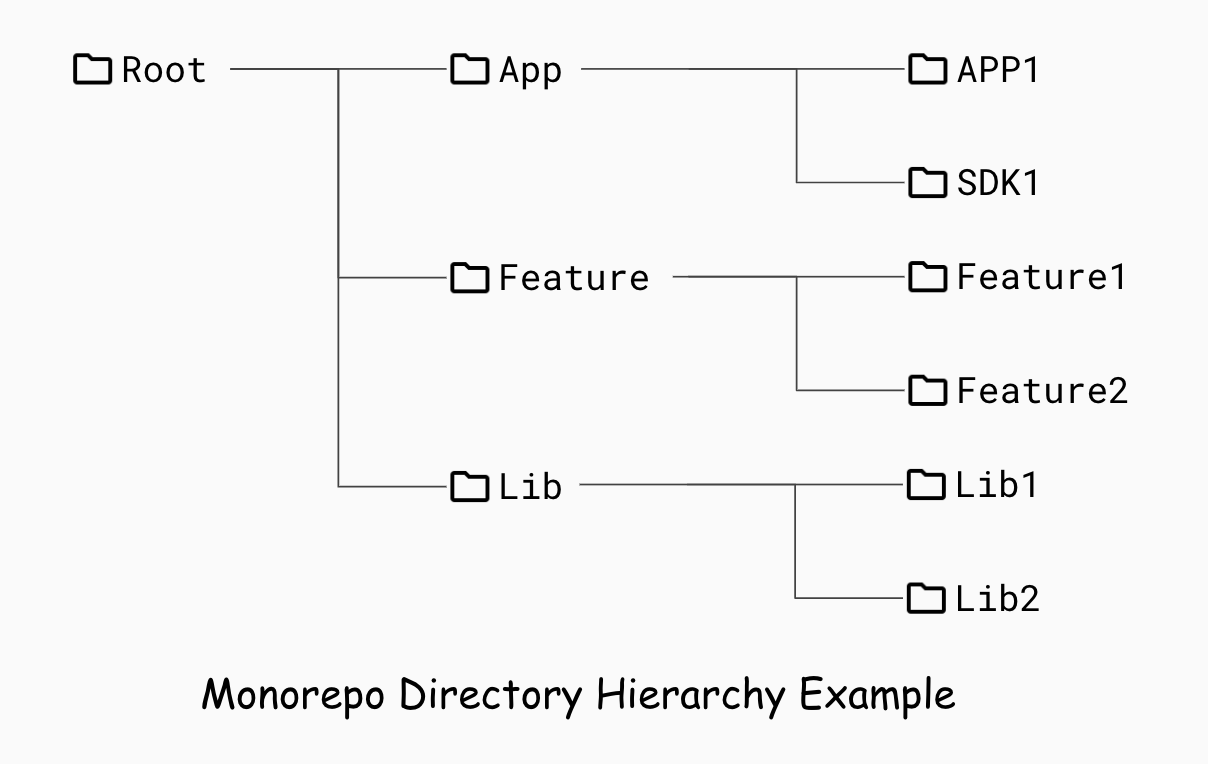
- App layer
- Modules that form applications or SDKs, such as the Buzzscreen SDK and BuzzAd SDK.
- Feature layer
- Modules that provide discrete user-facing features. App modules can combine several feature modules to deliver the functionality they need. Examples include video and step-counter modules.
- Library layer
- Modules that provide reusable units of logic shared by the layers above, such as auth and logger.
Local Library Modules
A local library module is referenced from within the local project. The client monorepo uses multiple local library modules, referenced as follows.
implementation project(":path")
A local library dependency points directly to the current source code without naming a separate version. This can give developers the impression that local library modules do not need version management. That is not true for SDK development: developers must version and publish each local library module. The reason is that apps and SDKs produce different build artifacts. See this guide for details.
To develop Buzzvil SDKs, every local library module therefore needs to be versioned and published.
Branching Model
A branching model defines how branches are managed in a source control tool such as Git. Common examples include Git Flow and trunk-based development. The client monorepo uses trunk-based development to keep the source in a valid, releasable state at all times.
Trunk-Based Development
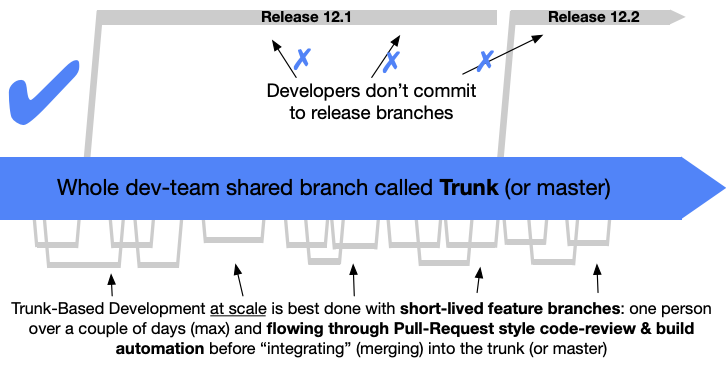
Trunk-based development is a strategy for managing branches in source control. Developers collaborate on master and avoid long-lived development branches, minimizing conflicts and preventing broken builds. Its defining principle is to keep the master branch—the trunk—in a valid, releasable state at all times. The main rules supporting that principle are below.
Development Rules
- Development can use direct pushes or branch-based pushes.
- Direct push: Make a small change on master and push it directly.
- Branch-based push: Create a feature branch from master and integrate it through a pull request.
- Buzzvil does not use direct pushes during development. We use branch-based pushes.
- Keep feature branches to small units of work wherever possible.
- For features requiring extended development, use feature flags and interfaces to break the work into smaller pieces.
Release Rules
- Release directly or through a release branch.
- Direct release: Release straight from master.
- Branch release: Create a release branch from master when needed, then release from it.
- Buzzvil uses both approaches as appropriate. See “Releases at Buzzvil” below for details.
- Do not merge work from release branches back into master.
- If additional work is needed on a release branch, do it on master first and cherry-pick the relevant commit into the release branch.
For more information, see Trunk-Based Development.
Version Management
Semantic Versioning
Buzzvil’s client projects use semantic versioning to maintain a consistent versioning policy.
Semantic versioning defines how to assign and manage product versions. It establishes consistent rules for modules and products, eliminating sources of confusion during collaboration.
Its main principles are:
- A version has three core components: Major, Minor, and Patch.
- Major: Increment when an API changes in a backward-incompatible way.
- Minor: Increment when adding backward-compatible functionality.
- Patch: Increment when fixing bugs while preserving backward compatibility.
- A prerelease version can be appended to Major.Minor.Patch.
- Examples: 1.0.1-rc.1 or 1.2.3-alpha.2.
For more information, see Semantic Versioning.
How Buzzvil Applies It
Semantic versioning allows prerelease identifiers and build metadata to extend the core [Major, Minor, Patch] version.
Buzzvil accepts any version that follows the semantic versioning specification, but generally uses the following convention for product versions.
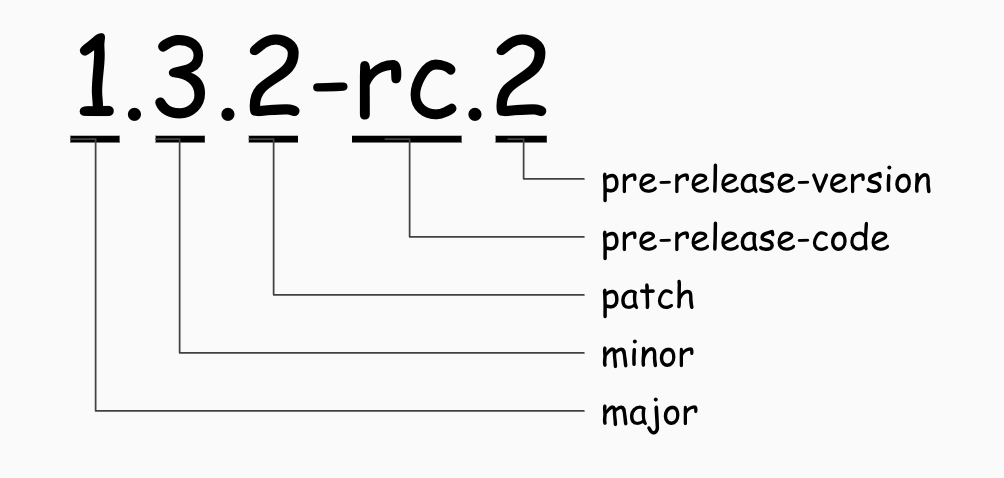
- [Major].[Minor].[Patch]-[Pre Release Code].[Pre Release Version]
- Major: Major version
- Minor: Minor version
- Patch: Patch version
- Extended version
- Pre Release Code: Prerelease identifier
- We currently use only rc. Other identifiers, such as alpha or beta, may be used after discussion if needed.
- Pre Release Version: Version number for that prerelease identifier
- Pre Release Code: Prerelease identifier
Do not use prerelease identifiers to encode unrelated information. For example, do not use 1.0.0-abtest.rc.1 to indicate a release for an A/B test. That is outside the purpose of prerelease identifiers, and their lexicographic precedence rules can make version ordering confusing. Use Git tags to record the meaning of a particular version instead.
When to Change Versions
Deciding when to increment a version is just as important as deciding its format.
Buzzvil uses trunk-based development and follows its versioning rules. Applying those rules strictly to every module, however, would create excessive management complexity. We therefore allow exceptions depending on the module’s circumstances.
This section defines when versions should be incremented under trunk-based development and how Buzzvil adapts those rules.
Trunk-Based Development
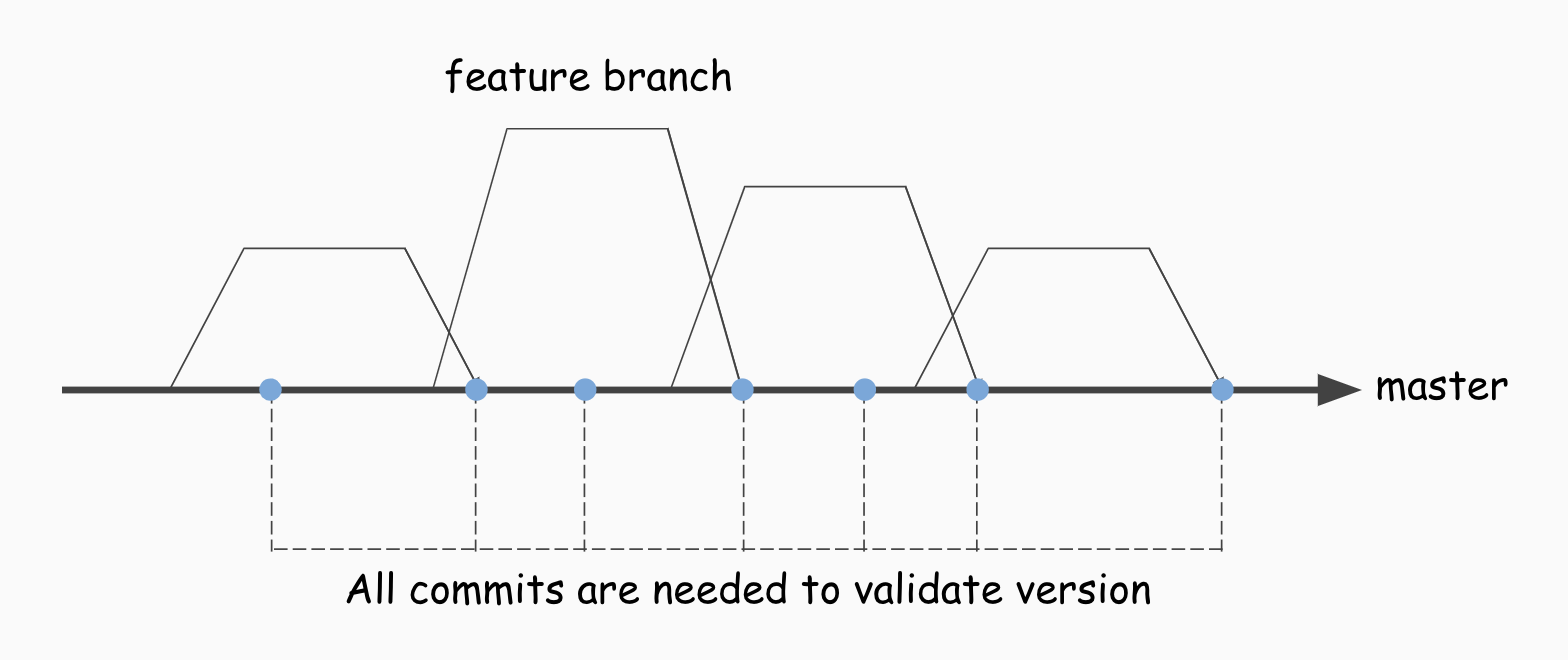
Trunk-based development requires every state to be releasable. This means every commit on master must have a valid version state.
For every push or pull request into master, developers must therefore increment the versions of changed modules according to semantic versioning.
However, incrementing versions on every commit adds work for developers. Even with CI automation, the process inevitably becomes more complex.
Buzzvil’s Policy
To simplify trunk-based development, Buzzvil increments module versions at release time rather than on every commit. Here, release time means the moment a release tag is applied to the product.
When releasing a module, remember to increment not only its own version but also the versions of any changed local library modules it references.
As the number of modules grows, this becomes difficult to do manually. Buzzvil therefore developed a Gradle plugin to automate releases.
Handling Hotfixes
If the branching model and semantic versioning rules are followed strictly, a hotfix after release should change no functionality and increment only the patch version. In the SDK business, however, we sometimes need to change functionality through a hotfix. This breaks the usual development rules, so CI can no longer verify that the version state is valid.
To address this, we define the following rules.
First, CI Does Not Validate Hotfix Versions
Because circumstances vary, rely on the developer’s judgment and intensive testing to verify stability.
Second, Avoid Changing Local Library Modules in Hotfixes
Changing a module in a hotfix creates code that differs from its existing version. The released module normally receives a new version, but local library modules must also be explicitly assigned new versions and published.
If a module needs changes, make and publish them on master where possible, then reference the published module remotely to avoid modifying it within the hotfix.
Third, Publish Modified Hotfix Modules with a Hotfix Version
If a hotfix must modify and republish a local library module, use hotfix as the prerelease identifier to avoid conflicts with versions used on master. For example: 1.0.1-hotfix.1.
Release Rules
The following rules govern releases from the monorepo.
Branching and Releases
Because the client monorepo uses trunk-based development, there are two release approaches.
- Release branch
- Create a release branch for a minor version.
- Perform subsequent maintenance on master, cherry-pick it into the release branch, and increment the patch version.
- Direct release
- Release directly from the desired commit on master.
Releases at Buzzvil
Except in special cases, Buzzvil currently tags master and releases directly, without creating a release branch. This requires considering the following issue.
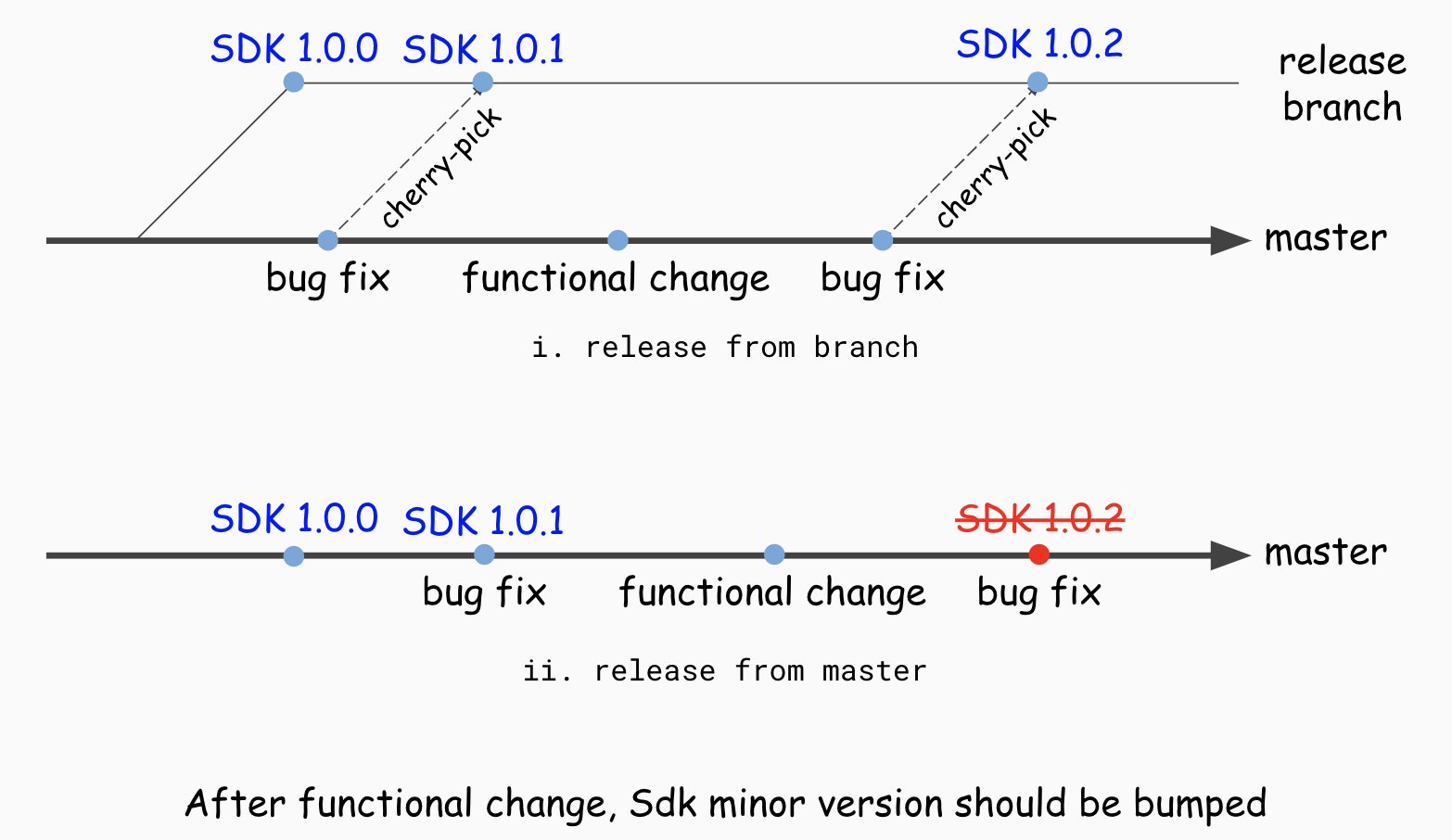
If commits introducing functionality changes have been added while releasing from master, the SDK requires a minor version increase; a patch-only release would not be sufficient. Creating a release branch and managing cherry-picks in every such case, however, would make the release system too complex. Buzzvil therefore uses the following rules.
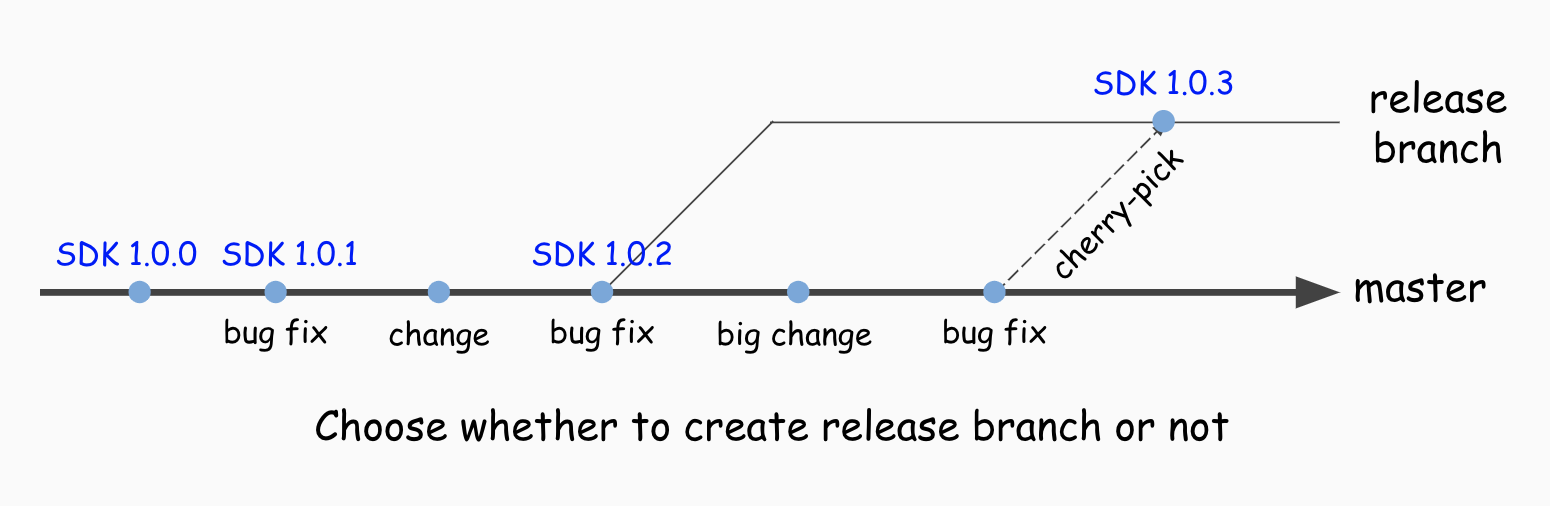
- By default, tag master and release directly.
- Even if functionality has changed in the meantime, the developer may decide to release without incrementing the minor version.
- If the developer determines that some changes must not be included, create a branch from the previous release tag and release from that branch.
FAQ
- Q) We manage Android versions using
versionName. Why not useversionCode?- A) It makes version increments difficult for CI to validate accurately.
versionCodeis an integer that normally increases by one, but a release from a hotfix branch can increment it separately. If master’s head has versionCode 3, the next commit’s versionCode may or may not be 4. To validate versions accurately, we therefore use the semantically versionedversionNamerather than the integer-basedversionCode.
- A) It makes version increments difficult for CI to validate accurately.
Reference
Related guides
All guidesHandbook
Contributing
Contributing Documentation Principles
Handbook
Go Testing
This document provides Go testing methods and guidelines, including recommended libraries and how to use them. These are recommendations only; projects are free to adopt or propose…
Handbook
Python Testing
This document provides methods and guidelines for testing Python code, including recommended libraries and how to use them. These are recommendations: projects may adopt or propose…