AI-translated. Read the original in KoreanEmbedded slides, videos and images remain in their original language.
Kubernetes Operations
Operating Kubernetes
This document provides information to help check the state of Kubernetes and the workloads deployed to a cluster, and troubleshoot problems.
kubectl
kubectl is a command-line interface for executing commands against a Kubernetes cluster. It is the essential tool for inspecting and operating workloads deployed to the cluster. See the official documentation for basic usage and the internal kubectl setup guide for EKS access for EKS configuration. kubectl is based on the Go client, which you can also use to build custom client programs easily.
oh-my-zsh Plugin
Once you are comfortable with kubectl, the oh-my-zsh kubectl plugin provides command aliases and completion. ReplicaSet and pod names include randomly generated parts based on the Deployment, Job, or other resource that manages them, so completion is particularly useful for operational work.
krew: The kubectl Plugin Manager
krew is a package manager for kubectl plugins. It offers many extensions that kubectl does not provide by default, such as a pod restart plugin, and is worth exploring.
kubectx
kubectx and kubens make it easy to switch cluster and namespace contexts. They are useful when managing several clusters or working across namespaces. Buzzvil currently assigns namespaces by service and controls individual access at the namespace level. We therefore recommend switching to your working namespace with a command such as kubens postbacksvc.
Switching between contexts can lead to accidental changes to the wrong resources. kube-ps1 displays the current cluster and namespace in your command prompt, reducing that risk.

Checking Pod Status
A pod is Kubernetes’ basic deployment unit for one or more related containers. Related containers include sidecars scheduled together with the main application container—for example, a container that sends metrics to external storage or a reverse proxy such as nginx. To scale horizontally, increase the number of pods rather than adding more containers to a pod.
Checking pod status is usually the first step in investigating an application. You can check whether pods are restarting, whether they have been scheduled onto nodes, and how much CPU and memory they have been allocated and are using. Resource allocation is particularly important: requests and limits determine scheduling behavior and what happens when a container needs more resources, including whether it receives more CPU time or is OOM-killed.
Using kubectl
The most basic way to inspect pod status is with kubectl.
  # 파드 상태 확인
  # READY: 파드에 정의된 컨테이너 중 몇 개의 컨테이너가 준비되었는지 확인할 수 있다.
  # STATUS: 모든 컨테이너가 잘 동작하고 있으면 Running. 다른 상태에 대한 설명은 https://kubernetes.io/docs/concepts/workloads/pods/pod-lifecycle/#pod-phase 참고
  # RESTARTS: 파드가 총 몇 회 재시작되었는지를 나타낸다. livenessProbe 실패 시, 혹은 메인 커멘드가 종료될 시 쿠버네티스는 파드를 재시작한다.
  $ kubectl get pods
  > NAME                                       READY   STATUS    RESTARTS   AGE
    buzzscreen-api-dev-7cc4c6b6b9-4rnq8        3/3     Running   2          7d8h
    buzzscreen-api-dev-7cc4c6b6b9-wh8bk        3/3     Running   1          7d20h
    buzzscreen-api-prod-68f4494fdd-6tz8j       3/3     Running   1          46m
    buzzscreen-api-prod-68f4494fdd-czpvt       0/3     Init:0/1  0          2s

  # 파드 리소스 사용량 확인
  # CPU: 1 == 1000m == 1코어
  $ kubectl top pods
  > NAME                                       CPU(cores)   MEMORY(bytes)
    buzzscreen-api-dev-7cc4c6b6b9-4rnq8        4m           119Mi
    buzzscreen-api-dev-7cc4c6b6b9-wh8bk        4m           123Mi
    buzzscreen-api-prod-68f4494fdd-6tz8j       3m           123Mi
    buzzscreen-api-prod-68f4494fdd-8vrxg       68m          110Mi
Using Spinnaker
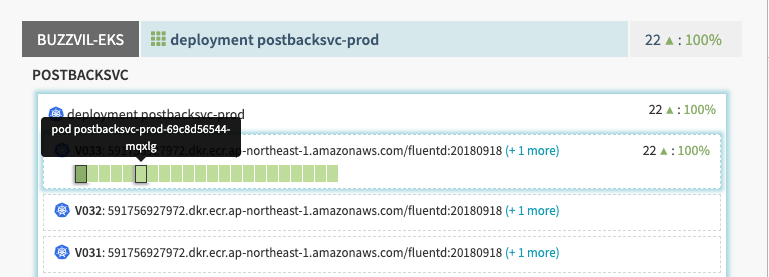
Without a command-line interface, you can use Infrastructure → Clusters in Spinnaker to inspect pods belonging to a deployed Deployment and view basic logs.
New Relic Infrastructure
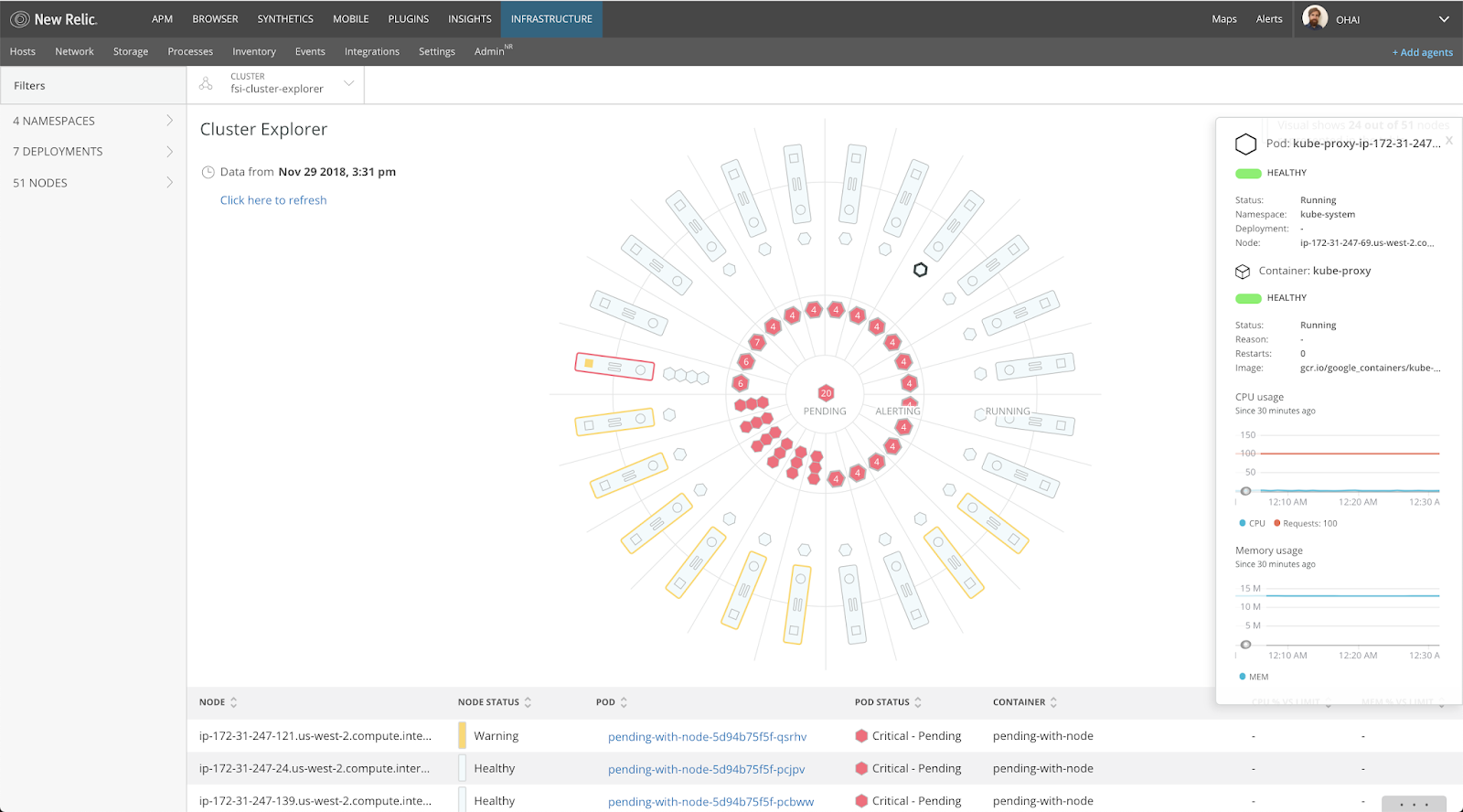
New Relic Infrastructure’s Kubernetes integration provides a GUI for checking cluster nodes and pods. You can inspect node storage, resource usage for individual pods, frequent restarts, and similar conditions, and configure alerts.
Viewing Logs
Container workloads should write their log streams to STDOUT and STDERR. This allows logs to be stored and managed centrally at the cluster level rather than by individual containers. You can view these logs in the following ways.
kubectl logs
The simplest option is kubectl logs. It retrieves logs for a specific pod; use -f, --follow to follow the stream.
# POD_NAME에 해당하는 파드를 출력. 선택적으로 CONTAINER_NAME에 해당하는 컨테이너의 로그만 출력 가능.
$ kubectl logs -f POD_NAME -c CONTAINER_NAME
# 특정 label에 매칭되는 여러 파드의 로그를 출력. 하나의 파드에 여러 컨테이너가 존재할 경우 컨테이너 옵션이 필수이다.
$ kubectl logs -l LABEL=value -c CONTAINER_NAME
stern
Because kubectl requires you to identify individual pods, it is inconvenient for quickly inspecting logs across several pods. stern lets you query pod names and follow logs from all matching pods in real time. The --since TIME option makes it easy to retrieve logs from a specific point in time.
# buzzscreen-prod이 들어간 모든 파드의 1분 이내의 로그 조회
$ stern buzzscreen --since 1m
Query-based pod selection makes stern and grep much more convenient than kubectl logs for many tasks. We also recommend its completion support for bash and zsh.
kibana
kubectl and stern cannot retrieve old logs after a pod is deleted. We therefore store logs written to STDOUT in a separate Elasticsearch instance at the cluster level. Use Kibana to inspect them and progressively narrow the results with queries.
Rollback
TBD
Grafana
TBD
Related guides
All guidesHandbook
API Definition
This document explains how to define and use APIs (application programming interfaces) at Buzzvil. Interfaces are defined using Protocol Buffers. Guidelines API-First Approach Use…
Handbook
Buzzvil Architecture
This website brings together an overview of Buzzvil’s software architecture and the documentation needed to develop within it. Introduction The advertising ecosystem is complex bec…
Handbook
Service Deployment
This document describes what you need to prepare to deploy backend services at Buzzvil. Guidelines The process for deploying services to Kubernetes at Buzzvil is shown below. Altho…