AI-translated. Read the original in KoreanEmbedded slides, videos and images remain in their original language.
Improving CI Tests for Airflow Data Pipelines

Data Engineer
Introduction
Hi, I’m Abel, a data engineer at Buzzvil. In this post, I’ll explain how we reduced our data pipeline CI test time from around seven minutes to around three.
Background
Our Data Platform team previously introduced Building a Self-Service Data Platform. To add a pipeline, users write a YAML file in the required format, open a GitHub pull request, and deploy it. CI tests run automatically when the pull request is created to catch human errors.
These tests affect everyone creating pipelines, not just our team, so their impact is broader than that of many other CI tests. I wanted to improve them and make everyone managing pipelines more productive, but the work had remained below other priorities. Then Buzzvil’s Velocity Sprint gave us two weeks to pause regular work, tackle accumulated technical debt, and improve efficiency. That was our opportunity.
The existing CI pipeline
Before deciding what to improve, we needed to understand the stages in our current CI process.
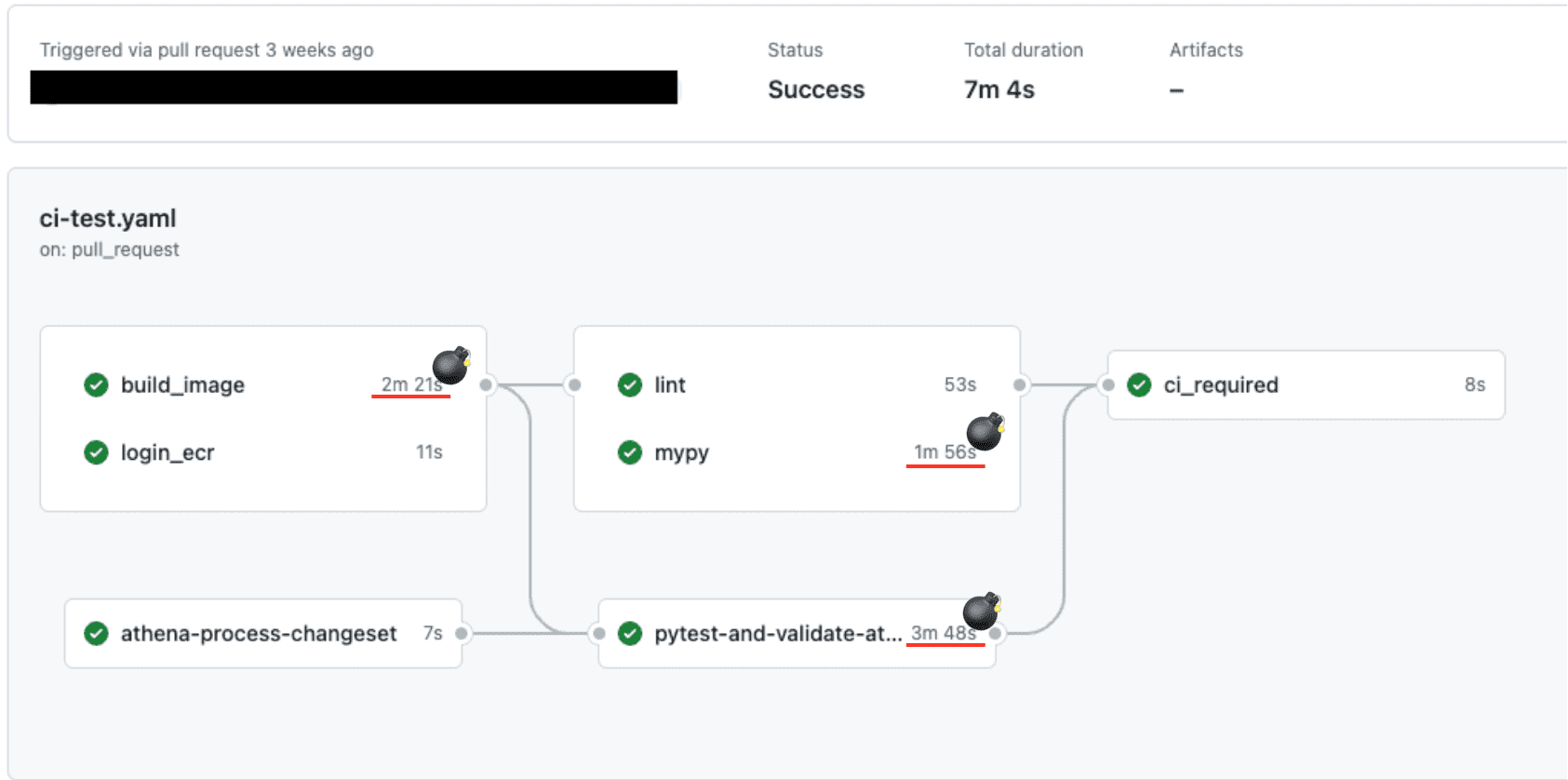
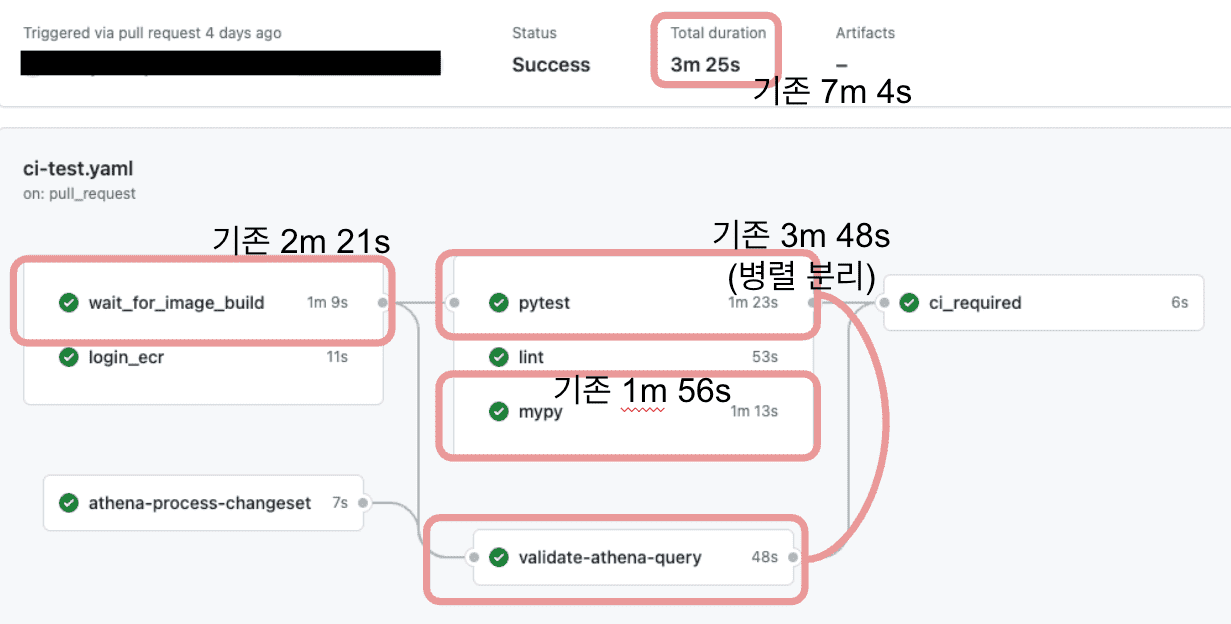
The diagram shows their execution order. First, login_ecr authenticates access to the container registry, and build_image builds the image. Once both succeed, lint runs flake8 to check style and detect simple errors, while mypy performs its checks. An additional athena-process-changeset stage identifies added or modified query files. Once that succeeds, pytest-and-validate-athena-query runs tests and checks those queries for syntax errors. Only when every stage succeeds does ci_required report the result and finish CI.
The dependency graph and stage timings reveal where improvement matters. For example, ci_required waits for lint, mypy, and pytest-and-validate-athena-query. Making a shorter stage even faster has no effect until the slowest one finishes. Lint and mypy were therefore low priorities until pytest-and-validate-athena-query became shorter than them. Initially, build_image and pytest-and-validate-athena-query offered the most value.
The improvements
The build_image stage
Making build caching reliable
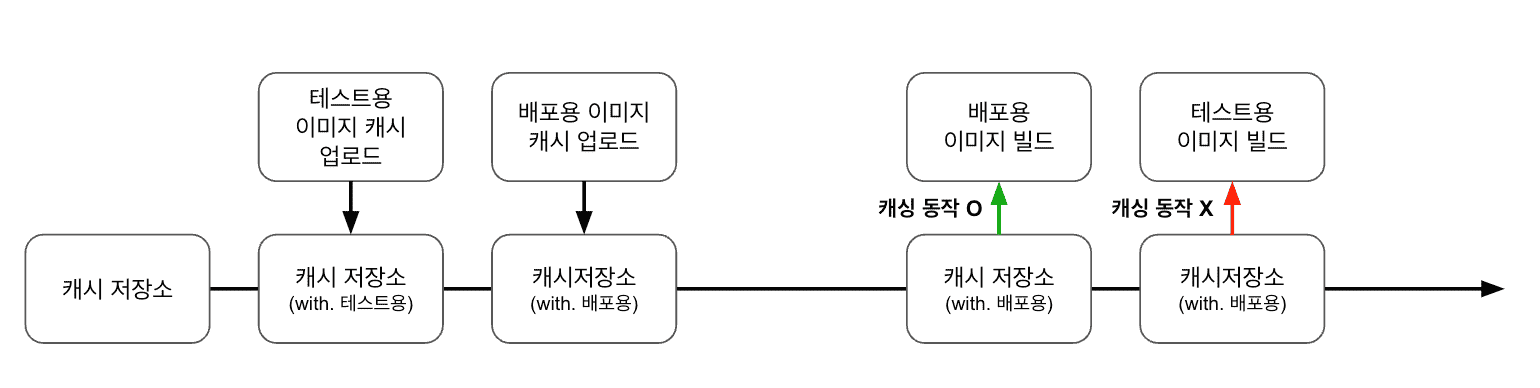
The data pipeline repository builds two images: one for CI tests and one for deployment. CI image build times varied considerably, with the slowest taking more than twice as long as the fastest. Logs from slow builds showed unchanged layers being rebuilt instead of reused from cache.
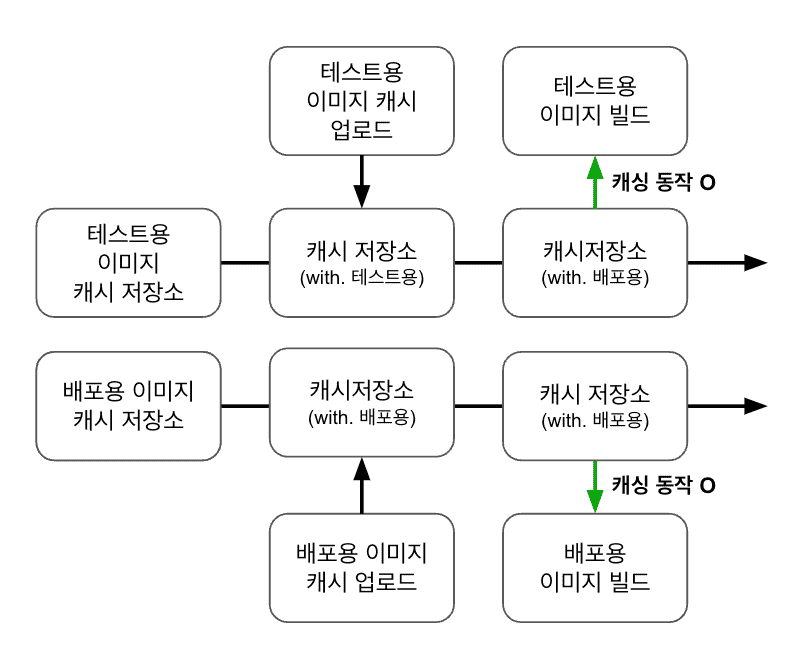
We checked the cache repository and found the branch’s cache had been uploaded correctly. The cache tags then revealed the problem. Although the repository built two different images, caching was organized only by branch. Whichever image uploaded its cache later overwrote the earlier image’s cache. The earlier image could therefore not reuse its cache on the next build. Intermittently rebuilding the CI image without cache caused the large timing variation.
We changed cache identification to include the branch, Dockerfile name, and build target. That stabilized build_image duration.
Improving dependencies
The image build process ran in this order: download cache → build image → push image → generate cache → push cache. Images and cache data were managed separately so deployment could begin as soon as the image was ready, while cache handling continued afterward.
CI, however, depended on the entire build process and waited until the cache push finished. We applied the same detection approach used for deployment, making CI depend on the image being pushed rather than the full build workflow. That removed cache-processing time from CI’s critical path.
The pytest-and-validate-athena-query stage
Removing unnecessary commands

This stage initialized Airflow so DAGs could run, executed tests, and validated the syntax of queries used in the pipeline. The tests themselves took less than a minute, but environment setup consumed one minute and forty seconds.
The initialization command creates a SQLite file named airflow.db. Its contents vary by Airflow version but remain identical across CI runs using the same version. We considered caching it by Airflow version. However, Airflow upgrades were infrequent, and manually managing the file was simpler to configure and operate than implementing version-aware cache detection.
We therefore committed airflow.db—the output of airflow db init—to the repository. Removing repeated initialization from CI saved one minute and forty seconds.
Running in parallel
Previously, pytest and Athena query validation ran sequentially because both needed the output of airflow db init and therefore shared an environment. Query validation was also relatively short, so sequential execution had seemed reasonable. Once the database file lived in the repository, sharing the same environment was no longer necessary. Running pytest and Athena query validation in parallel reduced CI time further.
Improving mypy
After these changes, pytest-and-validate-athena-query fell from the high three-minute range to the mid one-minute range. Mypy, still taking close to two minutes, became a higher priority than further pytest improvements.
Caching
By default, mypy stores cache data in .mypy_cache beneath the directory where it runs. We persisted that directory by branch using GitHub Actions’ cache storage, reducing runtime from roughly one minute fifty seconds to one minute ten seconds.
At the time of this work, GitHub Actions cache storage supported up to 10 GB. Older entries were removed when capacity was exceeded, and entries not accessed for seven days were also deleted. These constraints matter: storing multi-gigabyte images while several branches are active can make caching ineffective or even cause the caching overhead to exceed the benefit.
The results
CI tests that previously took up to seven minutes now consistently finish in the mid three-minute range—an improvement of roughly 50%. This helps everyone creating and managing pipelines, not just data engineers.
Closing thoughts
About six months have passed since this work. We spend noticeably less time waiting for CI, which has also improved our ability to stay focused. Improving a workflow does more than make future work efficient: it creates an opportunity to reexamine steps we have long taken for granted. This time, the focus was CI. I hope to keep identifying inefficiencies in other workflows and share those improvements too.