AI-translated. Read the original in KoreanEmbedded slides, videos and images remain in their original language.
Building a Scalable Ad Server with Elasticsearch

Software engineer

The ad server is a core component of Buzzvil’s rewarded advertising platform. One of its main jobs is targeting: delivering ads to users who match the criteria advertisers specify. We have built and operated our own ad server since our early days running Honeyscreen, a lock-screen app with rewarded ads. As we evolved into a rewarded advertising platform, the numbers of users and ads grew rapidly, and targeting requirements became more varied. We increasingly needed an ad server that could scale horizontally. That led us to migrate our original MySQL-based system to Elasticsearch. This article explains how and why.
The ad server’s challenges
Our ad server faced two main challenges.
- Joining many tables
Retrieving a single ad that is ready to serve requires access to several tables. At Buzzvil, ad objects are normalized in a MySQL database. Targeting criteria, creative information, and configuration settings are spread across seven tables. Accessing all of these tables for each ad request can become a performance problem. - Complex WHERE conditions
Business requirements introduced an increasingly diverse set of targeting criteria. As a result, the WHERE clause used to retrieve matching ads from MySQL grew more complex. Meeting Buzzvil’s requirements takes more than 100 WHERE conditions.
Characteristics of ad serving
There are two characteristics we can take advantage of when optimizing ad serving.
- Reads vastly outnumber writes
An ad object may be created and updated anywhere from once to a few dozen times over its lifetime, yet it may be served thousands or even millions of times. Our strategy should therefore optimize heavily for reads. - Eventual consistency is acceptable
Changes to an ad object do not need to be reflected in ad serving immediately. It is sufficient for an update to take effect within a window of roughly one second to one minute.
Defining the ad model
To make the problem easier to follow, let’s start with a simplified ad model.
Lineitem
This table holds an ad’s targeting information.
| Column | Description |
|---|---|
| id | Self-explanatory |
| is_active | Self-explanatory |
| target_country | Possible values are KR, US, … |
| target_gender | Possible values are ALL, M, and F |
| target_carrier | Possible values are ALL, VERIZON, TMOBILE, … |
Creative
This table holds the properties users see, such as the ad image. It has a one-to-one relationship with the Lineitem table.
| Column | Description |
|---|---|
| id | Self-explanatory |
| lineitem_id | Self-explanatory |
| image_url | Self-explanatory |
Action
This table defines the action we want a user to complete through the ad. It has a one-to-one relationship with the Lineitem table.
| Column | Description |
|---|---|
| id | Self-explanatory |
| lineitem_id | Self-explanatory |
| action_type | Possible values are landing, install, purchase, … |
| action_metadata | JSON serialized metadata for action |
The original MySQL implementation
The following query retrieves ads that match a woman in the United States using Verizon as her mobile carrier.
SELECT
  *
FROM
  lineitem
INNER JOIN
  creative
ON
  lineitem.id = creative.lineitem_id
INNER JOIN
  action
ON
  lineitem.id = action.lineitem_id
WHERE
  lineitem.is_active = 1
  AND lineitem.target_country = 'US'
  AND lineitem.target_gender in ('ALL', 'F')
  AND lineitem.target_carrier in ('ALL', 'VERIZON')
This approach accesses multiple tables. Its complex WHERE conditions also make indexes difficult to use, so retrieving the data requires a full scan.
Addressing the problems
Joining multiple tables
We synchronize the result of joining the three tables into a separate ad-serving cache. This does not have to be an external cache; it could also be a cache table inside MySQL. Think of it as a kind of materialized view.
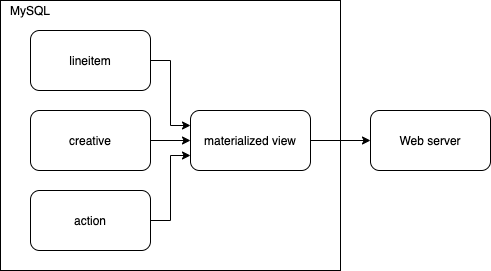
Complex WHERE conditions
We create separate tables named {is_active}:{target_country}:{target_gender} according to the targeting criteria. For example, we might have the following tables.
0:KR:M1:KR:M1:US:ALL1:US:M1:US:F
Splitting the cache into tables means that our earlier query needs to search only 1:US:ALL and 1:US:F. This substantially reduces the amount of data that must be scanned.
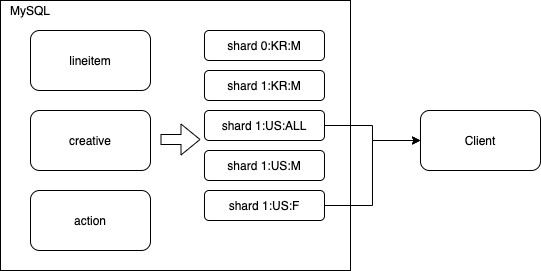
Elasticsearch
The approach above does not scale well: as targeting criteria become more numerous and complex, the number of cache tables grows exponentially. Before investing further effort in making it scale, we considered how to avoid reinventing the wheel. That led us to search engines. Google, for example, can quickly search a vast collection of web pages using many different keywords. If we substitute user attributes—country, age, gender, and so on—for search keywords, a search engine and an ad system are doing similar kinds of work. We chose Elasticsearch as the search engine for our ad server.
Search engines are fast because they use inverted indexes. Elastic’s blog explains how they work. Assuming you are familiar with the idea, let’s look at how the sample lineitem data is indexed.
Sample Lineitem data
Here is the Lineitem data we will use in this example.
| id | is_active | target_country | target_gender | target_carrier |
|---|---|---|---|---|
| 1 | 0 | KR | M | TMOBILE |
| 2 | 0 | KR | M | VERIZON |
| 3 | 1 | KR | M | TMOBILE |
| 4 | 1 | US | ALL | TMOBILE |
| 5 | 1 | US | ALL | VERIZON |
| 6 | 1 | US | M | ALL |
| 7 | 1 | US | M | TMOBILE |
| 8 | 1 | US | M | VERIZON |
| 9 | 1 | US | F | ALL |
| 10 | 1 | US | F | TMOBILE |
| 11 | 1 | US | F | VERIZON |
Index entries for the sample data
The table below lists the document IDs indexed under each term.
| Term | Documents |
|---|---|
| is_active:0 | 1,2 |
| is_active:1 | 3,4,5,6,7,8,9,10,11 |
| target_country:KR | 1,2,3 |
| target_country:US | 4,5,6,7,8,9,10,11 |
| target_gender:ALL | 4,5 |
| target_gender:M | 1,2,3,6,7,8 |
| target_gender:F | 9,10,11 |
| target_carrier:ALL | 6,9 |
| target_carrier:TMOBILE | 1,3,4,7,10 |
| target_carrier:VERIZON | 2,5,8,11 |
Let’s revisit the WHERE conditions from our original query to see how the index handles them.
  lineitem.is_active = 1
  AND lineitem.target_country = 'US'
  AND lineitem.target_gender in ('ALL', 'F')
  AND lineitem.target_carrier in ('ALL', 'VERIZON')
We can translate the query into the following set operations.
(is_active:1) ⋂ (target_country:US) ⋂ ((target_gender:ALL) ⋃ (target_gender:F)) ⋂ ((target_carrier:ALL) ⋃ (target_carrier:VERIZON))
= (3,4,5,6,7,8,9,10,11) ⋂ (4,5,6,7,8,9,10,11) ⋂ ((4,5) ⋃ (9,10,11)) ⋂ ((6,9) ⋃ (2,5,8,11))
= (3,4,5,6,7,8,9,10,11) ⋂ (4,5,6,7,8,9,10,11) ⋂ (4,5,9,10,11) ⋂ (2,5,6,8,9,11)
= (5,9,11)
In this way, an inverted index can efficiently evaluate complex conditions without scanning all of the data.
Using Elasticsearch as a recommendation engine
A search engine can also be viewed as a recommendation engine. Google ranks the results best suited to the keywords we enter and returns them in that order. An ad system similarly needs to choose the most relevant ads based on a user’s information. Where our previous database simply filtered ads, Elasticsearch can both filter them and rank them using a variety of scoring approaches. It even supports machine learning, so with the right setup, Elasticsearch alone can handle simpler recommendation logic.
For example, we can represent user and ad information as vectors, then sort ads by how close the two vectors are. Elasticsearch’s Painless scripting language provides a cosineSimilarity function for implementing this.
Configuring an Elasticsearch cluster for ad serving
Elasticsearch can search document collections ranging from tens of gigabytes to hundreds of terabytes or more. To support this, it provides shards and replicas. Multiple shards let us scale horizontally as data grows, while replicas increase search throughput and improve reliability.
Ad serving, however, does not need multiple shards. A website search engine may have enough documents to require sharding, but an ad-serving system needs only active ads, so its document collection is much smaller. At most, a few hundred thousand ads are live on a given day. The data might range from hundreds of megabytes to tens of gigabytes, which is small enough for a single shard. Using more shards would be inefficient, because every search would have to send a request to all of them.
With one shard, the most efficient setup is to have one replica on each node. Elasticsearch normally uses a fixed replica count. If you have five nodes but configure four replicas, one node will be idle. We therefore want the number of replicas to match the number of nodes exactly. Setting "auto_expand_replicas": "0-all" when creating the index handles this.
Another performance consideration is the coordinating node. In a cluster with multiple shards, a particular node may not contain the shard a request needs. Every node can act as a coordinating node, routing incoming client requests to the nodes that hold the data. With one node, one shard, and one replica per node, every node holds a shard, so the data is always available locally. However, the coordinating node appears to distribute requests in round-robin order as part of its own load balancing. That can forward a request to another node unnecessarily, even when the data is local, creating avoidable network traffic. We prevent this by setting the search preference to _only_local.
Finally, because the data set is relatively small, performance tends to be limited by CPU rather than disk or memory. We therefore recommend instances with strong compute performance.
At Buzzvil, we run the Elasticsearch cluster in an Auto Scaling group with an ELB (Elastic Load Balancer) in front of it. When traffic grows, we can scale out simply by adding instances. This gives us a system that scales horizontally without much extra work.
Is Elasticsearch fast enough?
Our production cluster’s p95 response time is roughly 21 ms. We consider that a good result, especially given the overhead of using Painless scripts to customize scoring. The memory allocation guideline for Elasticsearch is to give it about half of the system’s memory, leaving the other half for the operating system’s filesystem cache. As mentioned earlier, our entire ad data set is only a few gigabytes, so effectively all ads can reside in memory through that cache. This is why a disk-based database can deliver performance approaching that of an in-memory database.
Closing thoughts
The point I want to emphasize is that we built the system we needed with minimal effort. Using a search engine instead of building an ad-serving engine ourselves saved a great deal of time. Choosing Elasticsearch, a widely used technology proven in production, also helped us operate the system reliably.
If you would like to learn more about how Buzzvil uses Elasticsearch, I recommend this article too!
Sources
- Performance cover image by Nick Youngson CC BY-SA 3.0 Alpha Stock Images