AI-translated. Read the original in KoreanEmbedded slides, videos and images remain in their original language.
What Was Filling Up MemoryDB? — Part 2

Software Engineer

Hello, I’m Simon (Sangwon Lee), a server engineer on the allocation systems team.
This is part two of “What Was Filling Up MemoryDB?” Part one followed our investigation into what was consuming 85% of MemoryDB’s memory. Here, I explain how we solved the problem and reflect on whether there might have been a better approach.
What Happened in Part One?
One day, we received an alert that MemoryDB memory utilization had reached 85% (2.63 GB), even though the actual data in use occupied only 165 MB. Our investigation found an accumulation of tracking_items.
When a client reads a key configured for client-side caching, Redis records that client so it can notify it when the key changes. These records are tracking_items. They are reclaimed after clients are notified of a change to the key’s value, including TTL expiration. Yet invalidating all the live keys our service cached on the client side reclaimed almost none of them.
Looking deeper, we found something suspicious: reading a nonexistent key also creates tracking_items. A nonexistent key never expires, so its tracking records are never reclaimed unless someone writes a value to it. I decided to call these nonexistent keys ghost keys. Writing a value to one ghost key accessed by empty requests reclaimed 540,000 tracking_items—about 18 MB—across the two nodes.
We had found the cause. How could we fix it?
Could We Block Every Ghost Key?
That was the first approach that came to mind.
The ghost key used in our test, w:KR-, was meant to retrieve weather for a user’s location through a key such as w:KR-{location}. We could easily avoid that particular case by skipping the weather lookup when the user’s location was missing.
But finding every ghost key would mean discovering and blocking them individually through logs or similar methods. Even after that cleanup, new logic could introduce more, leaving us to play whack-a-mole. The problem was not that we must never read ghost keys. We needed to address a structure in which a read record is never removed unless a write occurs.
OPTIN vs BCAST
Redis client-side caching has two modes. We were using the default mode, OPTIN. The other is BCAST, or broadcasting mode.
To recap OPTIN: when a client reads a key with client-side caching enabled, a tracking_item is recorded. Records therefore accumulate in proportion to keys × clients that read them, and are reclaimed only when a write occurs on the key.
With BCAST, a client declares a prefix when it connects: “I’m interested in keys starting with w:.” Whenever a key under that prefix is written, the server notifies every subscriber.
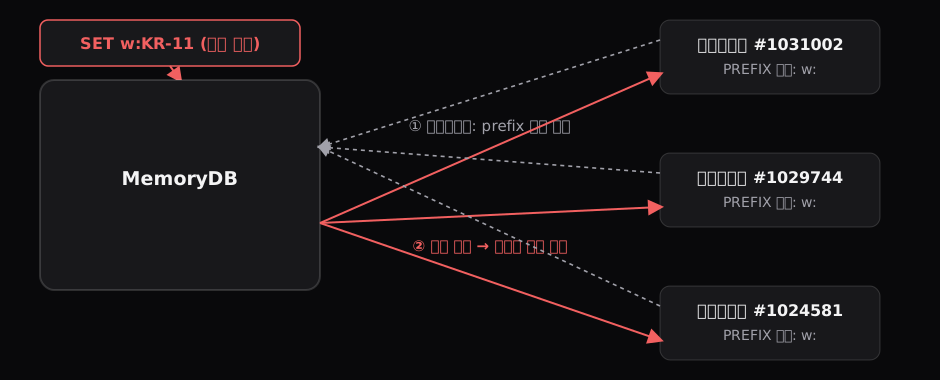
At first glance, the two seem similar because both notify clients when writes occur. The differences become clear in the following details.
-
Records are kept per prefix rather than per key. In OPTIN, reading
w:KR-11andw:KR-12records the client ID for each key. In BCAST, declaring “I’ll subscribe to keys starting withw:” at connection time creates just one subscription entry forw:. -
BCAST records the subscription when the connection between the client and MemoryDB is established, rather than when the client reads a key. The client need not have read anything yet: announcing an intention to read keys under that prefix is enough. A client subscribed to
w:is therefore notified whenw:KR-11is written, even if it has never read that key. -
In BCAST, all of a client’s subscription records are removed when its connection closes. Once the connection is configured, reading additional keys creates no more records, and disconnection reclaims everything. This eliminates the underlying accumulation problem.
| Previous mode (OPTIN) | BCAST | |
|---|---|---|
| Storage unit | Key × client | Prefix × client |
| Record creation | Whenever a key is read | At connection time |
| On disconnection | Left for lazy cleanup | Removed immediately |
| Reading ghost keys | Creates records | Creates no records |
| Memory | Proportional to cumulative connections | Bounded by current connections |
| New cost | — | Write notifications also go to clients that never read the key |
How Can BCAST Remove Records When a Client Disconnects?
Part one explained why OPTIN cannot reclaim records on disconnection. If a client has cached many keys, finding its tracking items requires scanning the entire Tracking Table, a radix tree, which is expensive. How can BCAST clean up at disconnection instead? Comparing the data structures explains it.

OPTIN’s Tracking Table is indexed only in the direction key → client. There is no reverse index answering “Which keys did this client read?” Cleaning up one connection would therefore mean scanning tens of millions of entries. A server handling thousands of requests per second cannot do that for every disconnection. Hence the design: leave cleanup until the key is invalidated.
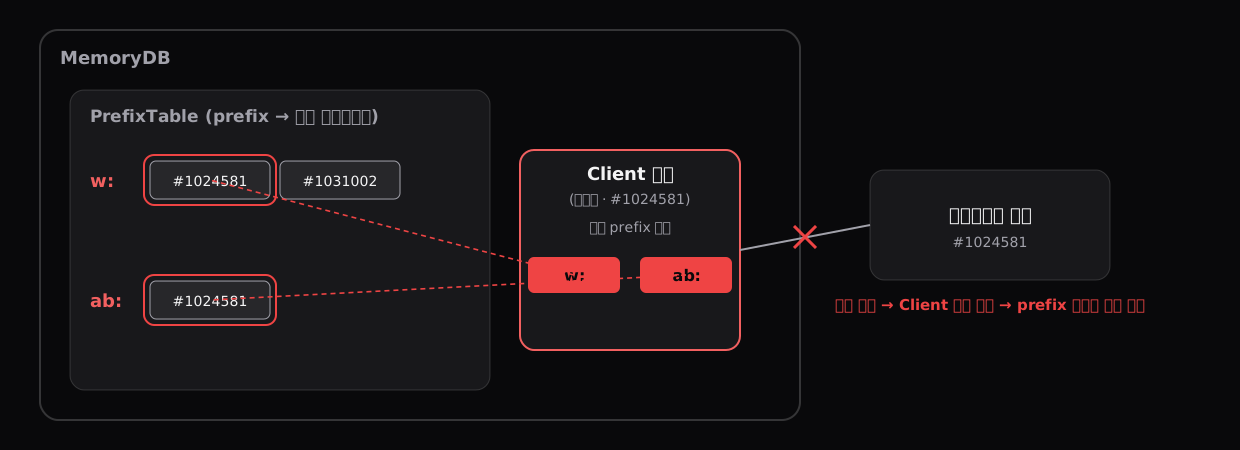
BCAST’s Prefix Table instead maps prefix → pointers to the client objects subscribed to it. Each client object also holds its own list of subscribed prefixes—the reverse index missing from OPTIN. Let’s follow the process from the moment a client connects to MemoryDB.
Establishing a connection creates a client object.
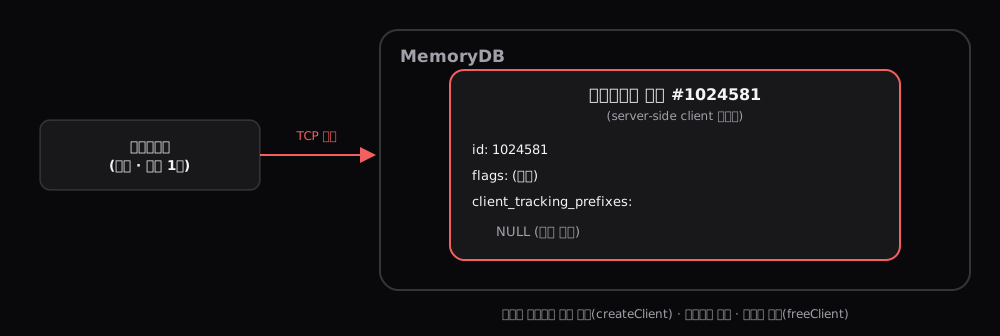
When a client opens a TCP connection to MemoryDB, MemoryDB creates a client object, a client struct. It exists for the lifetime of the connection and is freed when the connection closes. Alongside the client ID, socket, and current command, it holds tracking-mode flags and client_tracking_prefixes, the list of prefixes subscribed to by this client. The flags and list are initially empty.
A subscription request registers the client in the Prefix Table.
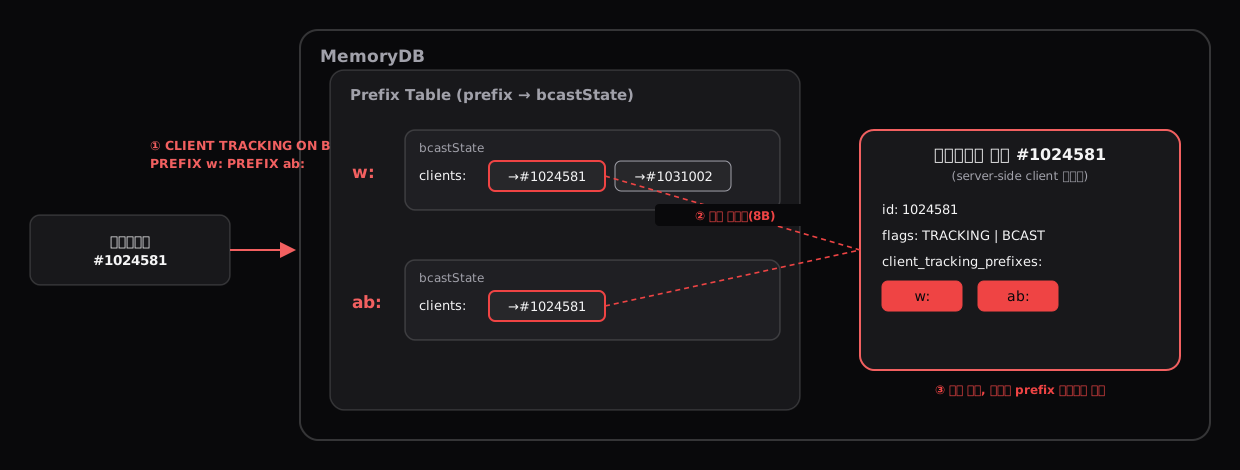
Immediately after connecting, the client library, rueidis, sends CLIENT TRACKING ON BCAST PREFIX ab: PREFIX w: …. MemoryDB performs three actions for each prefix.
- Find its entry in the Prefix Table, creating one if this is the first subscriber. Each entry is a small
bcastStatestruct containing a subscriber list,clients, and a pending list,keys, that temporarily collects keys written to. - Add a pointer to this client object—8 bytes—to
clients(→#1024581in the illustration). - At the same time, add the prefix to the client object’s
client_tracking_prefixes(w:andab:on the right).
One detail matters here. OPTIN’s Tracking Table stores a client ID, a number. BCAST’s subscriber list stores a client-object pointer, an address. OPTIN records can outlive the connection; they cannot point to an object that has already been destroyed, so they store an ID. BCAST guarantees removal at disconnection, so retaining the address is safe. The type of value stored reveals each mode’s cleanup policy.
Reads leave no records; writes are collected and announced in a batch.
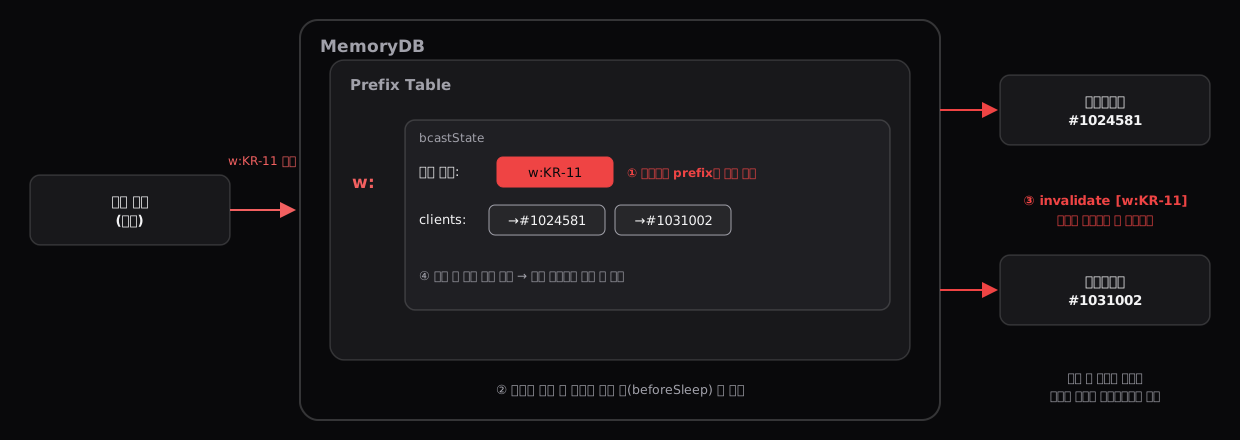
Suppose a write occurs on w:KR-11. When its value is updated, MemoryDB does the following.
- Scan the Prefix Table for prefixes matching
w:KR-11.w:matches;ab:does not. Addw:KR-11to the pendingkeyslist inw:’sbcastState. Nothing is sent yet. - If writes to
w:KR-26,w:KR-27, or other matching keys occur before transmission, add them to the same pending list. Multiple writes to the same key collapse into one entry. - Just before the event loop finishes processing requests and returns to waiting, at
beforeSleep, send the entire pending list as one invalidation message to every client object inw:’s subscriber list (#1024581and#1031002). - Empty the pending list. The next loop starts fresh.
Client #1031002 receives the same message even if it has never read w:KR-11. MemoryDB does not check whether it has: no such read record exists. On receiving the message, the client removes w:KR-11 if it is in its cache, or discards the message if it is not.
MemoryDB’s responsibility in BCAST ends at announcing that a write occurred under a prefix. Everything else belongs to the client: choosing prefixes for the keys it will cache, removing keys it actually holds when invalidation arrives, and ignoring the rest. Knowledge of “who holds which keys” has moved from MemoryDB to the clients.
On disconnection, follow only the client’s prefix list and remove its entries.
Returning to the original question: when a connection closes, MemoryDB follows the prefix list on the client object and removes its pointer from each prefix’s clients list. Unlike OPTIN, which must scan the entire table to find those entries, BCAST already knows where to look.
MemoryDB therefore stores only number of prefixes × number of live connections. Even if 26,000 connections come and go each day, or clients read countless ghost keys, the bound does not grow with that history. This is why BCAST can clean up when a connection closes.
How Did We Apply It?
Considerations Before Adopting BCAST
As we have seen, BCAST has clients declare their interests in advance instead of making MemoryDB remember every key each client reads. That creates several considerations.
-
It is a poor fit for frequently written keys. OPTIN notifies only clients that actually read a key; BCAST sends to every matching subscriber, even those that never read it. Subscribe to frequently updated keys, and MemoryDB spends effort sending notifications while clients spend effort discarding them. In fact, frequently written keys may not be good candidates for client-side caching in the first place.
-
Prefix scope matters. An overly broad prefix brings notifications for writes you do not care about. An empty prefix (
''), for example, receives notifications for every key. If a prefix is too narrow and omits a cached key, that key receives no invalidation and stays stale until the client TTL expires. MemoryDB also rejects overlapping prefixes such asw:andw:KR. -
Having every connection subscribe to every prefix weakens the benefit. A client subscribed to keys it never reads creates unnecessary notifications. Each client instance should register only prefixes for keys it actually caches.
-
Key names must be organized by prefix. If cached keys cannot be divided into a small set of fixed prefixes, there is no practical set to register. The client library must also support BCAST correctly. Our version had a bug that kept sending a command rejected by the server in BCAST mode, so we first needed to upgrade to a fixed version.
Would It Fit Our Server?
We checked those conditions against our workload one by one.
| Condition | Our service |
|---|---|
| Write frequency | All cached keys use batch writes, mostly once a day; some hardly ever change. |
| Read frequency | Read on every request, peaking above 7,000 requests per second. This extreme read/write asymmetry makes client-side caching appropriate. |
| Prefix structure | Five key families divide cleanly into five fixed, non-overlapping prefixes. |
| Per-connection subscriptions | Only two client instances use cached keys: one registers four prefixes, the other one. The remaining clients do not subscribe. |
The conditions looked good. Before proceeding, though, we needed to test the notification volume generated by a batch write in the development environment.
Let’s Apply It!
Our Go Redis client, rueidis, supports BCAST. However, our version had a bug that repeatedly sent a command the server rejects in BCAST mode, so we upgraded to a fixed release first.
We only needed to pass CLIENT TRACKING ON BCAST PREFIX ab: PREFIX w: ... where connections are created. The application code that reads and writes cached values did not need to change.
There was one pitfall: if someone later adds a cached key but forgets to register its prefix, the key will not be invalidated until the client TTL expires. Neither server nor library checks this. We therefore added a warning comment where connections are created, plus a test checking that newly added client-cached keys are covered by the subscribed prefix list.
We deployed to development and confirmed that it worked. We measured notification cost by running a batch. When about 3,000 keys updated together, node network output briefly rose from roughly 30 MB per minute to 40–50 MB per minute—an extra 1–3 Mbps—and peak engine CPU stayed below 17%. Compared with OPTIN consuming another 0.2 GB of server memory every month, this was a cost we were happy to pay.
After a canary deployment to a subset of production pods, we rolled it out to 100% that same day.
What Were the Results?
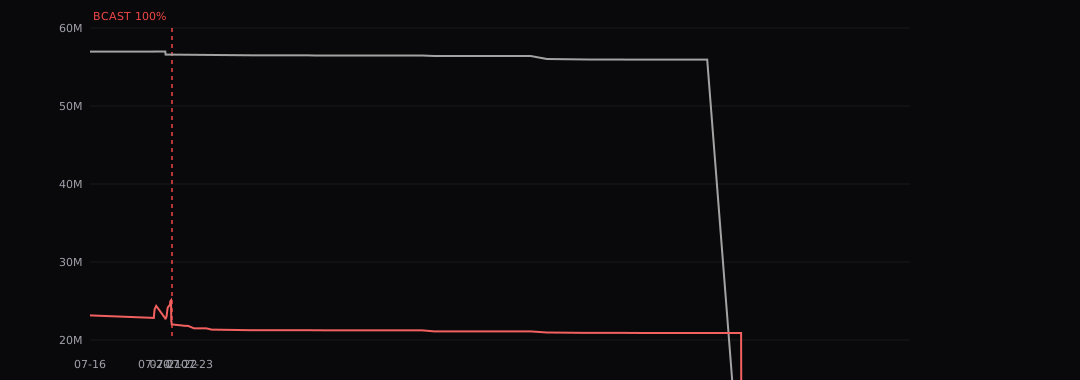
Immediately after deployment, tracking_total_prefixes changed from 0 to 5. We saw 473 BCAST connections on the primary and 444 on the replica, confirming successful registration. The replica’s tracking-item count, previously growing by about 280,000 per day, stopped increasing. All that remained was to clear the existing accumulation.
Failover
Switching to BCAST does not remove existing tracking items. As part one showed, ghost-key records are reclaimed only when the key is written. We did not know which ghost keys still had records, and Redis 6.2 has no command to empty the Tracking Table. Failover was our only remaining option. Recreating a node’s process through failover also removes its in-memory Tracking Table.
Failover rebuilds only the demoted node; the promoted node keeps its existing process. Because both our primary and replica had tracking items, we needed two failovers to clear both.
Was Failover Safe?
Failover interrupts connections to the MemoryDB cluster used by the live service. With thousands of ad requests per second passing through this store, we had questions to answer first.
- How long would the downtime last, and what would it do to the live service?
- Could clients fail during failover? Rueidis had a known crash bug related to failover.
Documentation and code alone were not enough to judge this, so we recreated the configuration in development and rehearsed a failover while sending requests.
- Clients: zero crashes and zero pod restarts.
- MemoryDB: the demoted node’s uptime reset from 989 days to 13 seconds, and 47,303 tracking items fell to zero, confirming that its process had been recreated.
- Client–MemoryDB disconnection: about 15 seconds, with automatic recovery.
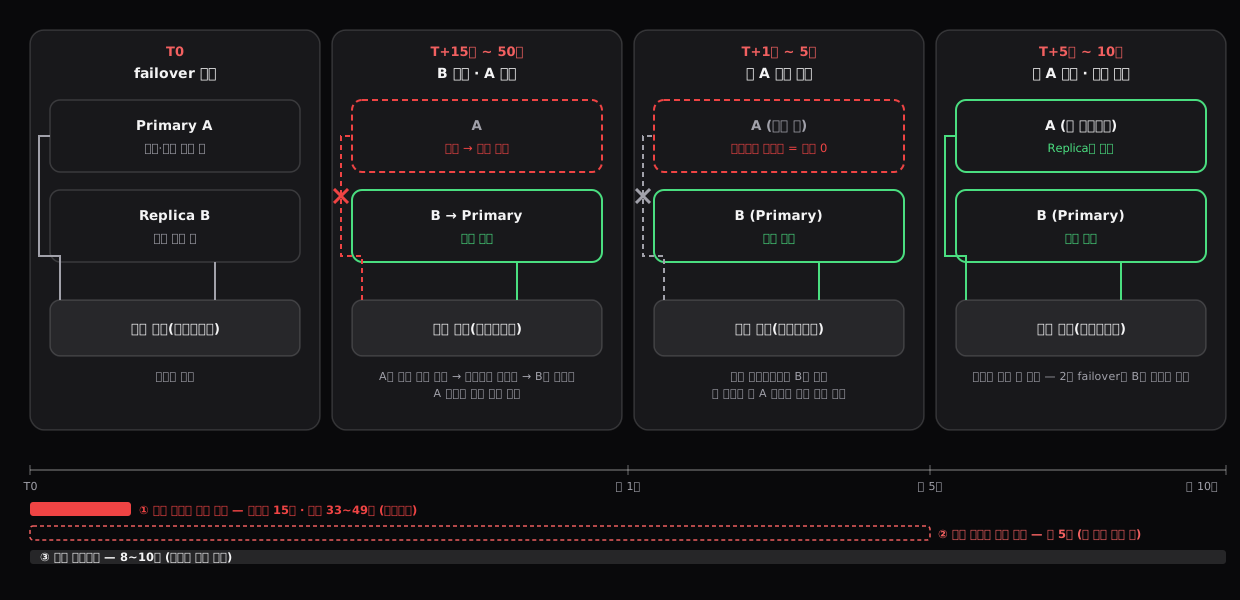
Fifteen seconds may sound alarming for a live service. But after considering the data in this store and how we use it, we judged the interruption noncritical.
- Ads themselves come from Elasticsearch. MemoryDB supplies supporting data such as weather, experiment configuration, and margin rates. Failing to retrieve that data does not stop ad delivery.
- These keys use client-side caching, so most reads normally never reach MemoryDB. During failover, however, losing the connection also discards the local cache populated through it. Reads during the interruption therefore go to MemoryDB without a cache. They all have short timeouts—20–60 ms depending on key type—so if no response arrives, ad selection continues without that item.
For those 15 seconds, some requests proceed without supporting data. Critical failures such as ad delivery stopping do not occur.
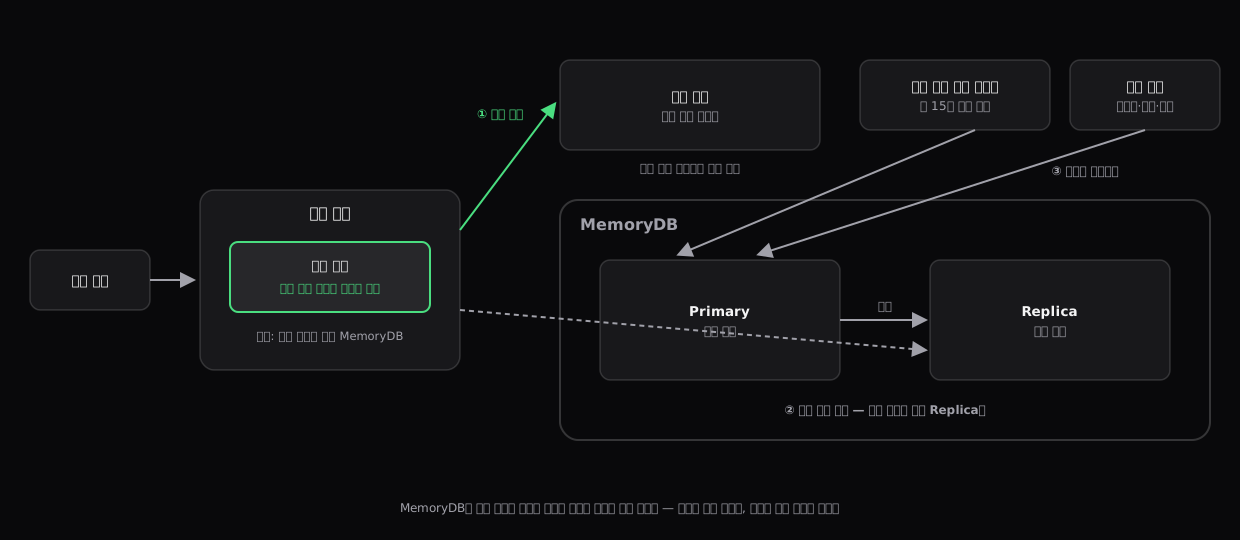
The write path is simpler still. MemoryDB writes come from periodic systems, not user requests. Their update intervals range from roughly 15 seconds to around once a day. Processing an individual ad request does not write anything to MemoryDB.
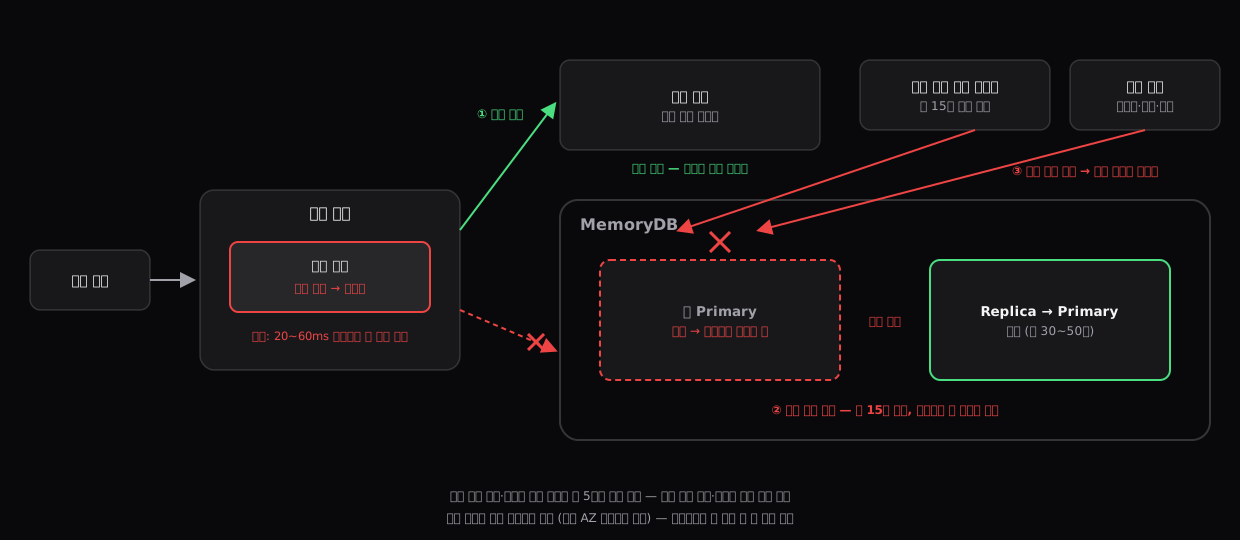
While the primary briefly disappears during failover, only an update batch running at that moment can fail. These writes overwrite the same keys with their latest values, so skipping one failed cycle and succeeding on the next restores the normal state. We simply needed to avoid scheduled batch times when running failover.
We did not need to worry about losing stored values either. MemoryDB acknowledges writes only after recording them in transaction logs across multiple availability zones and guarantees no data loss during failover. In rehearsal, we also confirmed that both nodes had matching key counts before and after failover.
Finally, the ad server’s health check does not depend on MemoryDB. A brief store outage does not mark the server unhealthy and trigger cascading restarts. In practical terms, reads temporarily become less precise and writes may be delayed by one cycle; there is no path that stops ad delivery.
What Happened in Production?
We chose an early-morning period with low traffic and no deployments or batch jobs for the production failover.
First, we demoted the existing primary. Promotion completed in 33 seconds, and the demoted node’s 55,945,680 tracking items fell to zero. After confirming matching key counts, we demoted the other node later that morning, clearing its 20,900,737 items and restoring the original roles.
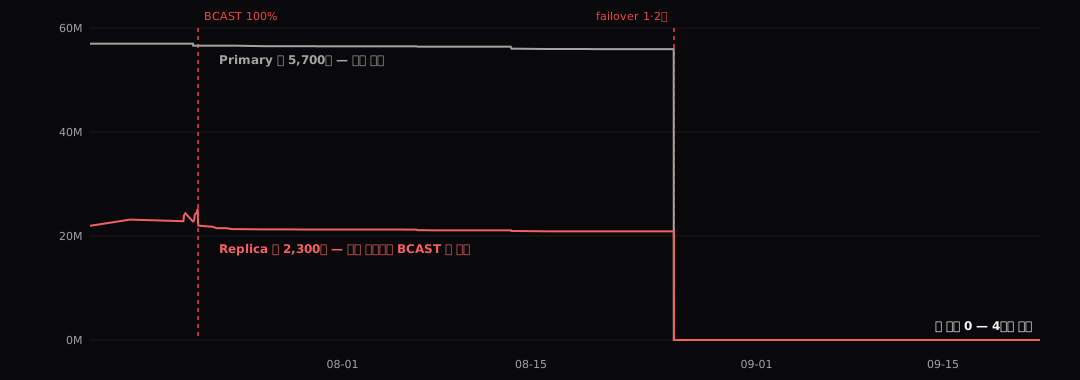
- Tracking items across both nodes: 76,846,417 → 0.
- Memory utilization: primary 85%, replica 30% → about 4% on both, leaving only the actual data.
- Zero client crashes and no ad-serving issues.
Four weeks have passed since failover as I write this. Our collector, which records metrics every 30 minutes, still reports zero tracking items on both nodes and memory utilization around 4%. BCAST is preventing the accumulation from returning.
Looking Back
Identify the cause before relieving the symptom.
If we had failed over as soon as we identified tracking_total_items as the culprit, the same alert would have returned a few months later. Finding the ghost-key cause let us adopt BCAST to prevent recurrence structurally, then proceed with failover confidently.
We need to understand the mechanisms behind convenient features—and that takes computer science knowledge.
Client-side caching is useful, but if you do not know when its records are created and removed, especially when they are never removed, you can encounter this kind of accumulation. Understanding why Redis chose these recording methods also requires knowledge of data structures. I had used my computer science fundamentals less often than expected after starting work, but this reminded me how essential they are to becoming a good engineer.
“Was client-side caching really worth going through all of that?”
That was the first question I received when presenting this at our internal engineering seminar. I still think it was needed: these keys are read for every ad request, so without caching, thousands of lookups per second and payloads such as experiment-configuration JSON would converge on one node.
But the question’s real point lay elsewhere. I had asked only “How do I fix this feature?” rather than “Do we need this feature at all?” I was looking for answers entirely within the feature where the problem appeared. I focused on identifying and removing whatever occupied 85% of memory without reconsidering whether it was necessary. Once again, I was grateful for colleagues who brought a perspective I had missed.
What Comes Next?
Now that memory utilization is down to 4%, what can we do with this cluster?
We could downsize the nodes. With only around 150 MB of actual data, the current db.t4g.medium (3.09 GiB) is oversized. Moving one size down to db.t4g.small (1.37 GiB), at Tokyo-region list prices, would reduce the hourly cost per node from $0.147 to $0.074. Across the primary and replica, that is roughly $215 to $108 per month, saving about $1,280 a year.
But I’m also considering whether we could use the more than 3 GB of spare capacity somewhere else to improve the service. We currently query RDS in real time for certain request or ad-click flows. Using MemoryDB there might let users engage with ads faster. Whichever direction we take, I’ll write up the results.
If your MemoryDB utilization is high, could it be full of something other than your actual data?
Thank you for reading.