AI-translated. Read the original in KoreanEmbedded slides, videos and images remain in their original language.
Running GitHub Actions on Kubernetes

DevOps Engineer

Introduction
Hi, I’m Cade, an engineer on Buzzvil’s DevOps team. GitHub Actions has become one of the most popular CI/CD platforms, and many of you probably use it already. Today, I’ll share the decisions and experience behind installing and operating self-hosted runners efficiently.
First, why don’t we simply use GitHub-hosted runners? They are convenient because GitHub handles maintenance, but they also have drawbacks.
We cannot fully control the build environment. If we need a particular OS version or tool, the available customization can be limiting, introducing unnecessary operational costs and slowing CI. Access to internal networks also creates security concerns or requires complicated network configuration.
For these reasons, we decided to host our own runners.
What is ARC?
There are two main ways to self-host GitHub Actions runners: install them on individual instances such as EC2, or use Actions Runner Controller (ARC) on Kubernetes. We chose Kubernetes.
ARC is a Kubernetes operator that coordinates and scales self-hosted runners. In simpler terms, it lets runners—the environments executing GitHub Actions workflows—run as Kubernetes pods. Several factors drove our choice.
Cost efficiency
VM-based autoscaling can overprovision resources and waste money, or underprovision them and slow builds, harming developer experience. With ARC, we can allocate resources to runner pods according to the workflows they handle.
Scalability
ARC uses Kubernetes to scale runner pods automatically with workload demand, avoiding wasted runner resources and using infrastructure more efficiently.
Speed
ARC can maintain a fixed number of idle runner pods, while Kubernetes can provision additional pods quickly when needed. With little time spent waiting for runners, workflows start sooner.
Beyond these benefits, our DevOps team already operated more than 95% of its tools on Kubernetes, making ARC easy to add to the existing infrastructure.
Two ARC versions: community and GitHub
ARC began as an open-source community project maintained by a few core contributors. The community version was released in February 2020 and gained popularity among developers looking to run Actions runners on Kubernetes. Requests for official support grew. In December 2022, GitHub adopted the project and began turning it into a fully supported product. The GitHub-supported version became generally available in July 2023.
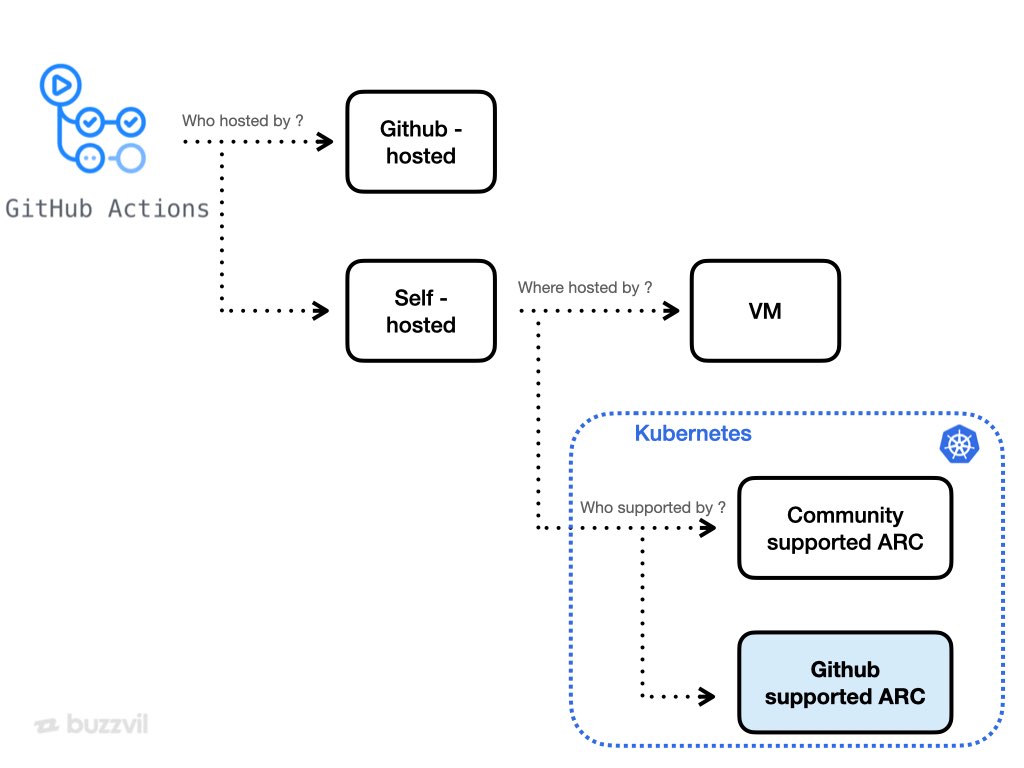
At the time of writing, ARC therefore has two versions: one supported by GitHub and one by the community.
| Aspect | GitHub-supported ARC | Community-supported ARC |
|---|---|---|
| Mode | Runner Scale Sets mode | Pull-driven scaling mode, webhook-driven scaling mode |
| apiVersion | apis/actions.github.com/v1alpha1 | actions.summerwind.net/v1alpha1 |
| Runner image | runner | actions-runner-controller |
| Maintenance | GitHub | Community |
| Scaling mechanism | Long-poll connection | Polling or webhooks |
| Characteristics | More conservative about new features, but stable | More open to new features, but less stable |
| Advantages | No additional cert-manager installation No GitHub API rate-limit issue from polling Easier controller debugging | Multiple runner labels Built-in cron-based runner scheduling |
| Latest version, December 2023 | v0.8.1 | v0.23.7 |
| Release | Generally available July 2023 | Available February 2020 |
The main reason for these differences is a change in the client-server relationship.

GitHub-supported ARC acts as a client, authenticating and establishing an HTTPS long-poll connection. The community version acts as a server receiving creation events, so it requires TLS for HTTPS communication and an additional cert-manager dependency.
In the community version’s polling mode, querying repository workflow states to allocate runners can also make heavy use of the GitHub API, potentially exceeding the 1,000-requests-per-hour limit described here. Webhook mode avoids some of that but can be difficult to troubleshoot.
The GitHub-supported version addresses those problems, although its relative newness still brings operational and maintenance overhead.
These trade-offs should inform the choice of mode. We selected GitHub-supported Runner Scale Sets. Among our reasons, this statement mattered most:
With the introduction of autoscaling runner scale sets, the existing autoscaling modes are now legacy. The legacy modes have certain use cases and will continue to be maintained by the community only. — actions-runner-controller README.md
We judged that migrating away from a legacy community mode later would cost more than working around features still missing from the GitHub-supported version now.
GitHub-supported ARC: Runner Scale Sets mode
Let’s install ARC and run a workflow. Installation uses two Helm charts: the ARC controller and a runner scale set. The controller calls GitHub’s API and updates state; the scale set defines the runner environment where workflows execute.
First, install the controller. See the chart values documentation for detailed configuration.
NAMESPACE="arc-systems"
helm install arc \
    --namespace "${NAMESPACE}" \
    --create-namespace \
    oci://ghcr.io/actions/actions-runner-controller-charts/gha-runner-scale-set-controller
Next, install the runner scale set. Its chart supports many settings; our example is below. See the chart values documentation for more detail.
# githubConfigUrl는 러너에 구성하고 싶은 Github url 입니다.
## ex: https://github.com/myorg/myrepo or https://github.com/myorg
githubConfigUrl: "https://github.com/Buzzvil"
# git 인증을 위한 시크릿 명입니다.
githubConfigSecret: gha-runner-gha-rs-github-secret

## maxRunners는 실행기 확장 집합이 최대로 확장할 러너의 최대 수입니다.
maxRunners: 3
## minRunners는 실행기 확장 집합이 축소할 최소 러너 수입니다.
minRunners: 1

runnerGroup: "default"

## 생성할 Runner scale set의 이름입니다. (Defaults to the helm release name)
runnerScaleSetName: "buzzvil-test"

containerMode:
  type: "dind"  ## type can be set to dind or kubernetes

## template은 각 Runner Pod에 대한 PodSpec입니다.
template:
  spec:
    serviceAccountName: github-actions-runner
    containers:
      - name: runner
        image: 111111111111.dkr.ecr.ap-northeast-2.amazonaws.com/actions-runner:0.0.1
        command:
          - /home/runner/run.sh
        resources:
          limits:
            cpu: 2
            memory: 2Gi
          requests:
            cpu: 1
            memory: 1Gi
A few settings deserve explanation.
1. Minimum runners are key to fast starts and cost efficiency
## maxRunners는 실행기 확장 집합이 최대로 확장할 러너의 최대 수입니다.
maxRunners: 3
## minRunners는 실행기 확장 집합이 축소할 최소 러너 수입니다.
minRunners: 1
You can set minimum and maximum runner counts and allocate resources per pod. The minimum count keeps that many idle runners ready to accept jobs immediately. Measure average runner demand during engineering working hours, then use it to choose a minimum that reduces pending time. Adjusting the minimum at the start and end of the workday with a CronJob can improve cost efficiency further.
2. Running CI without IAM user access keys
template:
  spec:
    serviceAccountName: github-actions-runner
Create a ServiceAccount and reference it through serviceAccountName to configure IAM Roles for Service Accounts (IRSA).
apiVersion: v1
kind: ServiceAccount
metadata:
  name: github-actions-runner
  namespace: arc-systems
  annotations:
    eks.amazonaws.com/role-arn: arn:aws:iam::111111111111:role/github-actions-runner
This assigns designated roles to runner groups and limits their access to AWS resources.
3. Build a runner image suited to your organization
    containers:
      - name: runner
        image: 111111111111.dkr.ecr.ap-northeast-2.amazonaws.com/actions-runner:0.0.1
I strongly recommend building your own image on top of the base runner image, installing the tools you need. Unlike the community ARC image, GitHub’s base image is very slim. Even the Git CLI is not included by default.
# Dockerfile을 작성해 Runner 커스텀 이미지를 만드는 예시

FROM ghcr.io/actions/actions-runner:2.311.0

# 필요한 도구 설치 예시
RUN sudo apt-get update && sudo apt-get install -y git curl gcc jq unzip wget
4. Use runnerGroup to control repository and workflow access
runnerGroup: "default"
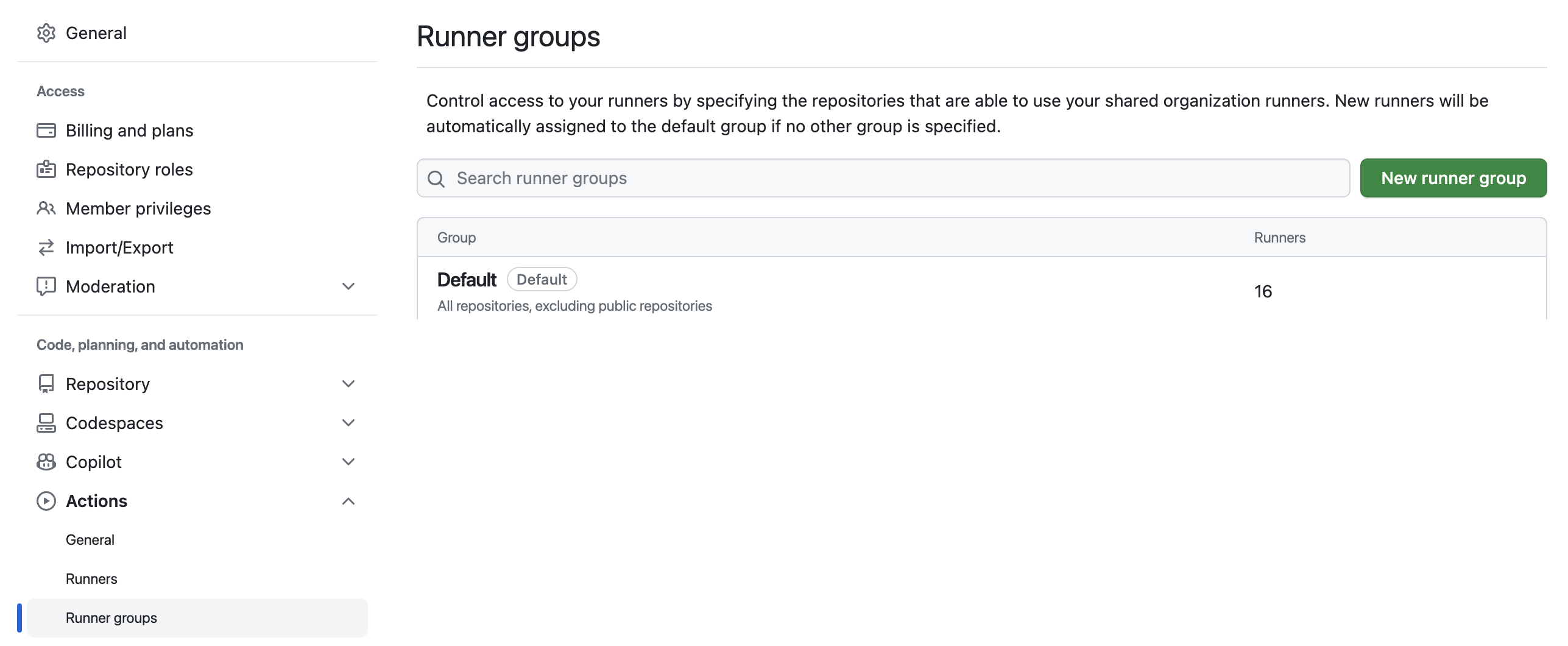
Under Organization → Settings → Actions → Runner groups, you can restrict runner access to particular repositories or workflows. Group runners with high resource requirements or special security needs to manage access conveniently through ARC. With the default group, the group’s repositories and workflows can access those runners.
5. What differs between dind and kubernetes modes?
containerMode:
  type: "dind"  ## type can be set to dind or kubernetes
To support GitHub Actions service containers and container jobs, ARC needs a container mode. The two options differ as follows:
-
dind: Adds a Docker-in-Docker sidecar to the runner pod. Docker commands are available, so it can build Docker images. However, it runs in privileged mode and offers weaker isolation. -
kubernetes: Uses runner container hooks to create separate pods for containers. Runner and job pods share work through persistent volumes. It provides stronger isolation, but Docker commands are not available by default, limiting image-build options. Tools such as Kaniko can be used instead.
See the official documentation for details. This example uses dind.
6. Add a secret for GitHub API authentication
Create the GitHub authentication secret as well. Follow the official documentation for the full procedure.
apiVersion: v1
kind: Secret
metadata:
  name: gha-runner-gha-rs-github-secret
  namespace: arc-systems
type: Opaque
data:
  github_token: <BASE64 ENCODED GITHUB PAT>
Once the values are ready, install the runner scale set with Helm, just as with the controller.
NAMESPACE="arc-systems"
helm install arc \
  --namespace "${NAMESPACE}" \
  --create-namespace \
  -f arc_values.yaml \
  oci://ghcr.io/actions/actions-runner-controller-charts/gha-runner-scale-set
After installation, Kubernetes contains the controller, listener, and runner workloads:
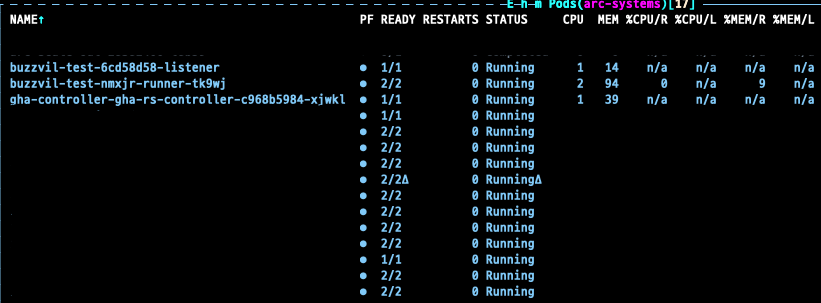
The official architecture diagram has a fairly long flow, but the three components can be summarized simply:
controller: Calls GitHub’s API and checks and updates runner state.listener: Handles scaling. It maintains a long-poll connection to GitHub and increases replicas when more runners are needed.runner: The isolated environment executing the workload. It connects to GitHub through long polling and runs jobs.
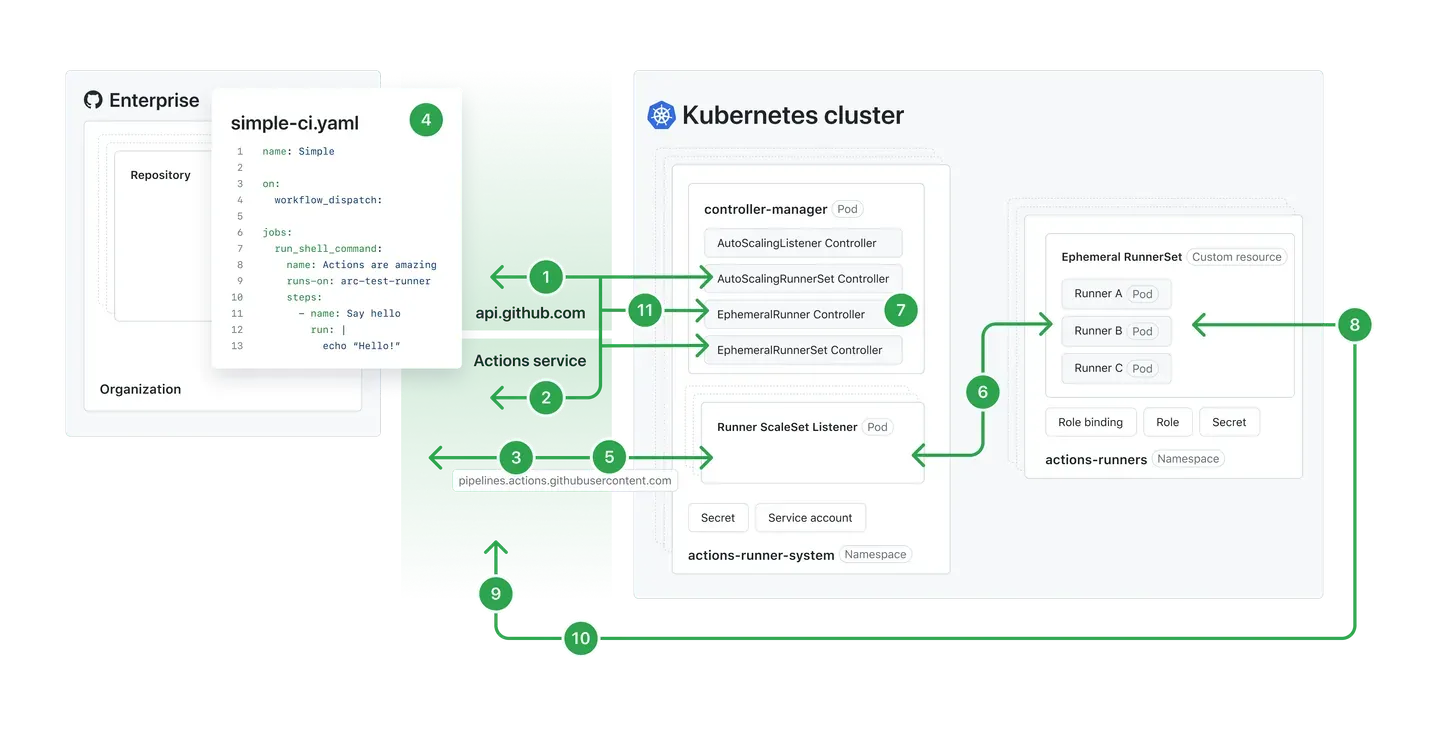 Source: GitHub, Actions Runner Controller
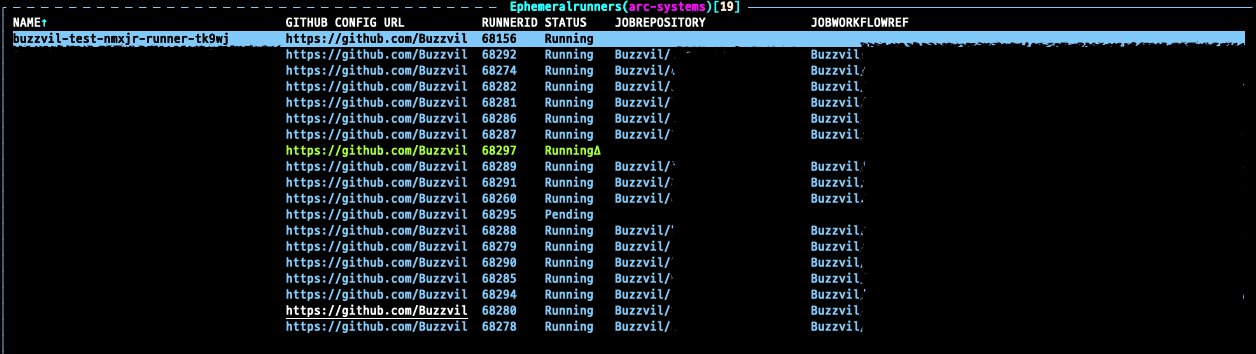
The diagram shows ARC’s autoscaling runner scale set mode. The controller combines several controllers, including EphemeralRunner and AutoScalingListener. EphemeralRunner is especially useful for inspecting state: it shows the running workflow’s ref, job name, repository, and related information at a glance.
The new runners also appear under Actions → Runners. Use the name configured in values as the label to direct workflows to them.
Closing thoughts
We’ve explored ways to run GitHub Actions on Kubernetes and installed the GitHub-supported ARC version that best fits our organization. ARC remains an actively evolving open-source project, with lively discussions around new capabilities. I look forward to further useful features and performance improvements.
This post focused on installation. In a future post, I hope to explain how our DevOps team monitors ARC, manages different runner types, and maintains shared GitHub Actions workflows.
I hope this helps anyone deciding how to self-host GitHub Actions and weighing the advantages and drawbacks of its different modes. Thanks for reading, and have a great day!