AI-translated. Read the original in KoreanEmbedded slides, videos and images remain in their original language.
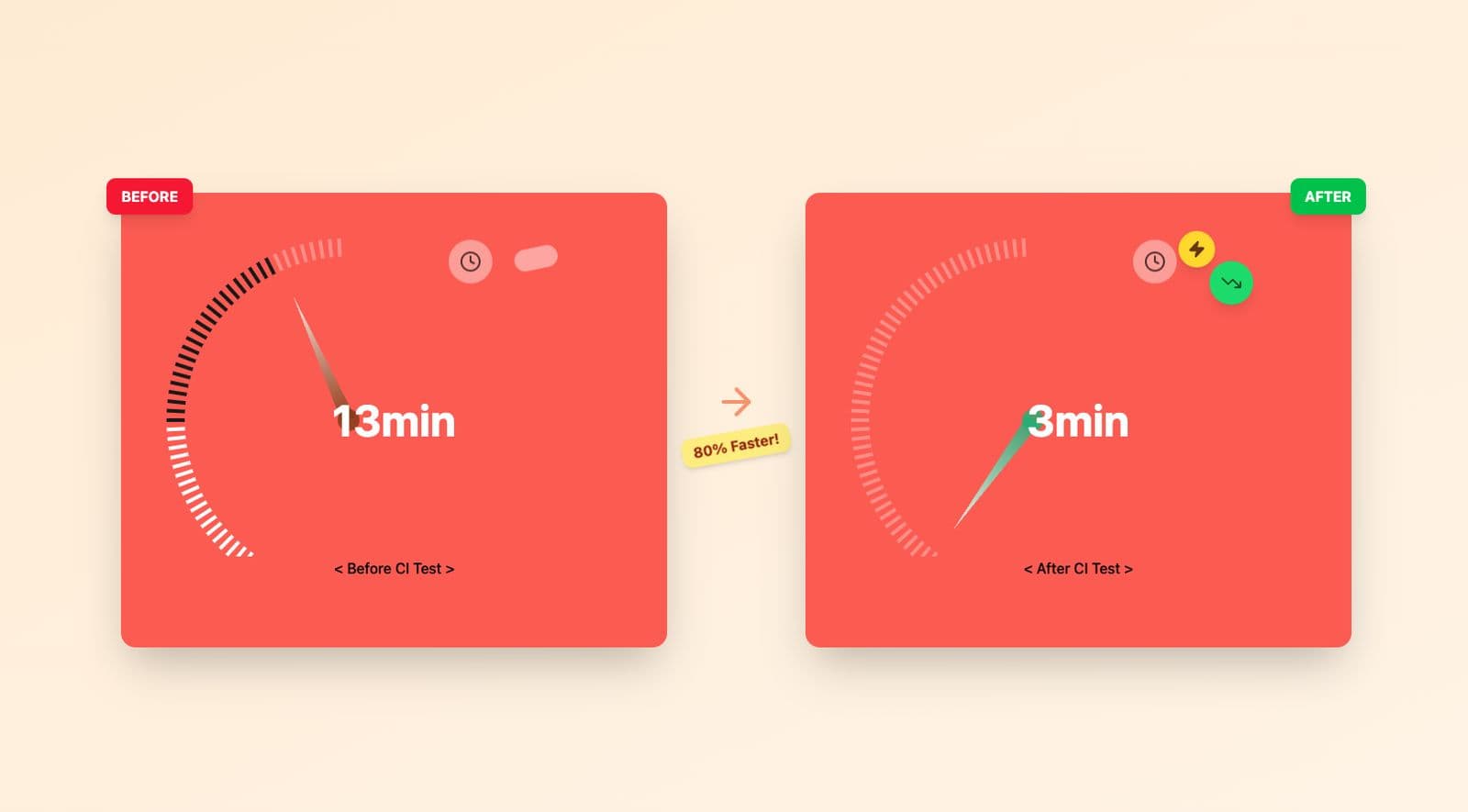
Cutting Python 2.7 CI Time from 13 Minutes to 3

Server Engineer
Introduction
Hello, I’m Elric from the Supply group’s Product Backend team.
Honeyscreen frequently deploys new promotions, but its long CI pipeline—about thirteen minutes—had become a bottleneck during urgent releases. We needed to address the underlying cause.
Problems in the Existing CI Process
Honeyscreen currently runs on Python 2.7, whose official support ended in January 2020, leaving it without further security patches or bug fixes. Its CI comprises three jobs running in parallel. Despite that parallelism, the long overall runtime suggested a bottleneck in one particular job.
Current CI Pipeline
- CI-Build: Build the project — 2m 48s.
- CI-Security: Security checks — 5m 16s.
- CI-Test: Run tests, the main bottleneck — 14m 57s. These are the most recent build times.
Duplicate ci-test Runs
ci-test took about thirteen minutes on average and ran both for the pull request and after merging into master. Repeating the same long job delayed deployment completion. In the image below, the final two entries are ci-test runs from the same PR, first during review and again after the master merge.

Unnecessary Package Installation
Unlike ci-build, ci-test included unnecessary package installation and source compilation. The tests themselves took around two minutes; preparing other resources was the bottleneck. The pipeline contained many slow steps, including building the unsupported Python 2.7 from source, downloading and installing PowerShell, and upgrading unnecessary system packages.
Existing CI-Test Timing
- ci-test: About eleven minutes on average, the main bottleneck.
- Master merge: Runs ci-test again after merging.
- Total CI time: 13+ minutes across the PR and master merge.
First Optimization: Remove Unnecessary Work — 13 Minutes to 5
1. Optimize the Trigger
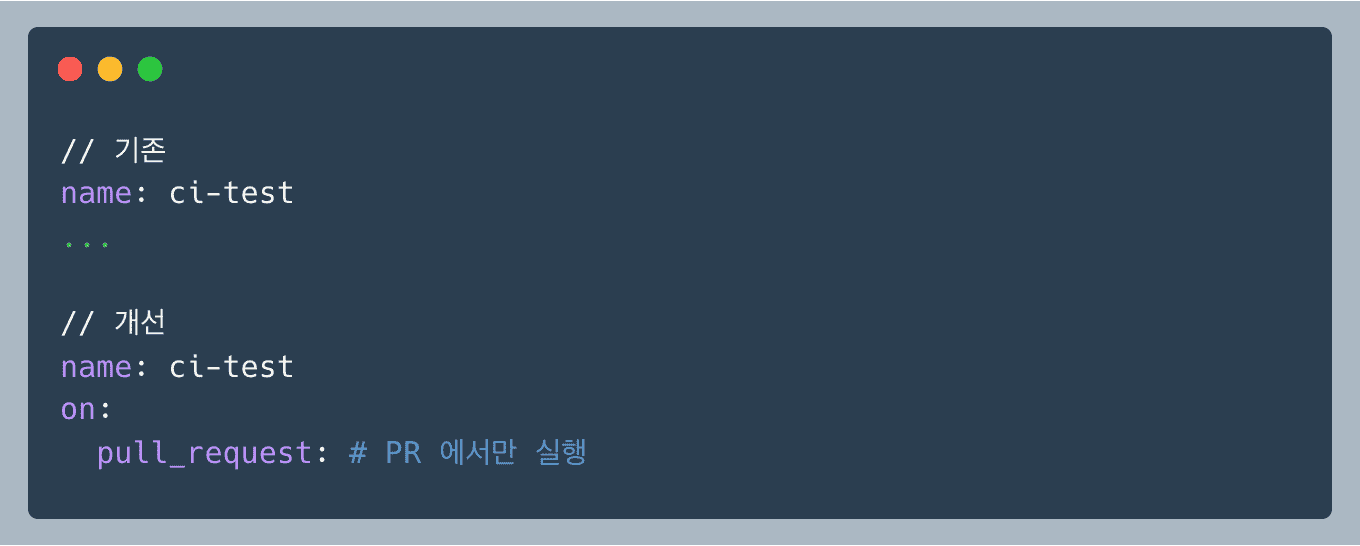
We restricted the trigger so ci-test would not run again after merging into master. Running it only before the merge sped up the deployment process.
Improvement: 50% shorter overall deployment time.
2. Remove PowerShell Installation
The existing ci-test.yaml contained a PowerShell installation command. Python 2.7 was required for the tests, but PowerShell was not used for anything after installation, so we removed it. My guess is that an older setup used PowerShell to launch Python 2.7; as the system evolved, Python could run without it, but the obsolete setup code remained.
Removing that step skipped a 75 MB package download and significantly reduced the runtime.
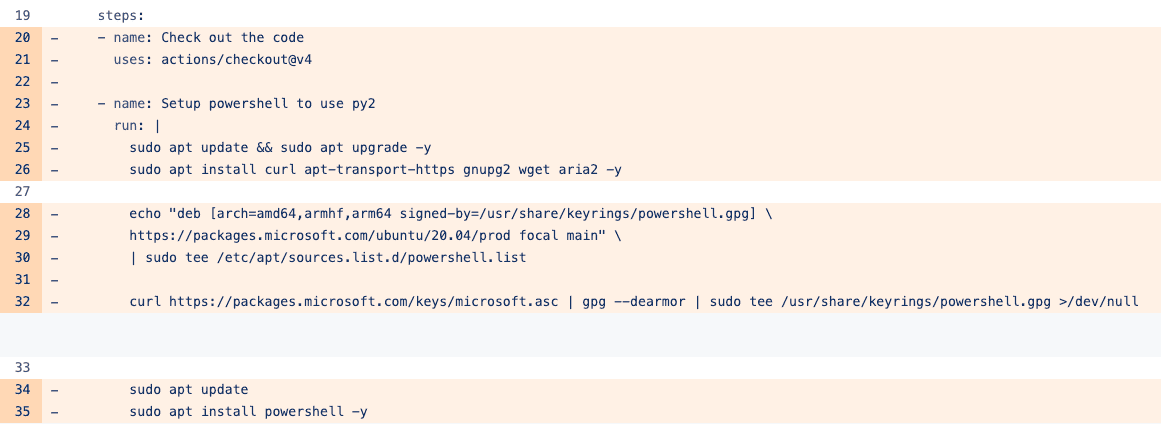
Improvement: 56 seconds ➡️ 0 seconds.
What is PowerShell?
- Microsoft’s task automation and configuration management framework, offering a command-line interface and scripting language.
3. Stop Building Python from Source
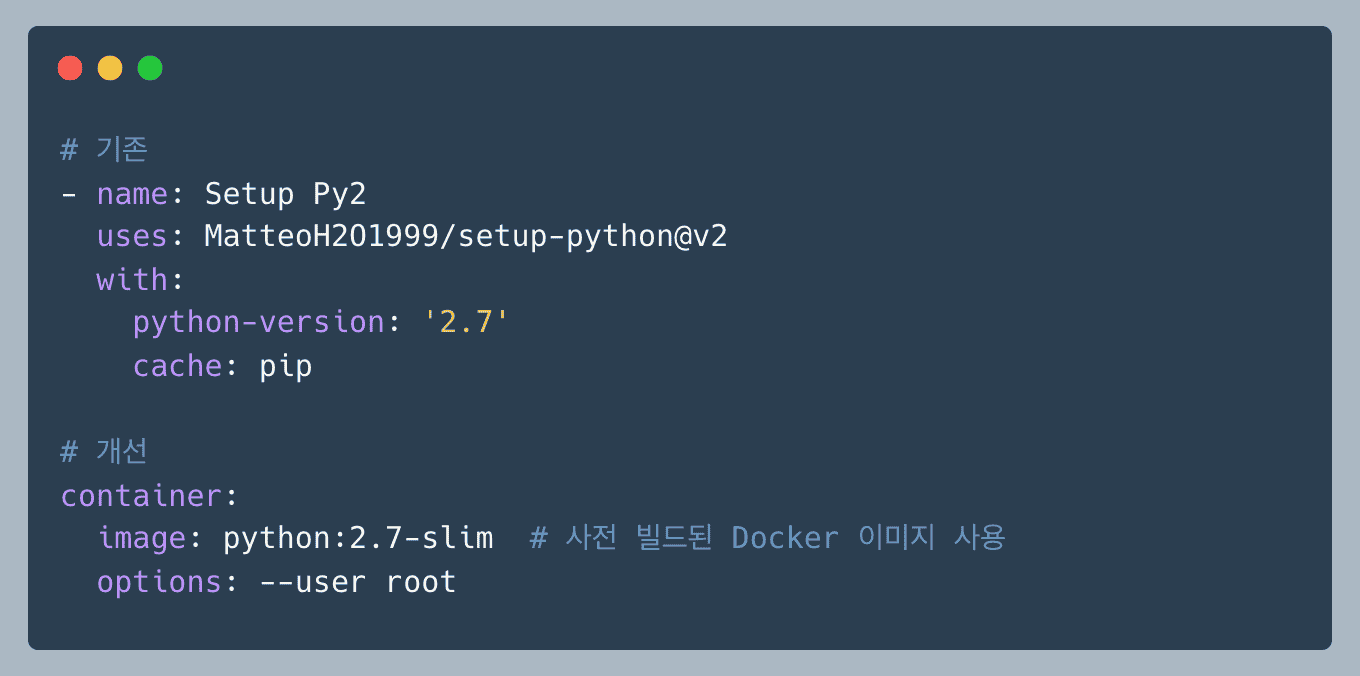
The official actions/setup-python had dropped Python 2.7 support, so ci-test used MatteoH2O1999/setup-python@v2 to download and compile the source on every run. That action performed these steps:
- Look for a Python 2.7 binary → fail because no binary is available after end of life.
- Download the Python 2.7.18 source from GitHub.
- Install compilation dependencies such as build-essential and libssl-dev.
- Compile with ./configure, make, and make install—the slowest step.
- Copy into the tool cache for later runs.
This took about ninety seconds. Switching to a Docker image with Python 2.7 already installed reduced it to roughly six seconds. We chose the lightweight python2.7-slim image. Slim removes unnecessary build tools, documentation, and test libraries, substantially reducing image size. Alpine is smaller still, but installing the C extensions our project uses can involve complex dependencies and potential build failures. The H project uses several native C extensions, including psycopg2 and cryptography, so we selected the Debian-based slim image for its package compatibility.
Improvement: 93% less time preparing Python.
4. Remove apt upgrade
First, because Docker containers run as root by default, we removed all sudo calls and their unnecessary overhead. Second, we changed apt to apt-get. Apt’s user-friendly interface and progress display are unnecessary in CI, while apt-get is better suited to scripts. Finally, we explicitly listed only the packages we needed. sudo apt update && sudo apt upgrade -y attempts to upgrade everything, including security updates in this disposable CI environment, adding 12 MB of downloads and more than a minute. We removed gnupg2, which had only been needed for adding the PowerShell repository. apt-transport-https was also unnecessary because apt already supported HTTPS.
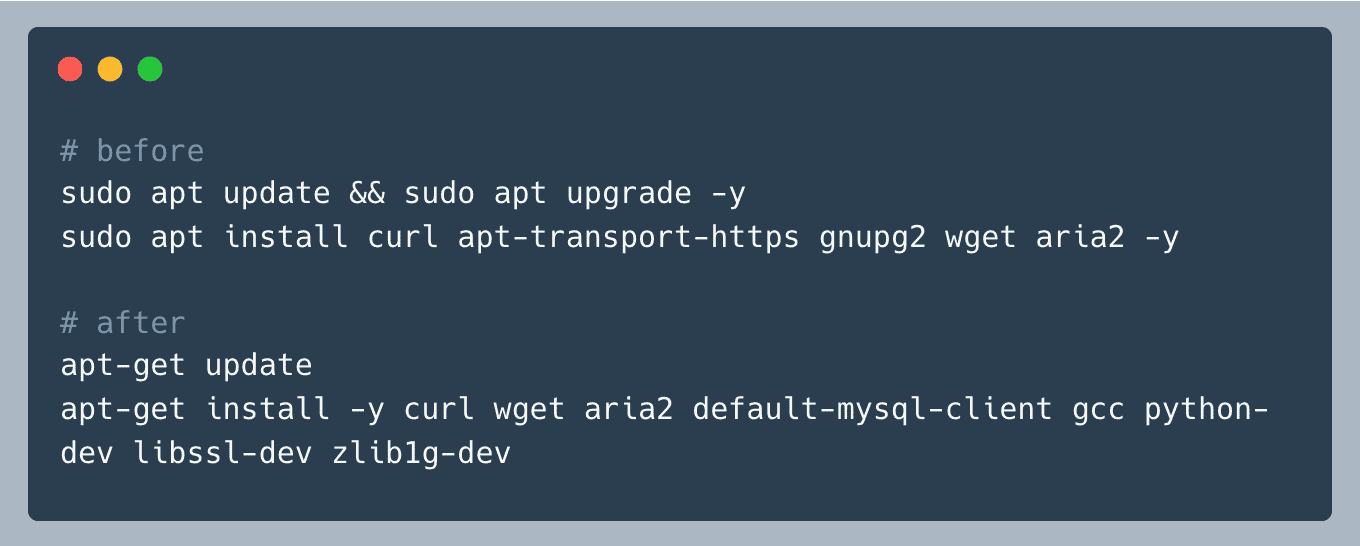
- Build tools: gcc, python-dev for compiling pycrypto.
- Networking: curl, wget, aria2.
- Database client: default-mysql-client.
- Required libraries: libssl-dev, zlib1g-dev.
Results of the First Round
These changes cut average ci-test time from thirteen minutes to five, a reduction of more than 60%. That seemed sufficient, so we shipped the first optimization. About a month later, however, we noticed new builds fluctuating between five and seven minutes. The first round had removed PowerShell, adopted the Python 2.7 slim image, and limited installation to required packages. For the second round, we decided to cache those required libraries as well.
Second Optimization: Better Caching — 5 Minutes to 3
Although the first round removed unnecessary work, packages were still installed on every run. The average of five minutes was inconsistent and could be longer.
Where the first round focused on removal, the second focused on caching to reuse what we genuinely needed. We also eliminated more unnecessary installation steps and used RAM instead of disk I/O.
1. Rethink pip Package Caching
What Was Wrong with the Existing Approach?
Initially, GitHub Actions’ actions/cache did not work properly inside our container setup because the container’s internal paths were separate from the host’s cache.
GitHub Actions and Containers
A GitHub Actions workflow normally runs on the runner specified by runs-on. That runner acts as a host machine running Docker containers. CI-Test therefore had this structure:
- Host machine, a Kubernetes node: The environment running the GitHub Actions runner, with a Docker daemon installed.
- Container: An isolated environment on that host, running all test scripts in python:2.7-slim.
The actions/cache cache was stored in a directory on the host. Apt and pip packages, by contrast, were cached at paths such as /var/cache/apt and ~/.cache/pip inside the container. Those were different locations, so the caches were not connected.
It was like storing something on the host, then looking for it inside the container.
The Solution: $GITHUB_WORKSPACE
We used $GITHUB_WORKSPACE to solve this. GitHub Actions checks out the workflow there, and in this setup it is the shared bind-mounted space between host and container—a folder both can access.
We configured the APT and pip cache directories under $GITHUB_WORKSPACE, the path shared by both environments.
APT Cache
We moved the APT cache directories under the workspace, to .apt/cache/archives and .apt/state/lists, and explicitly added a cache-directory option to apt-get.
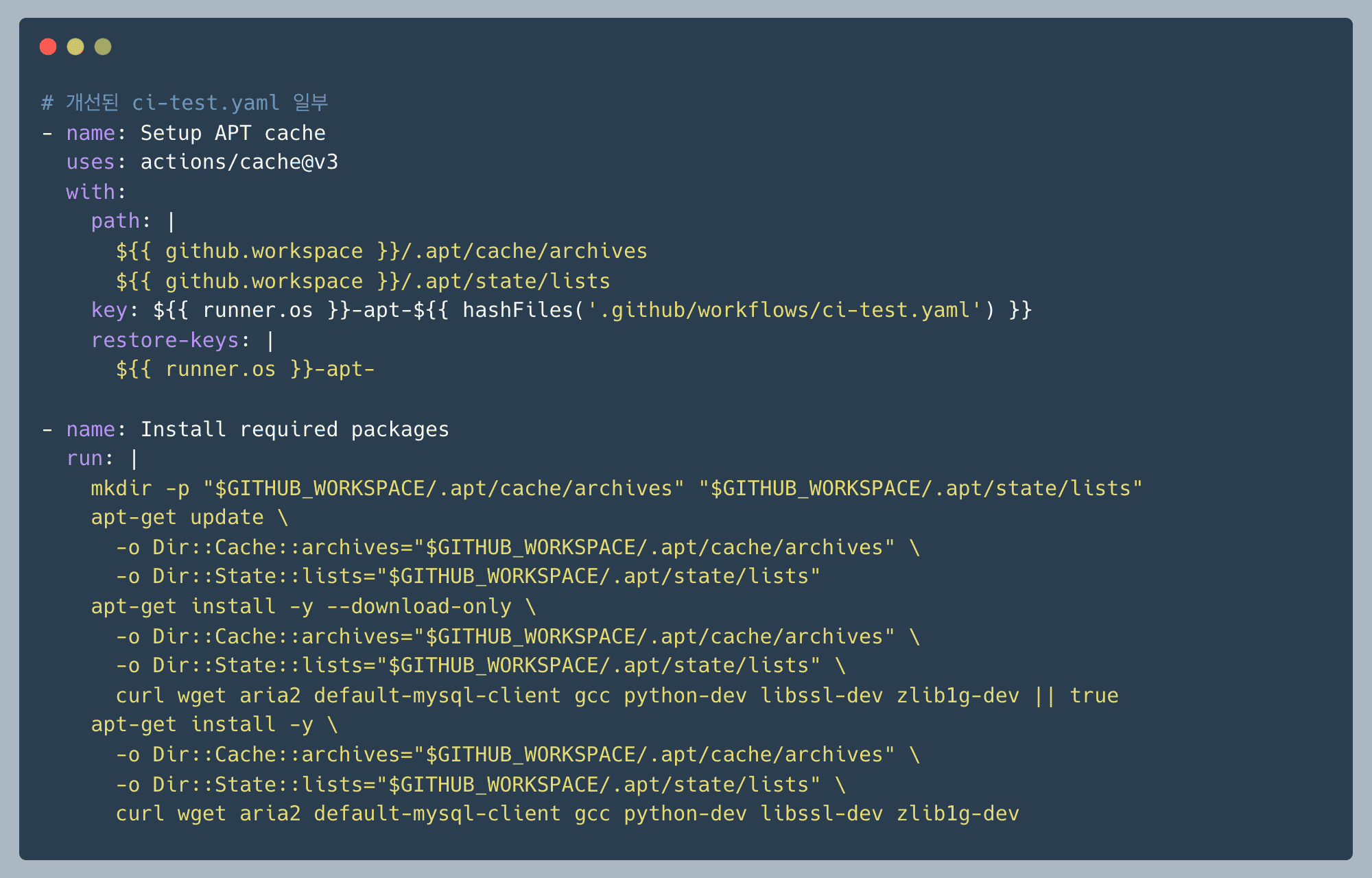
To maximize reuse, we split the process into two steps: download packages first with download-only, then install them from the cache.
pip Cache: From Downloads to Installed Packages
The H server uses around 150 Python libraries. After the first round, we cached only pip’s downloads: .whl and .tar.gz files, not the installed packages. As a result, pip install still ran every time, even when requirements.txt had not changed.
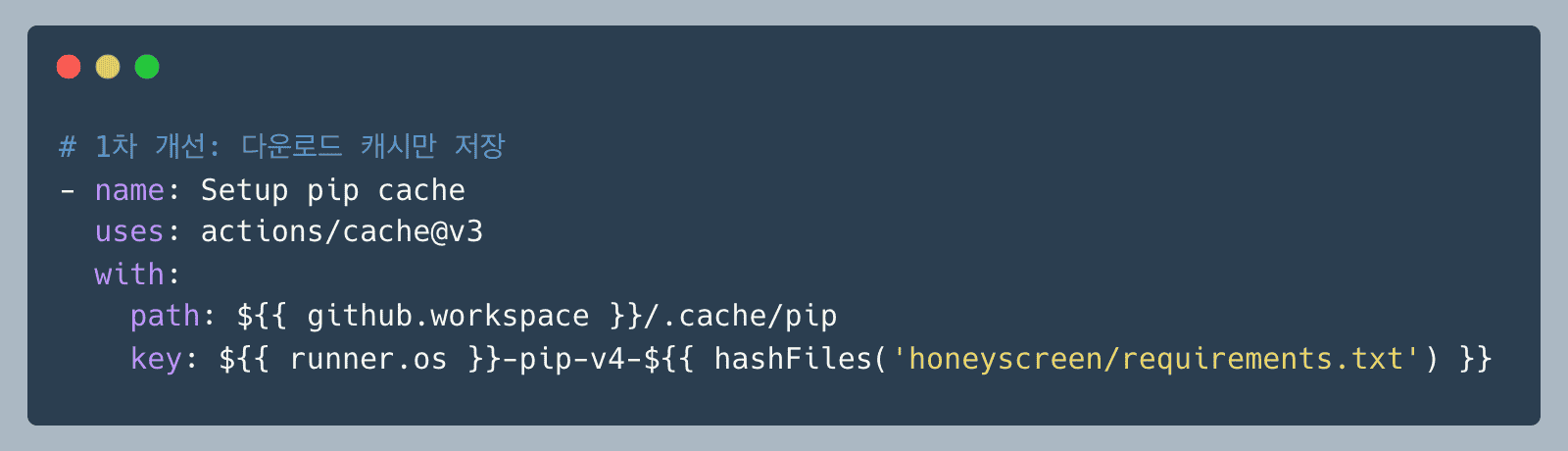
Before: Download Cache Only
pip install 실행 과정:
1. ✅ PyPI에서 패키지 다운로드 (.whl, .tar.gz) → 캐시 가능
2. 다운로드한 파일 압축 해제 → 매번 실행
3. site-packages에 설치 → 매번 실행
4. 의존성 검사 및 바이너리 컴파일 → 매번 실행
This saved the time needed to fetch packages from remote servers, but extraction, installation, and compilation still happened on every run.
After: Cache the Installed Packages
Following Docker layer-caching principles—put less frequently changing layers earlier—we decided to cache the installed site-packages directory itself. Pip packages remain the same until requirements.txt changes. In cooking terms, the old approach cached the ingredients; the new approach caches the finished meal.
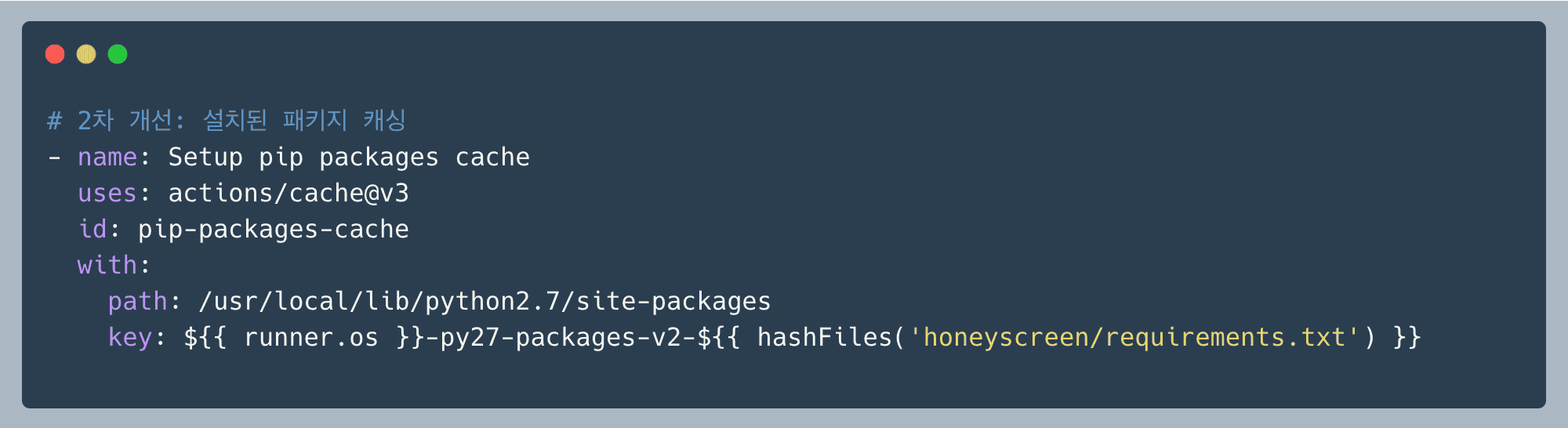 Why cache
 site-packages? /usr/local/lib/python2.7/site-packages is pip’s final installation destination. It holds extracted Python modules, compiled binaries, and package metadata in a ready-to-use state. Everything Python needs to execute import django, for example, is already there. Caching this executable state lets us skip more than two minutes of unnecessary work: 2 minutes → 0 seconds.

2. Optimize APT Package Installation
Skip Unnecessary Work with Conditional Execution
Instead of installing system packages every time without checking, we first checked whether they were already available. The shell built-in command -v tests whether a command exists. If all required packages are installed, the step exits without invoking apt-get. In our self-hosted runner environment, packages from previous builds often remain, so this check alone could save two to three minutes.
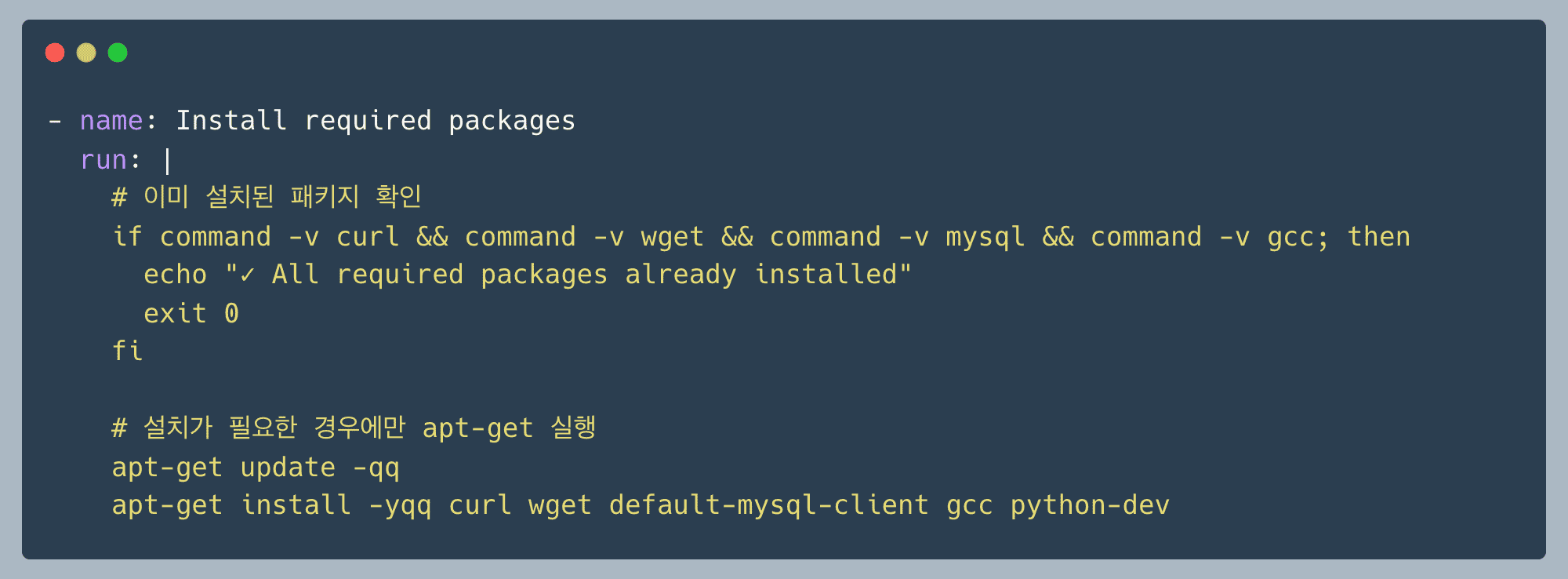
3. Optimize MySQL Tests
Disk I/O can bottleneck the test MySQL instance, so we configured it to use tmpfs, or memory-backed storage.
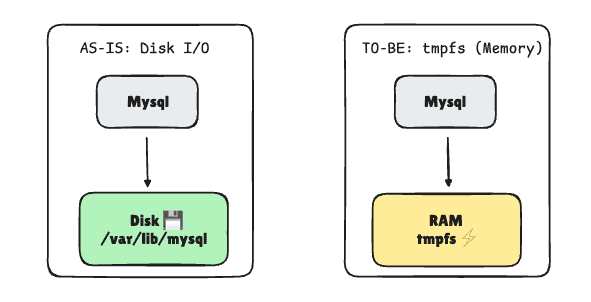
tmpfs stands for temporary file system: it places a filesystem in RAM rather than on disk. It behaves like a regular filesystem, but storing data in memory makes it faster than disk I/O. CI test data does not need to persist, so tmpfs’s fast reads and writes seemed appropriate for speeding up tests.
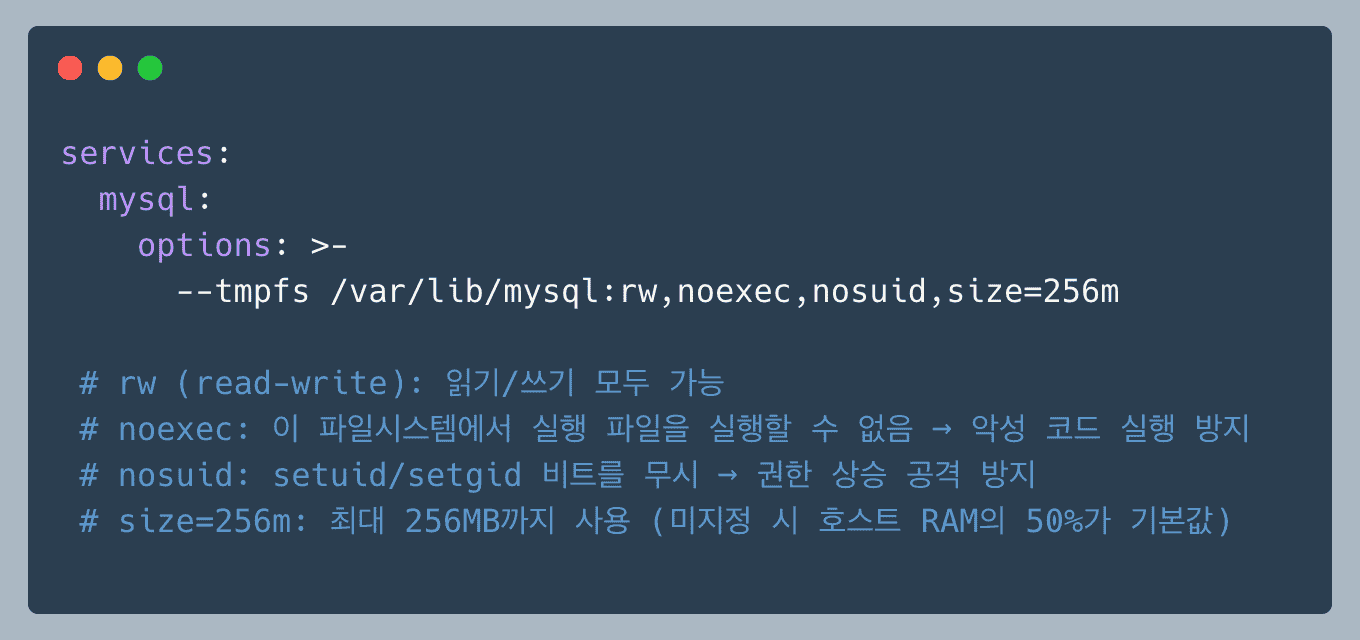
Mounting MySQL’s data directory, /var/lib/mysql, on tmpfs gives us:
- Memory I/O instead of disk I/O.
- Faster table creation, INSERT, SELECT, and other database operations.
- Automatic cleanup when the container exits.
- The possibility of swapping to disk if memory is insufficient. This is generally not a problem in CI, but enough memory is needed if fully memory-resident operation is required.
Results and Next Steps
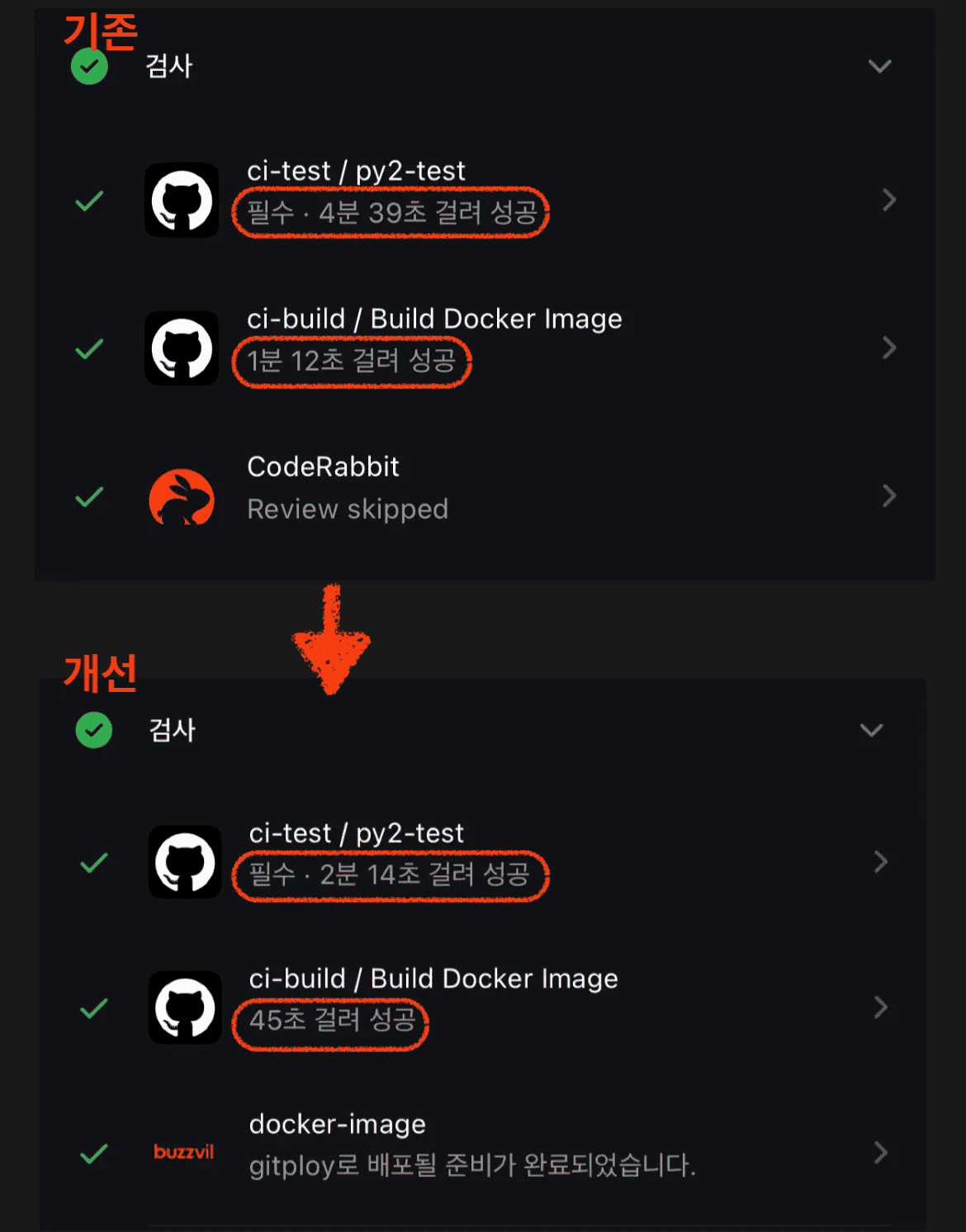
The Full Journey: 13 Minutes → 5 Minutes → 3 Minutes
The first round removed unnecessary work and reduced CI time from thirteen minutes to five. The second fundamentally changed the caching strategy, bringing it down further to around three minutes.
The results showed that what you cache matters. Following Docker layer-caching principles, we handled less frequently changing components earlier and skipped package installation entirely for most PRs, where requirements.txt did not change. The first PR still runs installation, but subsequent PRs can reuse the cache too, improving developer productivity.
- ❌ Ineffective caching: cache only intermediate artifacts, the downloaded files.
- ✅ Effective caching: cache the final result, the installed packages.
Overall ci-test Comparison
Further Optimization: Prebuilt Docker Images
The current CI still pulls large container images such as python2-slim, mysql:5.7, and amazon/dynamodb-local on each run. If they are not already on the self-hosted runner, they must be downloaded from Docker Hub, extracted, and prepared.
Caching has saved substantial time, but the eventual solution is a prebuilt Docker image with all dependencies installed in advance.
honeyscreen/Dockerfile.ci: Define a CI-specific Dockerfile that installs all required apt-get and pip packages..github/workflows/build-ci-image.yaml: Build the CI image from that Dockerfile and push it to ECR, Elastic Container Registry..github/workflows/ci-test-optimized.yaml: Use the prebuilt image in the actual CI-Test workflow.
# Runner 서버에서 1회만 실행 (초기 설정 또는 정기 업데이트 시)
docker pull python:2.7-slim
docker pull mysql:5.7.34
docker pull amazon/dynamodb-local:latest
This approach removes the package-installation stage entirely and can make CI faster still. It is the most effective way to work around this fundamental limitation of the Python 2.7 environment.
Closing Thoughts
Across two rounds of improvements, we reduced CI-Test time from thirteen minutes to three. Beyond saving time, we created an environment that supports faster testing and deployment, improving productivity.
This CI optimization was the first step toward migrating to Python 3. The next post will cover that migration and the challenges we encountered.