AI-translated. Read the original in KoreanEmbedded slides, videos and images remain in their original language.
Deploying Safely: Canary Releases and Rollbacks

Software Engineer

Balancing deployment speed and safety isn’t easy. This post explains how Buzzvil addressed the safety side.
- Deploying Elegantly: One-Click Deployment
- Deploying Safely: Canary Releases and Rollbacks
- Deploying Faster: DIY (Deploy It Yourself)
Deploying safely: canary releases and rollbacks
The previous post described the structure of Buzzvil’s deployment system. Here, I’ll explain the implementation and deployment process for our main runtime environment, Kubernetes on AWS EKS, including canary releases and rollbacks.
From GitHub to Kubernetes
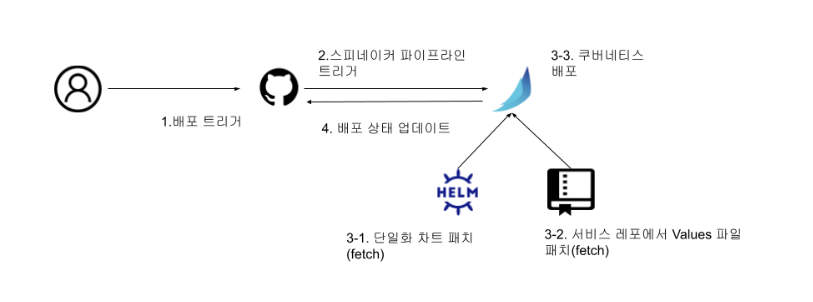
Kubernetes deployment has two main steps:
- Build a Docker image.
- Generate and apply Kubernetes manifests.
A commit SHA is unique, but long, difficult to read, and unable to express the build environment. We chose SHAs because our UI allows users to select them and our builds are not affected by the build environment. See this reference.
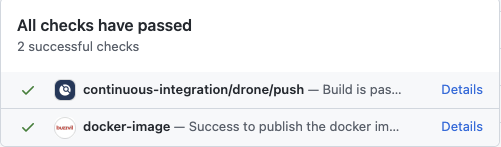
We build a Docker image for every commit. A push event triggers CI to build the image and upload it to the registry. Using the commit SHA as the image tag guarantees uniqueness. We also record image availability in commit status so it can be checked before deployment, using the docker-image context.
GitHub commit status
After building the image, we generate Kubernetes manifests with Helm; see its documentation. Every microservice uses the same Helm chart. Each service customizes its manifests through a values.yaml file and Helm’s --set option. In particular, --set lets us supply the image tag dynamically. Here is an example:
Example Helm command
helm upgrade \
	buzzvil-microservice \
	buzzvil-chartmuseum/buzzvil-chart \  # buzzvil-chartmusuem: 차트 저장소, buzzvil-chart: 단일 헬름 차트
	--install \
	-f release/values.yaml \
    --set global.version=COMMIT_SHA  # 커밋 SHA 값을 이미지 태그로 지정
We don’t run Helm directly. Instead, our deployment tool, Spinnaker, invokes it; see the official documentation. The pipeline retrieves the chart from our internal chart registry and values.yaml from the microservice’s GitHub repository. The Docker image tag—the commit SHA—comes from the GitHub deployment event. How does that event reach Spinnaker?
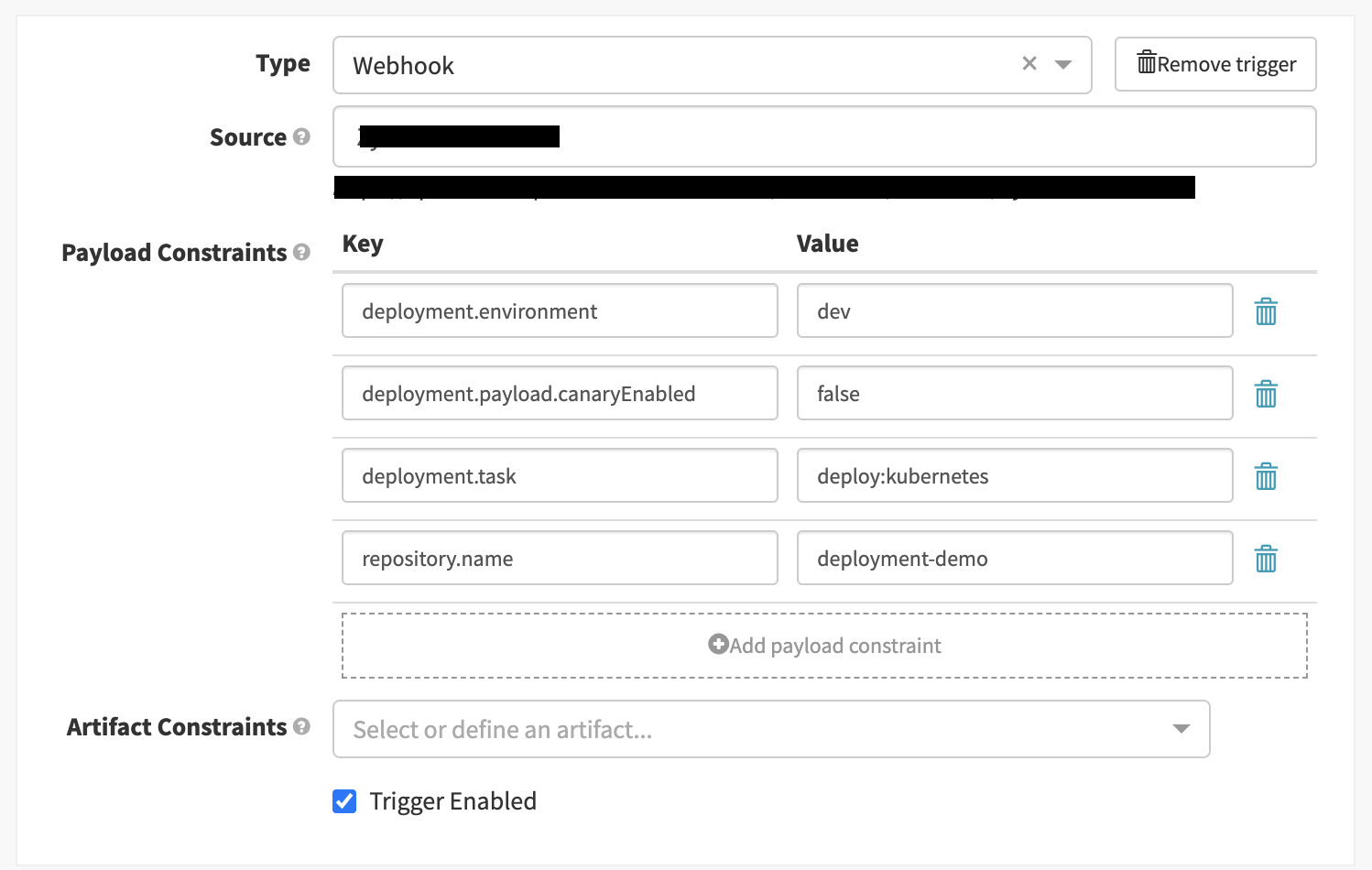
Spinnaker supports several trigger types, including webhook triggers; see the documentation. We configure a webhook so GitHub deployment events trigger the appropriate pipeline. Those events contain repository and deployment information, which work well as trigger constraints. We use repository.name and deployment.environment to select the pipeline for the service and environment. We also use deployment.task to distinguish deployments to different runtime environments.
Spinnaker trigger
Spinnaker’s pipeline expressions can access the received payload, as described in its documentation. We use an expression to retrieve the deployed commit SHA and set the image tag dynamically: ${trigger['payload']['deployment']['sha']}.
Spinnaker template
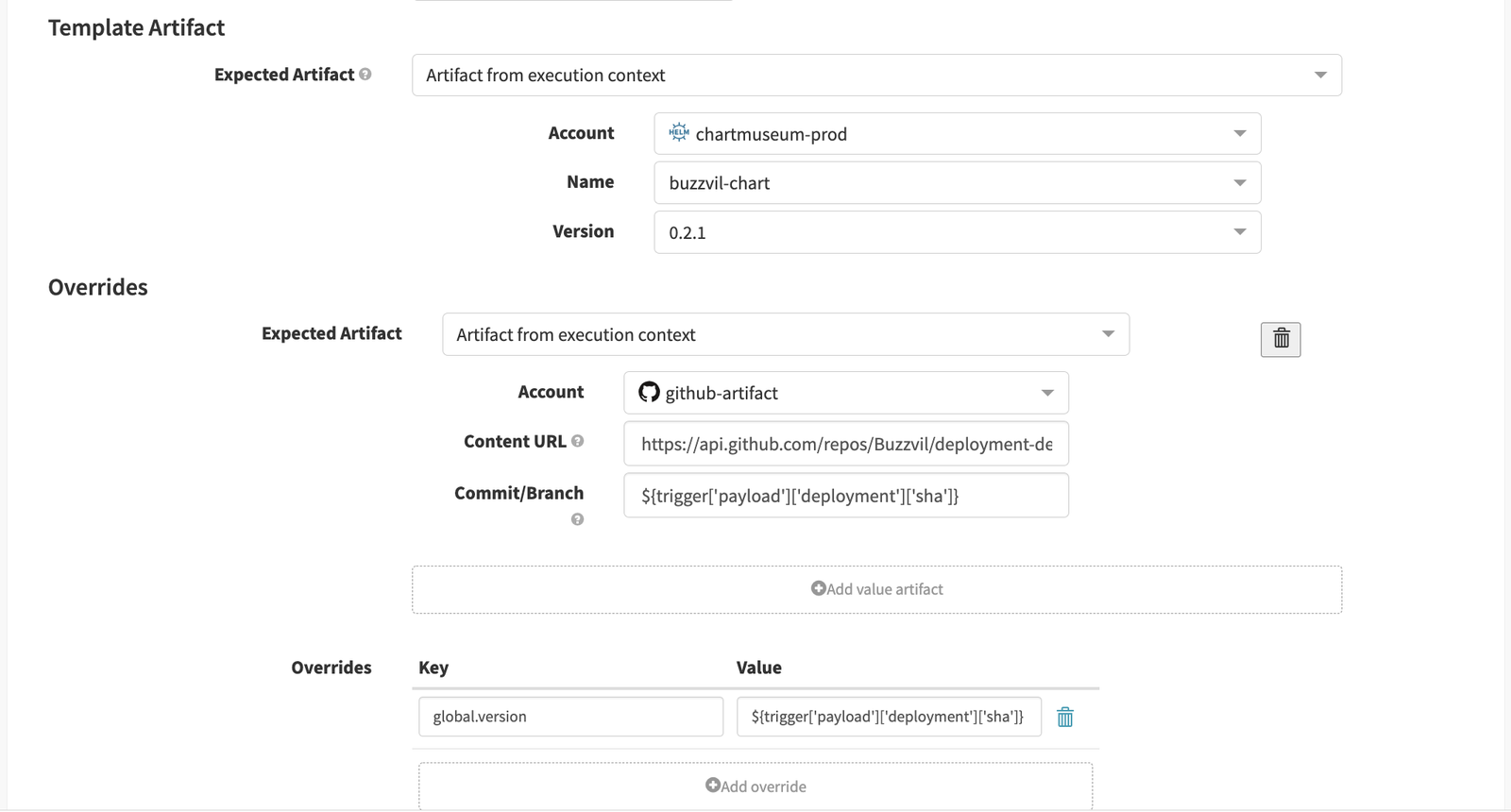
# 템플릿과 동일한 명령어
helm upgrade \
	buzzvil-microservice \
	buzzvil-chartmuseum/buzzvil-chart \
	--install \
	-f release/values.yaml \
    --set global.version=${trigger['payload']['deployment']['sha']}
Finally, Spinnaker deploys the dynamically generated Kubernetes manifests.
Canary releases
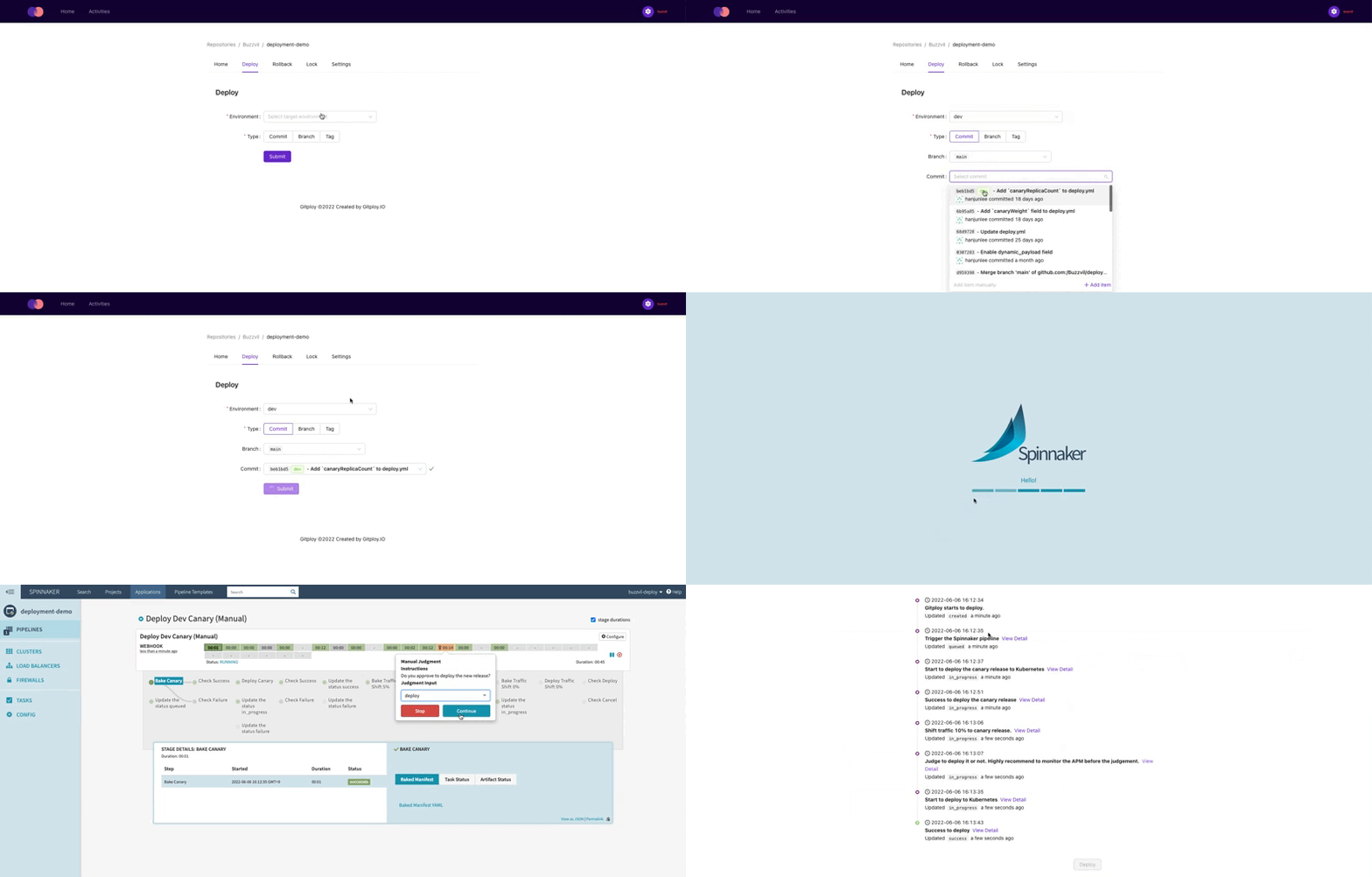
Buzzvil offers two deployment strategies: rolling updates and canary releases. A rolling update gradually replaces servers with the new version and is supported by Kubernetes’ Deployment resource. A canary release deploys the new version to only some servers and sends them a fraction of traffic. This enables A/B comparisons and limits the impact of problems, improving deployment safety. Kubernetes does not provide this complete canary workflow directly, so we implement it ourselves.
The process has three steps:
- Create the canary release.
- Shift some traffic to it.
- Clean up the canary release.
First, we prepare a canary release to handle the shifted traffic. We deploy it through the same process, using the same Helm chart and values.yaml. A chart setting, global.canary.enabled, configures the canary. Internally, it adds -canary to Kubernetes resource names to distinguish them from the main release. If the main Deployment is microservice-prod, the canary becomes microservice-prod-canary.
Spinnaker canary template
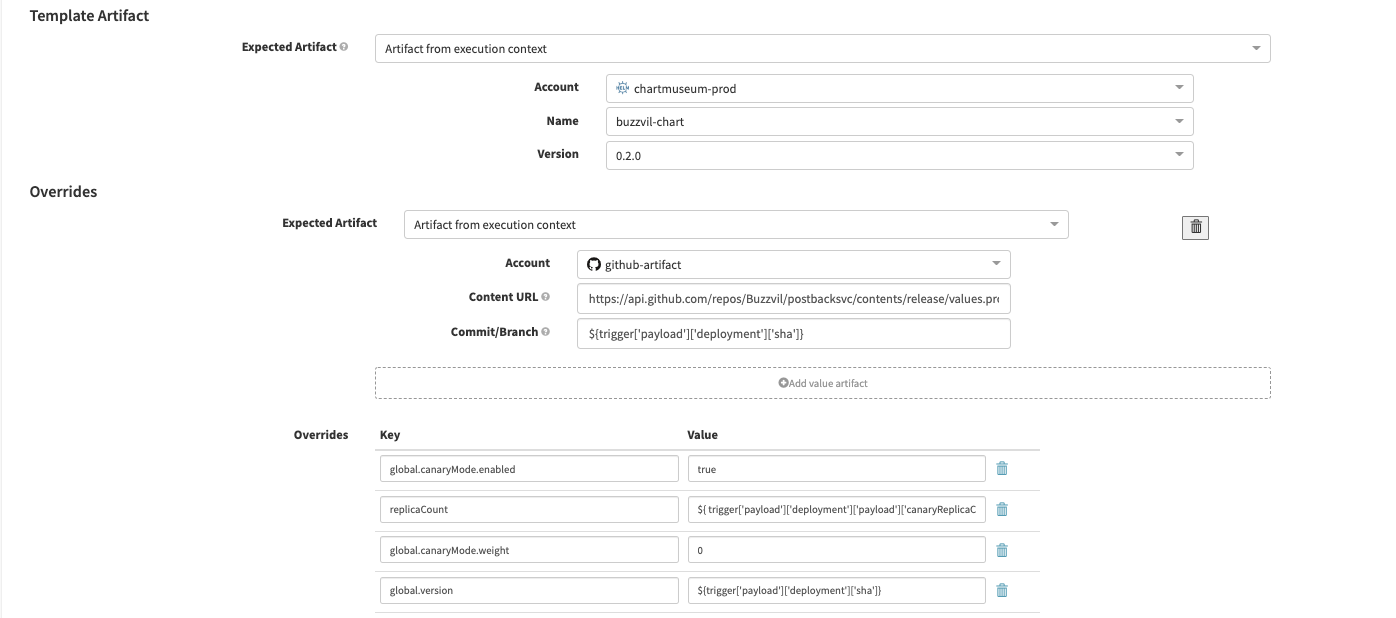
# 템플릿과 동일한 명령어
helm upgrade \
	buzzvil-microservice \
	buzzvil-chartmuseum/buzzvil-chart \
	--install \
	-f release/values.yaml \
  --set global.version=${trigger['payload']['deployment']['sha']} \
  --set golbal.canaryMode.enabled=true \
  --set global.canaryMode.weigth=0 \
  --set replicaCount=2
With the new version ready, we need to send it some traffic. Our service mesh, Istio, supports traffic shifting. A VirtualService resource defines the traffic weights for the main and canary releases. Our shared Helm chart includes that resource and exposes global.canaryMode.weight to configure the split. We create one VirtualService that distributes requests to both releases. Unlike other resources, it has no -canary suffix and is shared by both.
Spinnaker canary template 2
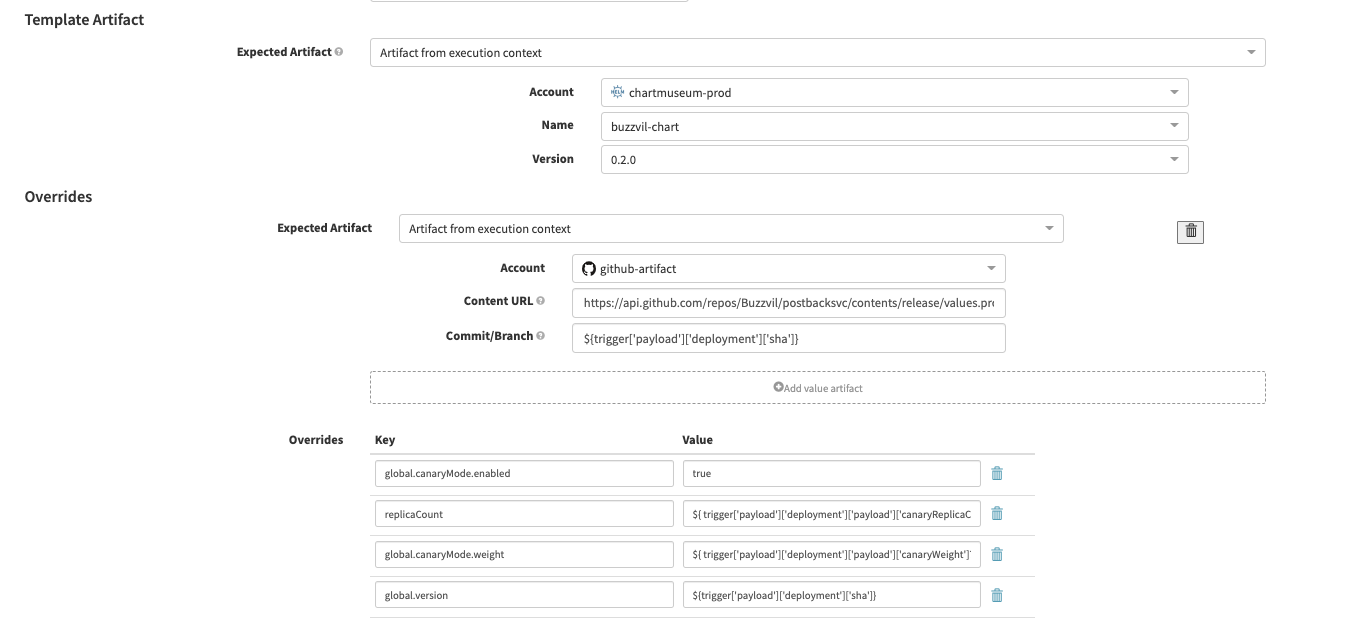
# 템플릿과 동일한 명령어
helm upgrade \
	buzzvil-microservice \
	buzzvil-chartmuseum/buzzvil-chart \
	--install \
	-f release/values.yaml \
  --set global.version="${trigger['payload']['deployment']['sha']}" \
  --set golbal.canaryMode.enabled=true \
  --set global.canaryMode.weigth=5
  --set replicaCount=2
Example VirtualService
apiVersion: networking.istio.io/v1beta1
kind: VirtualService
metadata:
  name: microservice-prod
  namespace: microservice
spec:
  hosts:
    - microservice-prod
  http:
    - name: primary
      route:
        - destination:
            host: microservice-prod
          weight: 95
        - destination:
            host: microservice-prod-canary
          weight: 5
Canary releases make A/B comparisons easier. We use Datadog for monitoring, which provides metrics by version. Engineers can validate the new version by comparing it with the existing one. And if a problem appears, only a fraction of requests is affected, limiting its impact.
After validation, we shift traffic back to the main release and clean up the canary. The engineer then decides whether to proceed with the full deployment or cancel it.
Spinnaker canary template 3
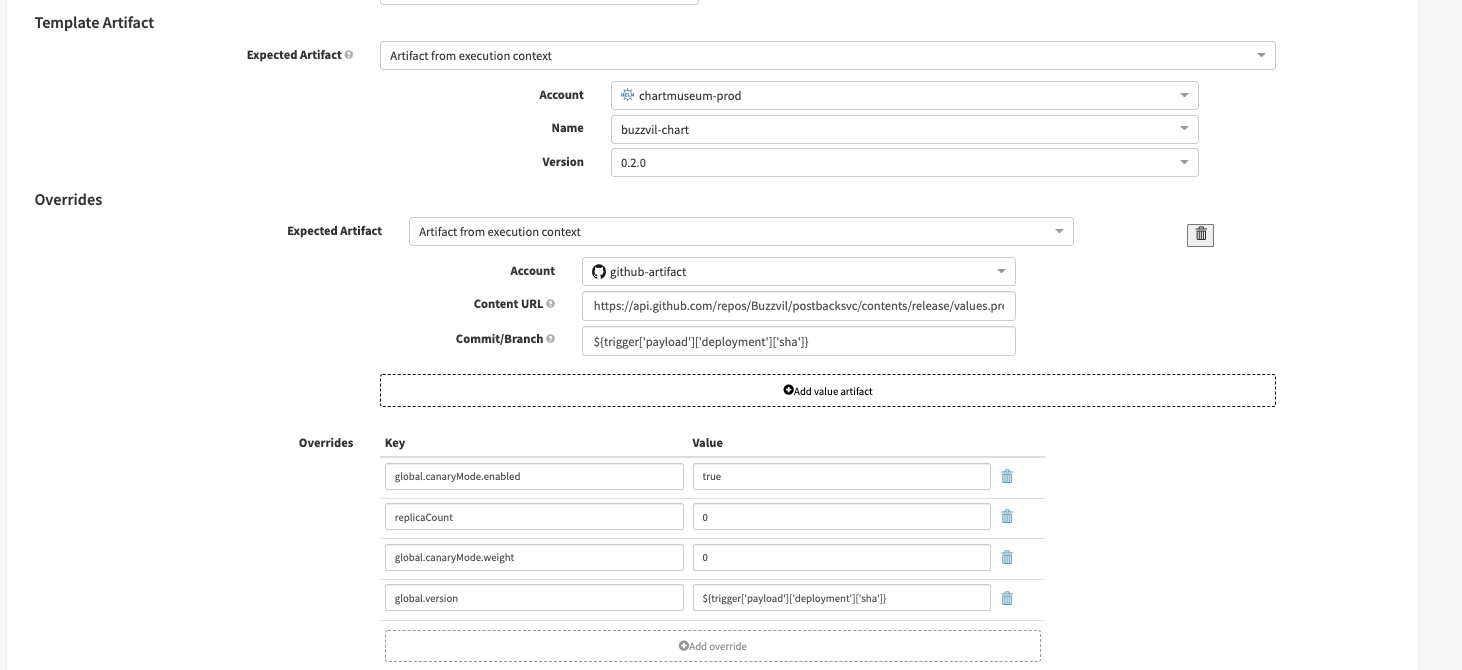
# 템플릿과 동일한 명령어
helm upgrade \
	buzzvil-microservice \
	buzzvil-chartmuseum/buzzvil-chart \
	--install \
	-f release/values.yaml \
  --set global.version=${trigger['payload']['deployment']['sha']} \
  --set golbal.canaryMode.enabled=true \
  --set global.canaryMode.weigth=0 \
  --set replicaCount=0
Engineers can also choose the canary replica count and traffic weight when deploying. These settings are passed in the GitHub event’s deployment.payload. Gitploy’s dynamic payload feature supplies them at deployment time. Spinnaker reads the values from the event payload and falls back to defaults when they are absent.
Gitploy configuration
envs:
  - name: prod
    task: deploy:kubernetes
    required_context: ['docker-image']
    serialization: true
    dynamic_payload:
      enabled: true
      inputs:
        canaryEnabled:
          type: select
          options:
            - "true"
            - "false"
          required: true
          description: Deploy in a canary strategy.
          default: "true"
        canaryWeight:
          type: number
          required: false
          description: Set traffic weight to canary.
          default: 5
        canaryReplicaCount:
          type: number
          required: false
          description: Set canary replica count.
          default: 2
Spinnaker pipeline expressions
- replicaCount:
${ trigger['payload']['deployment']['payload']['canaryReplicaCount']?: "2" } - weight:
${ trigger['payload']['deployment']['payload']['canaryWeight']?: "5" }
Rollbacks
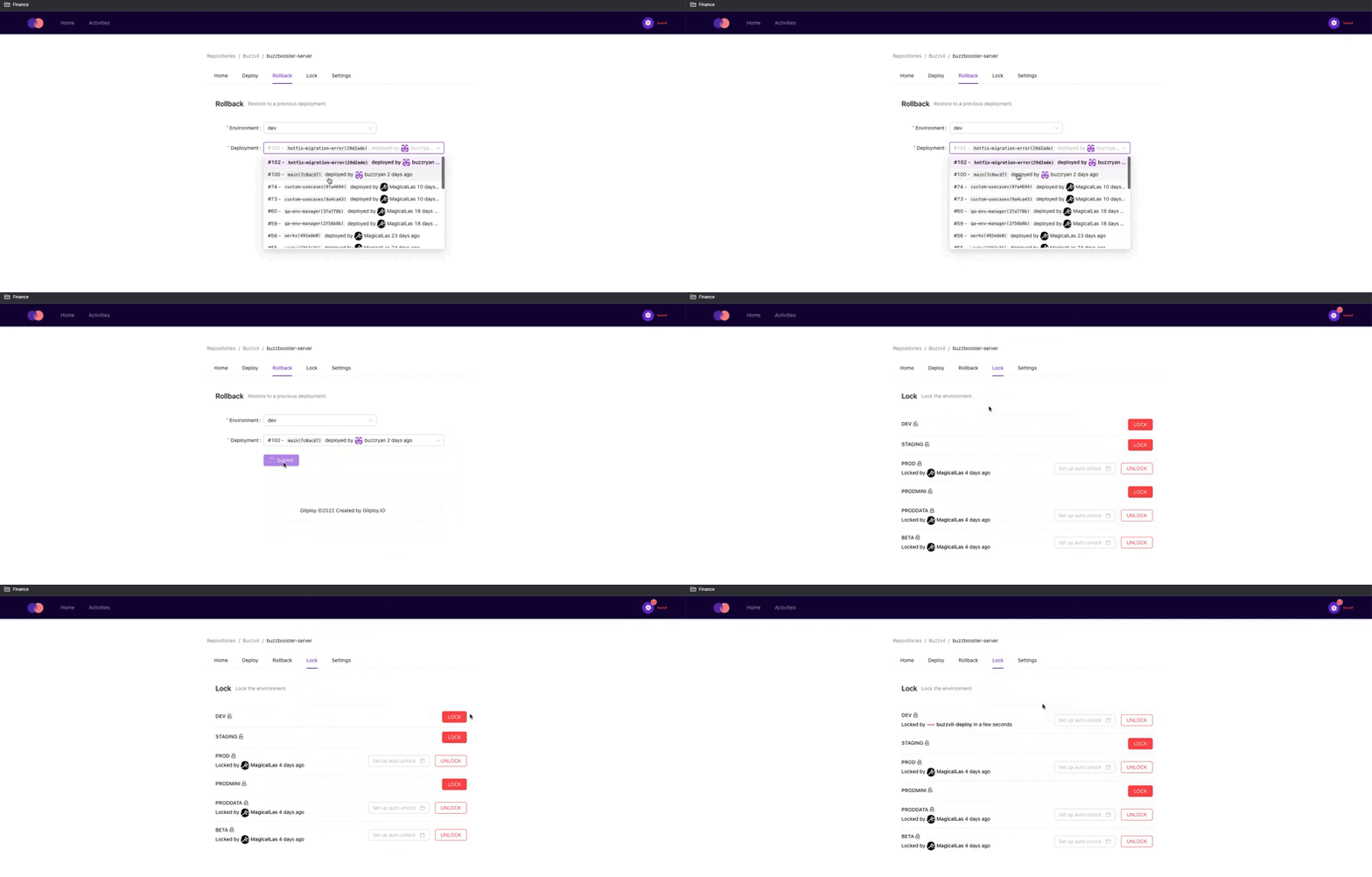
A rollback returns the service to an earlier version. When the current version has a problem, rolling back can restore service quickly.
Buzzvil implements rollback using commit SHAs from deployment history. Each deployment records its SHA, which can be deployed again. This works because the values.yaml file governing manifest generation is versioned in each repository. An earlier version of values.yaml generates the same manifests as before. The Spinnaker template below dynamically selects the commit from which it retrieves the file.
Spinnaker GitHub template

A common rollback approach is to revert code, prolonging the incident, while posting “Please stop deploying for now!” in chat. That adds coordination problems without addressing the underlying issue. We experienced the same thing. Now, rollback takes one click, and a deployment lock prevents further releases while we investigate.
Closing thoughts
We’ve continually improved our deployment system so the organization can release more confidently and safely. Deployments are now both easier and more reliable. If your team is balancing speed and safety, I hope this post helps. Thanks for reading. :)