AI-translated. Read the original in KoreanEmbedded slides, videos and images remain in their original language.
Understanding Android Fragmentation

1. Introduction
I’m Evan, a junior Android developer at Buzzvil. I’ve been developing here for about a year. Compared with this time last year, I feel I’ve grown a great deal by working alongside excellent engineers, while still recognizing how much I have to learn. Looking back over that year, many challenges come to mind, but fragmentation stands out. I’d like to write about Android fragmentation both to share my experience and to organize my own understanding.
What is fragmentation?
Before discussing Android specifically, let’s define fragmentation. It means that the environments in which apps run differ across devices. Broadly, it falls into two categories: operating system fragmentation and hardware fragmentation. Compared with iOS, which has less diversity in hardware and OS versions, Android is much more fragmented, creating a range of problems.
OS fragmentation
OS fragmentation means devices run many different OS versions. The chart below comes from Google’s Android developer site and shows the share of devices running each version in early July 2017, excluding shares below 0.1%. Versions range from Gingerbread to Nougat, while previews of Android O, the version after Nougat, are already appearing.
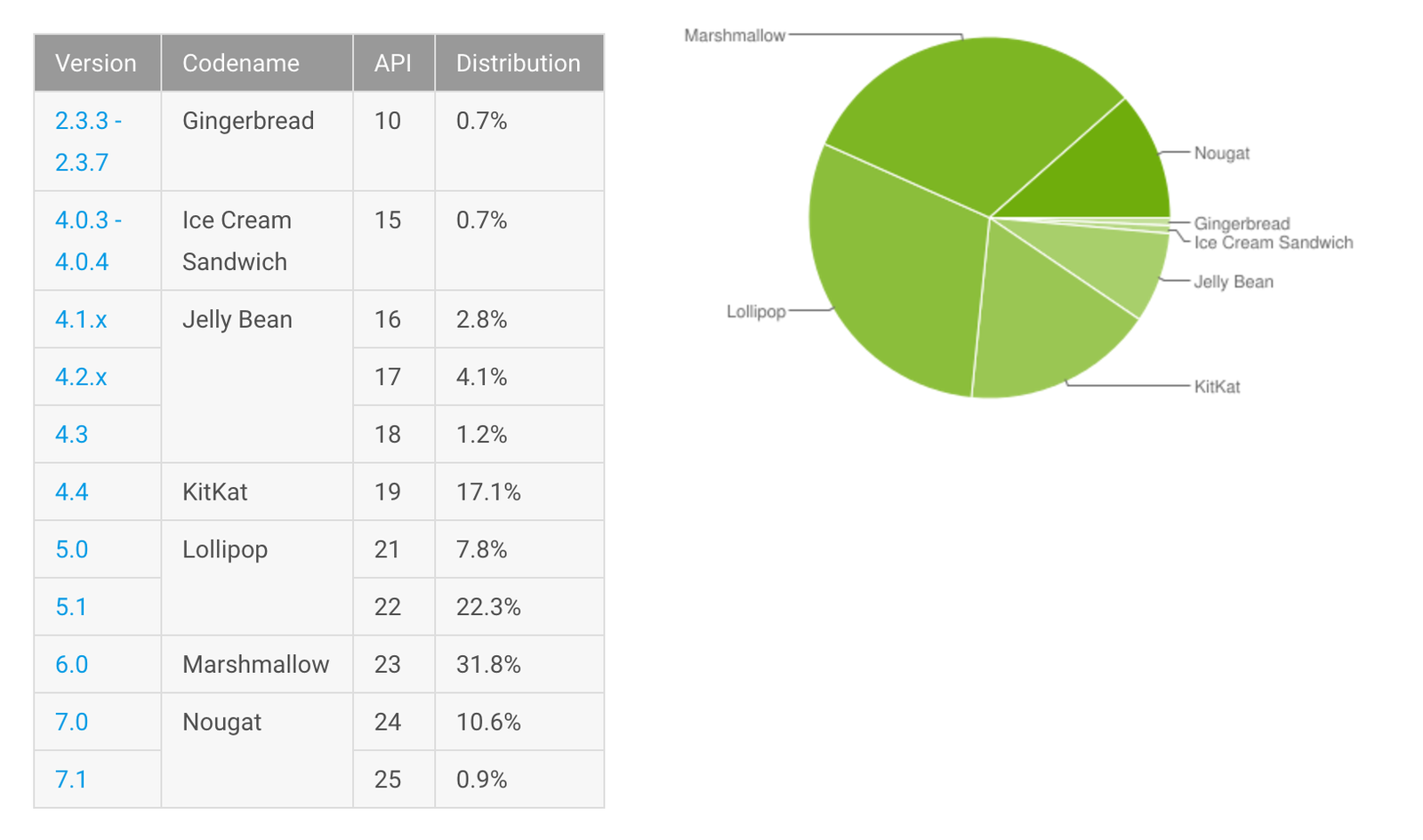
Distribution of devices running each Android platform version
Because the same devices can operate under different OS environments, even developing a single feature requires considering potential compatibility problems. Most apps use minSdkVersion and targetSdkVersion settings to limit the cases they must handle and improve stability. But to offer as many features as possible, developers must support a broad version range and adapt to each version. We also need to track API changes and removals in upcoming releases to prevent previously working features from breaking.
These are real challenges, but following Google’s documentation reduces the likelihood of unexpected bugs. OS fragmentation may therefore be the more manageable part of the problem. Hardware fragmentation is often harder.
Hardware fragmentation
A bigger challenge is the sheer number of device models from many manufacturers. The diagram below, published by OpenSignal in 2015, illustrates device fragmentation. Its report identified more than 24,000 distinct device types.
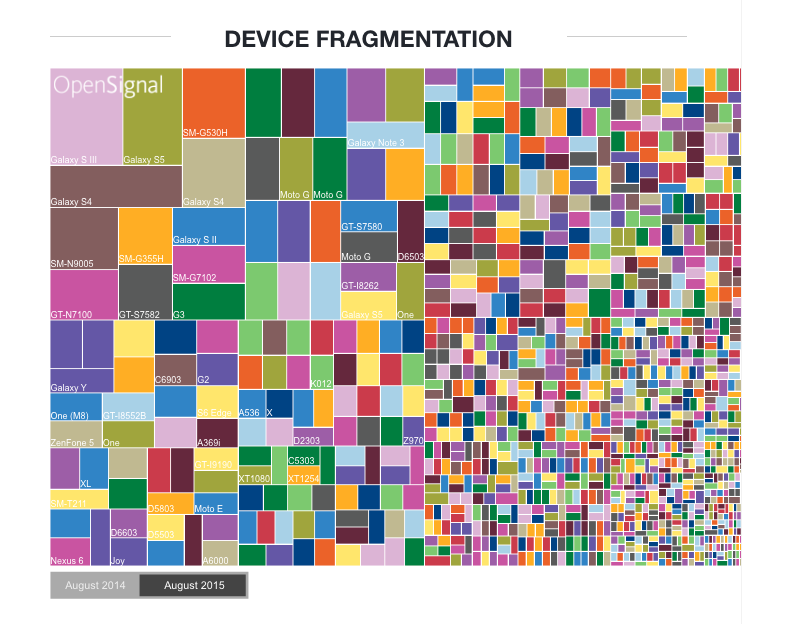
Device fragmentation (OpenSignal, 2015)
Android is open source, allowing many manufacturers to build devices around it. That diversity continues to grow. One resulting challenge is screen resolution: with so many device sizes, UI work always requires considering how the interface looks on different screens. This is especially costly in game development, where graphics are central.
Manufacturers can also customize features, services, and interfaces to their liking as long as they follow Google’s basic guidelines. Even the same model may be customized differently for different carriers. Such customization can cause an app to fail only on particular devices. With so many devices, these problems are difficult to anticipate and address in advance.
Why fragmentation happens
Let’s examine the causes more closely. The diagram below shows the five stages involved in producing an Android device:
- The Android team releases open-source code.
- Chip manufacturers adapt that release for their hardware.
- Device manufacturers adapt it for the devices they will ship.
- Manufacturers and carriers validate the result.
- The release reaches users.
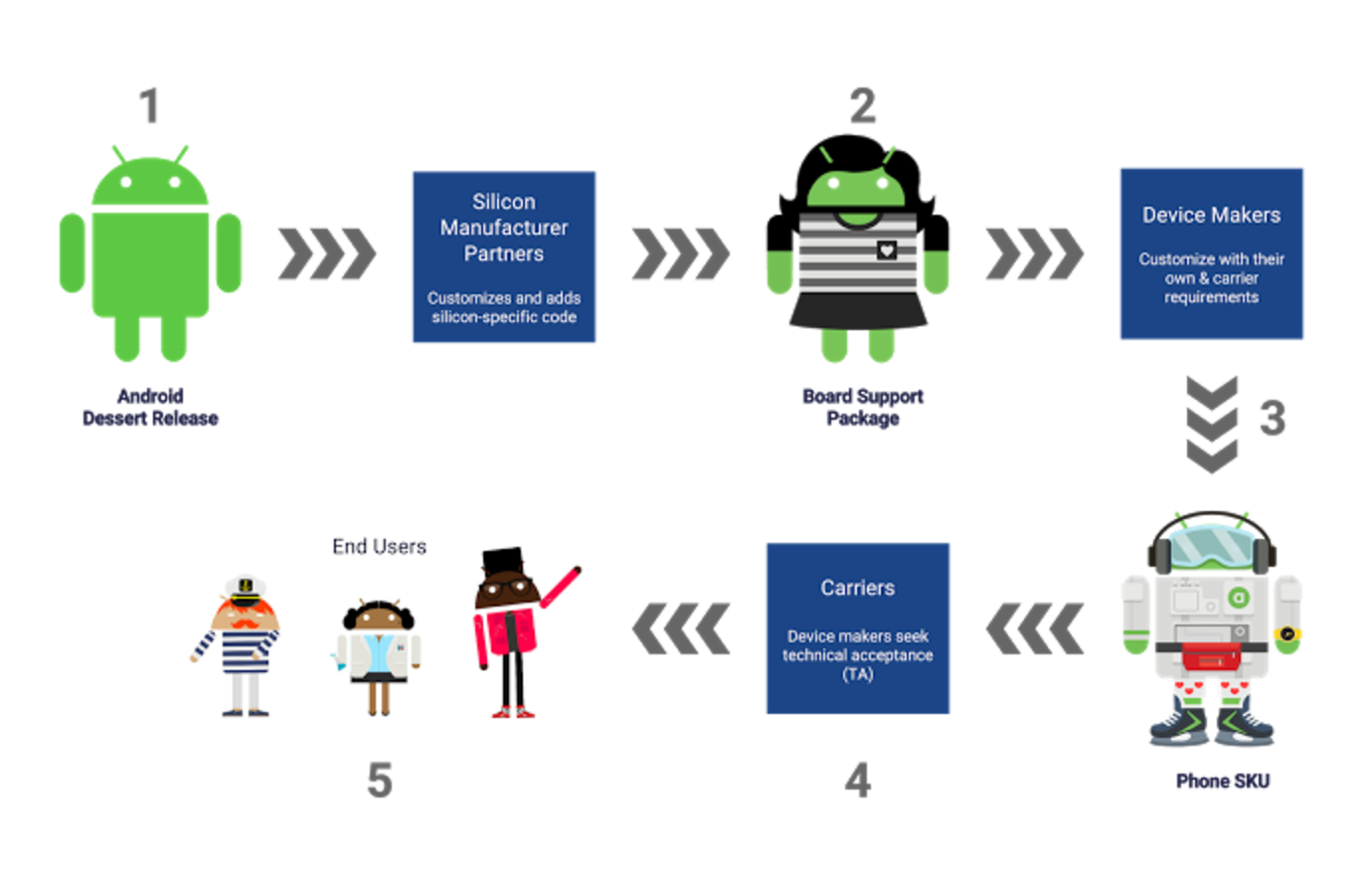
The Android device release process
Each manufacturer customizes Google’s updates for its devices, introducing hardware fragmentation along the way. This also contributes to OS fragmentation: the process can take a long time, making it difficult to predict when each manufacturer will deliver a new OS version.
How to respond
How should we handle fragmentation? Startups are unlikely to have the resources for perfect coverage, so it makes sense to develop in ways that minimize the effort required. Buzzvil is no exception. At the time of writing, we don’t have a dedicated tester. When QA is needed, engineers and operations staff involved in the service test together.
The same constraint applies to devices. We cannot test every model, so we identify popular devices in the countries where our services operate and focus on representative models.
Another approach is to avoid version-specific branches whenever possible. The more such branches we add, the harder it becomes to verify behavior and the more maintenance costs rise.
We also need compatibility checks for new versions and devices. As mentioned earlier, it is essential to examine additions, removals, and changes in upcoming releases and identify features requiring updates. Android O will introduce many changes; restrictions on implicit broadcasts, for example, mean existing uses of those broadcasts must be revised. Devices with unusual specifications need attention too. Recently released devices such as the Galaxy S8 have aspect ratios approaching 1:2, requiring special handling in the UI.
Google is, of course, aware of fragmentation and has introduced several responses. It continues to release reference devices such as Nexus phones, follows an annual Android release cycle, and allows core components to update through the Play Store, reducing manufacturers’ customization burden. Starting with Android O, Project Treble also helps manufacturers deliver OS updates more easily and quickly. These efforts are gradually reducing the burden fragmentation places on manufacturers and developers.
2. Closing thoughts
Fragmentation has been an issue since Android’s early days. Work by many stakeholders has improved the development environment, but fragmentation remains an important concern. Building apps that behave reliably and consistently across different environments means keeping it in mind at all times. I’ll need to keep learning too, so I can maintain compatibility with older versions while building services that work well in new environments.