AI-translated. Read the original in KoreanEmbedded slides, videos and images remain in their original language.
Automating Web UI Tests with pytest-bdd and Selenium

QA Manager
Hi, I’m Erica, QA Manager at Buzzvil. We operate an ad management dashboard called Dash. Within QA, we’re automating web UI tests for the advertiser-facing part of the system. In this post, I’ll share our progress and some considerations for teams starting test automation for the first time.
What we’re automating
The dashboard lets advertisers configure their ads. Its many features include setting images or videos, selecting placements, configuring budgets, schedules, and targeting, and generating performance reports. Changes occur across these features, so we run regression tests each time to check for effects on existing functionality. This automation project focuses on regression testing the ad items visible in the dashboard’s web UI.
A small aside: the project is called “Latte.” Frontend testing already has frameworks named after teas—Jasmine, Mocha, and Chai—and an earlier automation project here was called Green Tea. We continued that beverage theme. “Latte” also sounds like the Korean phrase for “back in my day,” a nod to when we tested everything manually. :)
How should UI automation begin?
Latte began as a pilot. For a little over three months, we tested whether Selenium and pytest made BDD-based automation straightforward, and whether we could integrate with TestRail, where we manage our test cases. The pilot gave us confidence that the approach could cover the full target area, so we moved into the main project using Selenium, pytest-bdd, and pytest-testrail-client. A pilot like this helps you judge whether your chosen combination of tools is suitable before committing to a full automation project.
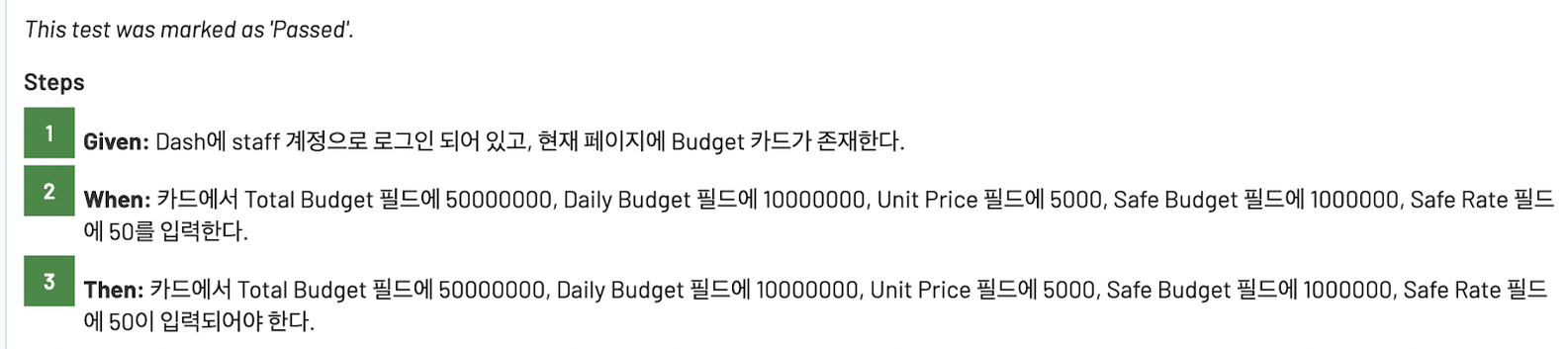
Another advantage is that you don’t need a perfect structure from day one. Latte’s pilot started with code that opened Chrome through Selenium’s WebDriver API, selected the username and password fields, and entered values. We then introduced page, element, and locator classes to establish a structure. Applying pytest-bdd let us separate scenarios and automation scripts into different directories. Shared functionality—whether used by one feature or across the whole session—became fixtures in conftest.py. As our understanding of pytest grew, we added hooks and configuration in pytest.ini. By the time pytest-testrail-client could send results to TestRail, we had established the complete project structure over a small test area. That made it easy to carry the same structure into the main project.
What decisions come with UI automation?
When starting web UI test automation, you need to decide its scope, choose tools, and design the project structure.
Structure
Fortunately, our scope—regression tests for ad items—was clear from the outset. We therefore didn’t spend much time debating the first question. Within that scope, our priority was generally to automate checks that were tedious or difficult to perform manually. During the pilot, the top-level directory structure naturally separated into test scenarios, test scripts, and web page objects.
├── features
│   ├── account
│   │   └── advertiser.feature
│   ├── ad
│   └── ad_group
├── step_definitions
│   ├── account
│   │   ├── conftest.py
│   │   └── test_advertiser.py
│   ├── ad
│   └── ad_group
├── page_objects
│   ├── locators
│   ├── page.py
│   └── element.py
├── pytest.ini
└── conftest.py
Tools
We considered whether to use JavaScript, already used by the frontend team, or Python, whose code is intuitive and easy to learn. Latte chose Python. That gave us its readability and access to the rich ecosystem of libraries that integrate with pytest.
Maintainability
Maintainability was our biggest concern as we built the project’s foundation. An earlier automation project had already existed, but dashboard UI updates changed page elements and broke a substantial portion of its scripts. For this second attempt, we strengthened that area by assigning IDs to as many test elements as possible and selecting elements with relative XPath expressions, making tests less sensitive to UI changes. We also wanted script writing to be practical, straightforward, and intuitive. Classes defined in our page objects let script authors reuse existing element definitions and concentrate on implementing the actions they needed.
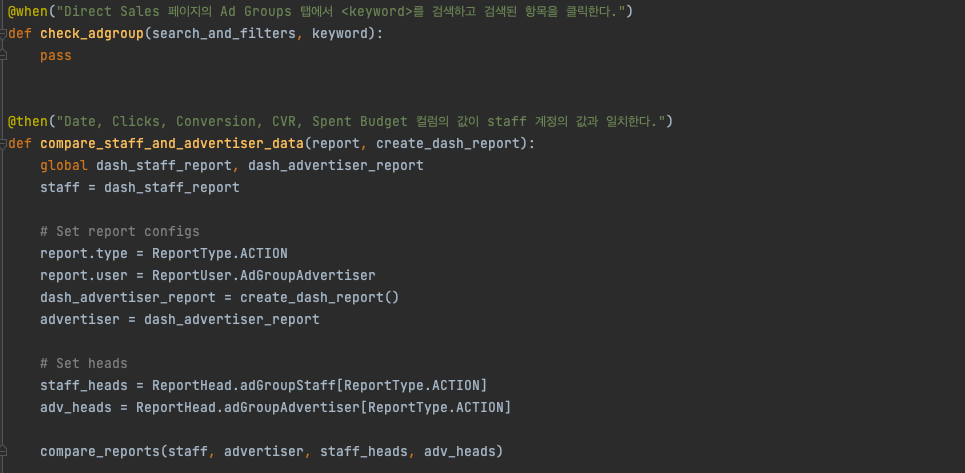
Extensibility
To support growth, we followed a BDD workflow: write test scenarios first, then the scripts implementing them. In practice, having scenarios defined made scripts easier to write. Amy, the QA Manager responsible for the dashboard, could also help author scenarios, making the project easier to move forward.
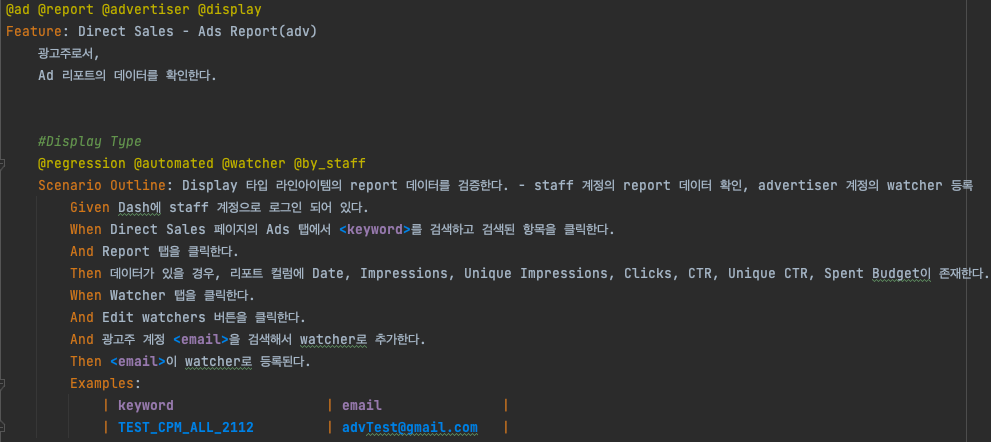
Where does UI automation end?
As our development approach settles, we’re gradually improving the project itself. Initially, we entered dashboard login details in the console; finding that inconvenient, we moved them into pytest.ini. ChromeDriver previously needed manual updates whenever Chrome changed version. We now use a library to match the driver version to the installed browser automatically.
Work still ahead includes parallel test execution with login sessions maintained across browsers, and hosting the automation project on a server so anyone can use it. Meanwhile, as the codebase grows, we see opportunities to refactor. Ongoing dashboard UI updates also mean existing tests need changes or additions.
Ultimately, test automation is software. Without continual maintenance, it risks becoming obsolete. But by maintaining it alongside the product under test, I’m confident it can reduce the testing burden and help us release with confidence.