AI-translated. Read the original in KoreanEmbedded slides, videos and images remain in their original language.
How Buzzvil Uses AWS
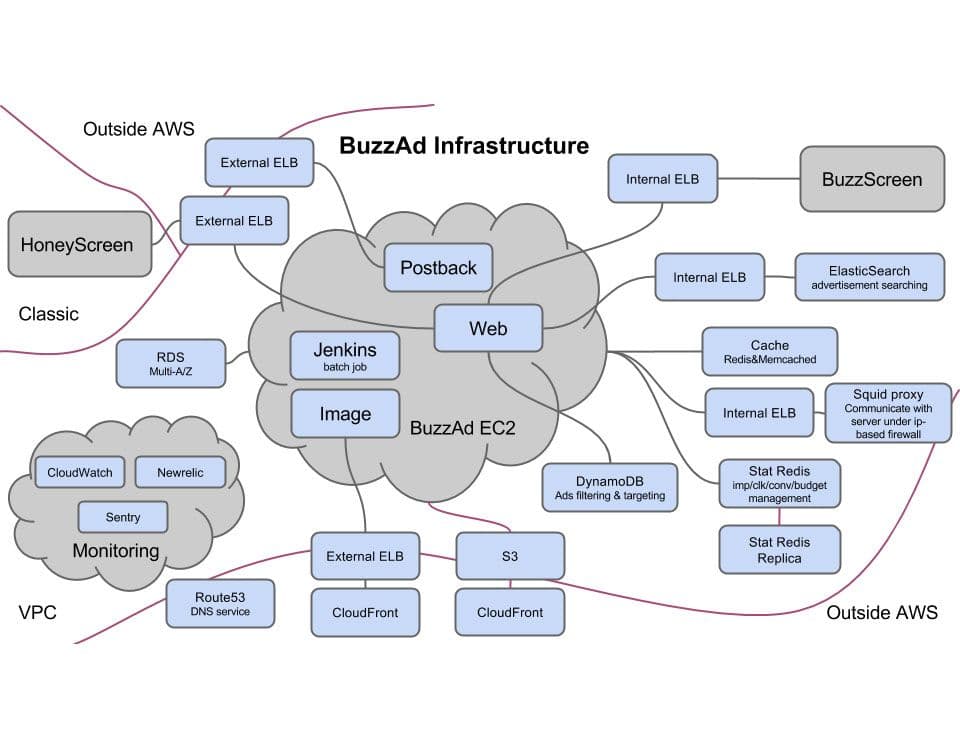
Buzzvil operates the Korean, Japanese, and Taiwanese versions of Honeyscreen, our rewarded lockscreen app, along with the BuzzAd ad network and Buzzscreen lockscreen SDK. Just six developers currently run all these services, so we rely on AWS wherever possible to reduce server operations work. Without AWS, running everything with this team would have been impossible. We started with EC2, ELB, RDS, and S3, then adopted Auto Scaling, CloudFront, Lambda, DynamoDB, Route 53, Kinesis, SNS, VPC, and more. In this post, I’ll introduce the services we have used, share practical tips, and describe what I have learned. 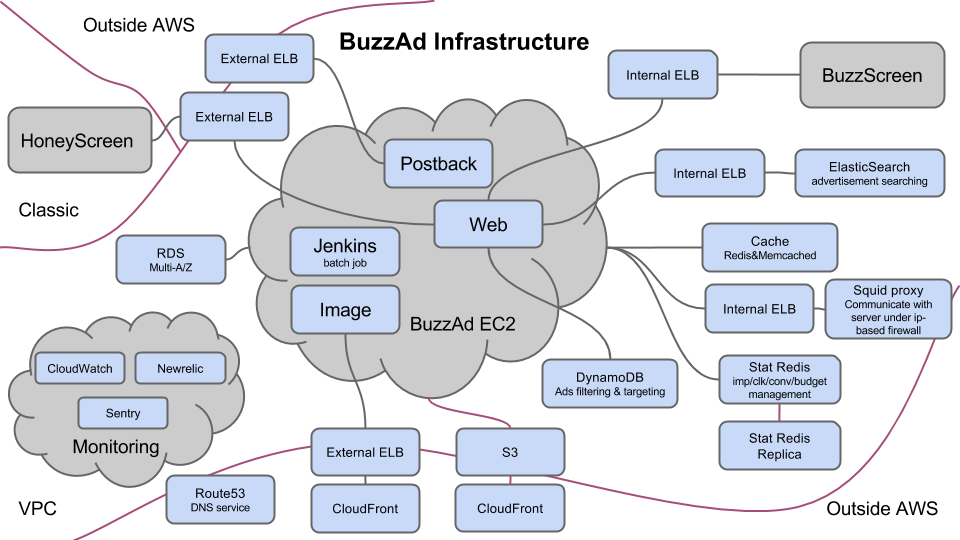 BuzzAd’s AWS architecture
EC2
EC2 is AWS’s flagship service. Creating and using an instance is straightforward, but improving security requires a few considerations. We apply an IAM role to every EC2 instance Buzzvil creates. Configuring the AWS permissions on that role improves security by eliminating the need to put access keys and secret keys in source code. AWS already provides SDKs for many languages. On an instance with an IAM role, an SDK can use AWS services with that role’s permissions without additional configuration.
We do not set security-group sources to “anywhere.” We open only the IP addresses and ports that actually need access. For communication between AWS instances, a security group can allow other instances in a specified security group rather than individual IPs, and we use this feature.
You can select an availability zone when launching an instance. Unless you are designing for the failure of an entire availability zone, placing all instances in one zone is preferable: traffic between instances in the same zone is free, while inter-zone traffic is charged.
Last year, AWS introduced the burstable t2 instances. The user guide explains the basics well. One misconception I had was that a t2.micro at 100% CPU would perform worse than a t2.medium at 100%. In fact, both have one vCPU, so while credits remain, their performance is the same. Understanding this helps you use t2 instances more efficiently. For example, if a t1.micro can handle burst traffic adequately, you would not move to a t2.medium simply to reduce response time.
Be careful when monitoring CPU usage in CloudWatch too. Low CPU utilization on a t2.micro is not necessarily reassuring. Its baseline performance is only 10%, so if average CPU utilization exceeds that, consider changing the instance type. CloudWatch shows both remaining and consumed CPU credits; keep an eye on them.
When operating many EC2 instances, reserved instances can save money. Pricing helpfully shows the percentage saved against on-demand rates, but there is another variable: new instance types or price reductions may arrive. Once purchased, a reserved instance cannot change type, although changes within the same class are possible—for example, two c3.large instances can become one c3.xlarge. Later price cuts do not apply retroactively to reservations already purchased. When c3 first appeared, replacing our existing instances with c3 felt like roughly a 30% cost saving by itself. New instance classes seem to arrive every one or two years, with price cuts on a similar schedule. We are considering buying c4 reserved instances ourselves but are waiting a little longer. C3 launched in November 2013 and c4 in November 2014. Before buying a reservation, consider waiting if the instance has been around a long time or you have a feeling a price cut is coming.
ELB
When HTTPS is required, ELB can perform SSL termination. It converts HTTPS to HTTP before forwarding requests internally, reducing the web servers’ workload. There are two kinds of ELB: an external ELB receives outside traffic and distributes it internally, while an internal ELB is accessible only inside AWS infrastructure. Internal ELBs are available only in VPC, not EC2-Classic.
Internal ELBs are useful for distributing traffic between internal servers. ELB is inexpensive, reliable, and scales almost without limit, making it a good fit in front of services that need to scale in a microservice architecture. At Buzzvil, we use internal ELBs not only for BuzzAd but also for communication with proxy and Elasticsearch servers. Elasticsearch has its own load balancing, but we judged ELB safer, and our one-shard, multiple-replica setup was well suited to it.
Auto Scaling
Auto Scaling automates scaling the number of instances in and out. There are several things to consider before using it. Because the instance count is not fixed, deployments need a way to discover their targets dynamically. We use Fabric and tag Auto Scaling instances, then find deployment targets by those tags.
Logs also need central collection. If an instance terminates during scale-in without special handling, its logs disappear. There are three main ways to preserve them: use a log shipper such as Logstash or Fluentd to send logs continuously to a central server; use a paid collection service such as Splunk or Loggly; or use a termination hook to delay shutdown briefly while transferring logs in bulk. I understand CloudWatch recently added a log collection service as well.
Traffic patterns vary, but if sudden spikes are common, fast scale-out is important. Prepare an AMI with required packages installed and much of the server configuration complete to reduce setup time for each new instance. Enable CloudWatch detailed monitoring too. Auto Scaling acts on CloudWatch metrics, which by default arrive every five minutes, limiting how quickly it can react. Detailed monitoring collects every minute, enabling a faster response.
Auto Scaling can also use Spot Instances. At Buzzvil, we keep EC2 CPU utilization below 60–70% to leave room for unpredictable events such as spikes too sudden for Auto Scaling or simultaneous failures of several instances. Maintaining excess capacity at all times can be inefficient. One solution is two Auto Scaling groups for one service: an on-demand group using the usual dynamic scaling rules, plus a fixed-size Spot group providing spare capacity. Size the Spot group so that losing all of it at once would not cause an outage. In other words, keep normal Auto Scaling and add Spot capacity as a buffer. Scheduled Scaling can help adjust that Spot capacity more efficiently. We do not recommend multiple dynamic scaling groups for the same service because their interactions can produce unpredictable results.
RDS
We use RDS MySQL with Multi-AZ. From backups to automated failover, RDS has been invaluable to a team with limited database operations experience. Even backing up and restoring a growing database becomes difficult when managing it yourself. RDS handles that work and saves substantial time.
Our services serve reads from caches, and most database traffic consists of writes, so we do not use read replicas. We do use Multi-AZ to reduce downtime during database failures. It doubles the cost, which is painful, but we pay it for reliability. My understanding is that its operation resembles a read replica, but the replica created by Multi-AZ cannot serve read requests; it is used for failover or instance restarts. Multi-AZ reduces downtime when a restart is required, such as scaling up an instance or upgrading MySQL. Still, restarts are not instantaneous: they seem to take around three to five minutes.
Snapshot restoration is another major benefit. Before a substantial operation such as a schema change, we can restore yesterday’s snapshot, test against real data, and then apply the change to production. We can likewise restore a snapshot to a micro instance to test code with real data cheaply. We recently considered Aurora, advertised as fully MySQL-compatible and up to five times faster, but abandoned the idea because it did not support micro instances. Easily restoring production data to another instance and running inexpensive tests on micro instances are major RDS advantages.
One caution when launching RDS: do not allocate more storage than you need. You can increase it later but cannot shrink it. We did not know this initially and launched with 1 TB, paying more than about KRW 100,000 per month for storage alone. I recommend starting around 10 GB during development and 50 GB at launch, then growing gradually.
DynamoDB
DynamoDB is AWS’s NoSQL service. It has inconveniences such as no transaction support and restrictions on adding indexes, but used for an appropriate workload, it offers an easily scalable database.
Writes are generally five times as expensive as reads. Eventually consistent reads cost half as much as strongly consistent reads, making writes ten times more expensive by comparison. Add several secondary indexes and write costs multiply again. Be aware that write-intensive DynamoDB workloads can therefore become expensive. You can reduce that burden somewhat by processing writes asynchronously to smooth peaks or adjusting capacity dynamically. Yet adopting DynamoDB to reduce operations work only to reintroduce it for cost savings is a difficult tradeoff. It would be nice if AWS directly supported features such as eventually consistent writes or capacity Auto Scaling.
DynamoDB pricing is quite complicated. Capacity consumed by reads and writes depends on item size, so you need to understand how item size is calculated—and the formula is not simple. Even attribute-name lengths can affect it significantly. If a read or write consumes more than one capacity unit, shortening attribute names may be worth considering. Costs also vary with secondary-index use during writes and the access patterns used to read those indexes, among many other factors.
If you plan to adopt DynamoDB, I recommend reading the official documentation carefully from beginning to end. You may find yourself thinking, “Everything really does cost money.” Operational overhead is close to zero, but the initial learning effort needed to use it properly is considerable. Used well, though, it is certainly useful.
ElasticCache
Our default policy is to use AWS’s managed services, but ElastiCache is an exception. We do not use it. Memcached installs with a single package-manager command and needs little configuration beyond memory limits and allowed IPs. It is proven stable, so running it ourselves adds little maintenance. ElastiCache costs around 25% more than running it directly on EC2.
ElastiCache also supports Redis. We use Redis extensively, not just as a cache but as persistent storage for ad clicks, impressions, and conversions. ElastiCache’s Redis offering feels focused more on caching than persistence. Although AOF can be enabled to minimize loss on failure, ElastiCache uses local instance storage rather than EBS, so data disappears when the instance reboots. Multi-AZ is recommended instead of AOF, but we remained uneasy that the data was in memory rather than on disk. We therefore install and operate Redis ourselves despite the extra maintenance.
S3 & CloudFront
We serve images and other content stored in S3 through CloudFront. As the S3 and CloudFront pricing pages show, the cost difference is small. In the Tokyo region, outbound traffic costs the same for both. CloudFront’s per-request cost is roughly twice as high, but depending on file sizes, it is a small fraction of the data-transfer cost. Transfers from the origin to edge locations are free, so using CloudFront where possible makes sense.
With more than 10 TB of traffic, an annual CloudFront contract can provide a discount. If the S3 origin is in Tokyo but much of the traffic comes from the United States or Europe, CloudFront may even be cheaper because traffic rates there are lower.
CloudFront can use an ELB rather than S3 as its origin. If a web server’s responses are cacheable, it can therefore benefit too. Buzzvil has an image server that generates content and some ad images automatically. CloudFront caches each generated image for reuse.
File invalidation is inconvenient, however: it takes time and costs extra. When a file must change, it is better to change its name so invalidation is unnecessary.
Route 53
When pointing to ELB or CloudFront distributions, we use Alias records rather than CNAMEs. Alias queries are free, saving a little money. Although an Alias resembles a CNAME, it returns an A record directly, avoiding the second DNS query a CNAME may require. This also gives it a small performance advantage. Unless there is a specific reason not to, I recommend using Alias records.
Lambda
We use Lambda for automated image resizing, as shown in the AWS example. An original-image upload to S3 triggers the generation and upload of several sizes.
Buzzvil uses WebP extensively to reduce image-transfer traffic. Lower-performance clients, however, take longer to render WebP, so we use JPEG for them. Images must therefore always be uploaded in both formats. Web-server logic currently handles WebP conversion, but we plan to move that to Lambda too. Python is our main language, and Lambda recently added it alongside Node.js and Java, making the service more convenient for us.
Kinesis
We use Kinesis to collect web-server logs. Fluentd on each server sends logs to Kinesis in real time, and a separate instance retrieves and stores them.
One inconvenience emerged in practice. A Kinesis stream consists of multiple shards, and increasing throughput requires more shards. The GUI console cannot change the shard count; only the API can, and you must write code that accounts for key rebalancing. Consumers reading the stream must also handle changes in shard count. I initially thought we could treat a stream as one large queue, but having to consider its internal shards creates more management work than expected.
For consumer logic, I strongly recommend Amazon’s Kinesis Client Library. KCL abstracts and manages everything except the application logic, making development much easier. I’ll discuss our Kinesis experience in more detail in a future post.
Account Management
We normally use IAM users rather than the root account. From time to time, reports appear of compromised AWS accounts running up enormous bills. Enable MFA to help prevent this. The additional one-time-password authentication step greatly improves security.
However, if you enable MFA on root and then lose or break your phone, recovery can be a hassle. One tip is to register another device, such as an iPad you own, using the same QR code when setting up the authenticator. Registering multiple devices at once provides a backup if the phone is lost. Alternatively, capture and print the QR code, then store the paper separately. Keeping the captured QR-code file on your computer is dangerous, though, so be sure to delete it.
Closing Thoughts
That covers the AWS services we use at Buzzvil. Since plenty of material already explains the basics, I focused on practical lessons from operating our systems. Writing this reminded me that AWS keeps evolving. Seeing several new services appear each year almost makes us worry about how Amazon maintains them all. It also shows the effort Amazon puts into technical innovation, which will make it difficult for other cloud providers to catch up.
AWS runs several blogs. The official AWS blog is especially useful for service updates, new launches, price cuts, and practical tips. That concludes this introduction to how Buzzvil uses AWS. I hope AWS continues adding useful services. In the next post, I’ll take a closer look at the BuzzAd server architecture running on this infrastructure.