AI-translated. Read the original in KoreanEmbedded slides, videos and images remain in their original language.
Hello, TLS 1.3

Software Engineer

Introduction
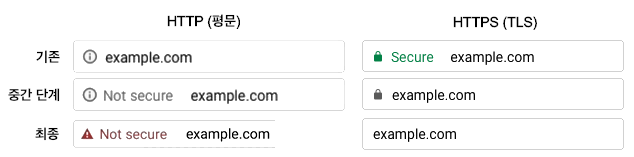
HTTP is the communication protocol used on the internet, particularly the web; HTTPS is its counterpart using the secure TLS channel. In 2018, Firefox and Chrome decided to label HTTP, long the standard way to communicate, as “Not secure.” Chrome went further, deciding to phase out the “Secure” indicator for HTTPS and display those sites normally. The message is clear: a secure TLS channel is no longer exceptional. It is ordinary, expected, and something that should always be used.
TLS is a security protocol designed to let two distant computers communicate safely over an insecure network. From the credentials you enter when logging in to a site to the information you provide when paying online, TLS has quietly protected our important communications. It is now something we take for granted. On August 10 last year, a new version, TLS 1.3, was finally released. Today, let’s explore this now-essential protocol and its latest version.
Understanding TLS
The first part of this article explains why TLS is needed and how it works, for readers who are unfamiliar with it. If you already understand TLS and only want to learn about version 1.3, feel free to skip ahead. Of course, the most precise and detailed way to understand TLS 1.3 is to read RFC 8446.
An Insecure Internet
We need TLS because the way data travels over the internet is not secure. Think of passing a note in class. To reach a friend sitting far away, you need help from classmates in between. Similarly, a client and server are not directly connected: countless routers along the way pass data from one to the next. The problem is that we cannot trust those intermediaries.
TLS Security Goals
What can untrustworthy routers do? Return to that classroom and the answer becomes clear. You probably folded the note before passing it on. That made it easier to pass, but you also hoped the classmates in between would not read it, so you folded the message inward. Folding provided a minimal layer of protection. Unfortunately, your classmates cannot necessarily be trusted.
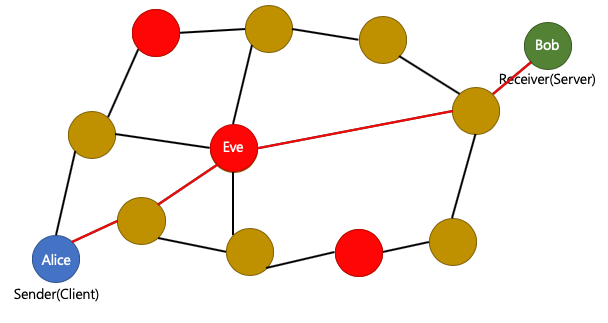
Let’s give everyone a name. Alice, named for A, wants to send a note to her friend Bob, named for B. Between them sits Eve, whose name comes from “eavesdrop,” and she has bad intentions. If the note reaches her, she can open it, reply to Alice while pretending to be Bob, or erase and replace a few words before forwarding it. She could even conspire with the red classmates nearby in case the note does not pass through her hands. This is a man-in-the-middle attack, made possible by untrusted intermediaries. TLS’s goal is now easy to describe: prevent Eve from interfering with the notes Alice and Bob exchange. Eve’s possible attacks fall into three groups.
- Eve can reply to Alice and pretend to be Bob.
- Eve can read the note Alice sends.
- Eve can alter or forge Alice’s note.
We can define three security goals to address these threats.
- Authenticity: Verify that the person exchanging notes with Alice really is Bob.
- Confidentiality: Allow only Alice and Bob to read their notes, keeping Eve out.
- Integrity: Ensure that the note Alice wrote has not been changed.
By meeting these three goals, TLS creates a secure communication channel over the insecure internet.
TLS Cipher Suites
TLS combines cryptographic techniques that address these security goals into cipher suites. The client and server can meet all three goals by selecting an appropriate suite. Each suite has a name to distinguish it, typically structured as follows.
TLS_{key agreement protocol}{authentication method}_WITH_{encryption method}{integrity check method}
For example, TLS_DHE_RSA_WITH_AES_256_CBC_SHA256 uses DHE for key agreement, RSA for authentication, AES_256_CBC for encryption, and SHA256 for integrity checking. As the colors suggest, the authentication method provides authenticity, encryption provides confidentiality, and the integrity check provides integrity.
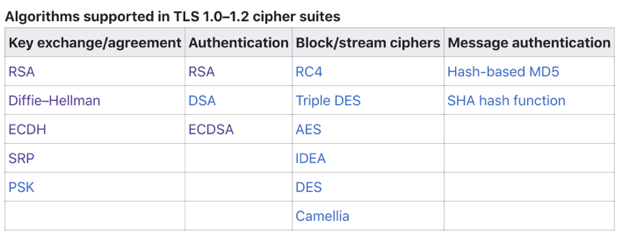
The image above shows Wikipedia’s list of techniques supported by TLS. Combining these elements produces a very large number of cipher suites. For a more detailed list, see Appendix C of the RFC defining TLS 1.2 or IANA’s TLS cipher suite registry.
Cryptographic Primitives
The cipher suites above consist of several components. These small algorithms are called cryptographic primitives: think of them as the Lego bricks that make up a finished model. Examples include symmetric encryption, asymmetric encryption, key agreement protocols, cryptographic hash functions, and message authentication codes. Understanding how they work and which security goals they meet will make TLS easier to understand.
Symmetric Encryption
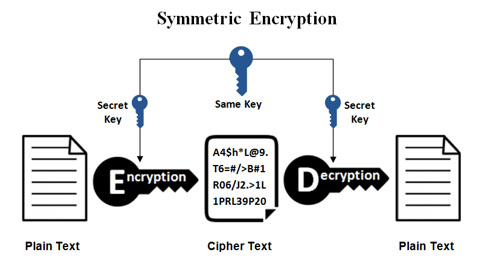
First, a few common terms. The original message is plaintext; its encrypted, unreadable form is ciphertext. Turning plaintext into ciphertext is encryption, and recovering plaintext from ciphertext is decryption. Both involve mathematical techniques and special data called a key. Because the correct key is required for these operations, it must be kept safe—much like the key to a safe.
Symmetric encryption uses the same key to encrypt and decrypt. Alice and Bob can exchange messages securely if they create a shared key and keep it away from Eve. It is fast and provides confidentiality because only someone who knows the key can encrypt or decrypt. If only two people hold it, the key also provides a degree of authenticity. Well-known examples include AES; SEED and ARIA, familiar from Korean digital certificates; and the increasingly prominent ChaCha20. There is one problem, however: how can two distant parties share the same key across an insecure network? We will return to that question under key agreement protocols.
Asymmetric Encryption
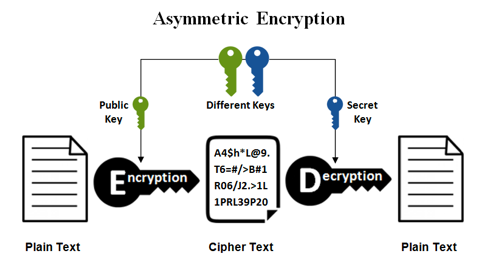
Asymmetric encryption uses different keys for encryption and decryption. The keys form a pair: something encrypted with one can be decrypted only with the other. Usually, one is a private key kept secret and the other is a public key available to anyone. This can provide authenticity by proving possession of the private key corresponding to a public key, and can be used to exchange the session key for actual encryption over an insecure channel. Encrypting with a public key provides one-way confidentiality because only the private key can decrypt it. However, these operations are expensive, so ordinary encrypted communication uses symmetric encryption. RSA and DSA are representative asymmetric techniques.
Digital Certificates
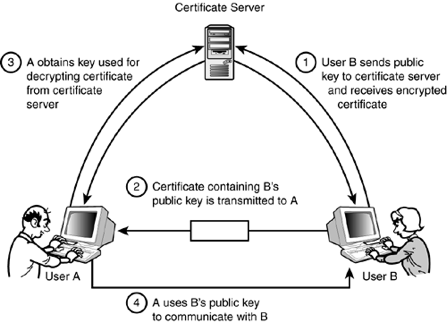
TLS uses digital certificates to authenticate that the other party is the intended recipient. Certificates require asymmetric cryptography and a trusted third party, a certificate authority (CA). Bob first proves his identity to the CA through various means and receives a certificate attesting that his public key belongs to him. He gives this certificate to Alice, who checks that it is valid and issued by a CA she trusts. If so, she encrypts data using Bob’s public key from the certificate and sends it to him. If Bob can decrypt it correctly, he possesses the private key corresponding to the CA-certified public key. This authenticates the party Alice is communicating with as Bob.
Key Agreement Protocols
Symmetric encryption requires a way to exchange keys securely over an insecure network. Algorithms that do this go by names such as key exchange, key agreement, and key establishment. Here, we will call them key agreement protocols. Two main approaches are a protocol based on RSA, the asymmetric technique discussed above, and Diffie–Hellman key agreement.
RSA Key Agreement
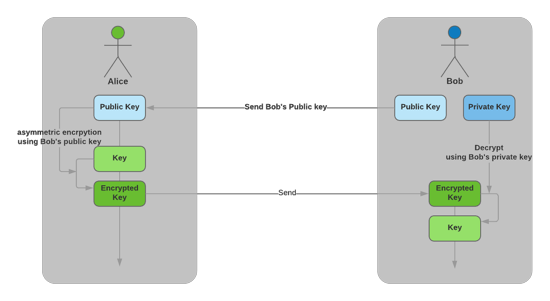
Start with RSA-based key agreement. Because Alice knows Bob’s public key, she creates a session key for their future communication, encrypts it with his public key, and sends it to him. Only Bob has the private key needed to decrypt it, so Eve cannot obtain the session key. Alice and Bob can thus exchange the key securely and establish a secure channel. Yet this apparently safe approach has another security problem.
Forward Secrecy
Without Bob’s private key, Eve decides to record all their traffic. If she ever obtains the key, she can decrypt those recordings to recover the session key Alice sent, then read their conversation. Bob’s private key could indeed be exposed at any time for any number of reasons. One example is the Heartbleed bug (CVE-2014–0160), which made headlines in 2014. This OpenSSL implementation vulnerability lets an attacker retrieve unauthorized data from server memory. Whether through Heartbleed or another route, once Bob’s private key is exposed, even communications from before that exposure are no longer safe. Protecting communications not only now but also against a future private-key compromise is called forward secrecy, or perfect forward secrecy (PFS). The RSA-based protocol we just discussed does not provide it. Let’s turn to a key agreement protocol that does.

Diffie–Hellman–Merkle Key Exchange (DHM, DH)
This remarkable technique is usually called Diffie–Hellman, though some argue for Diffie–Hellman–Merkle to acknowledge Merkle’s contribution of the underlying idea. It allows a session key to be established securely over an insecure channel while providing forward secrecy. The reason is that the session key itself never crosses the network—only clues used to derive it do. The following illustration from Wikipedia makes the idea easier to understand.
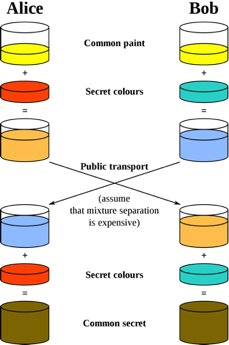
The illustration uses colors as an analogy for keys. Alice and Bob want to create the same color through insecure communication. Assume mixing colors is a one-way function: mixing two colors is easy, but separating the mixture into its original colors is difficult. They publicly choose a base color, yellow here. Alice secretly chooses red; Bob chooses cyan. Rather than send these secret colors, each mixes theirs with yellow and sends the result: orange and blue. Each then mixes the received color with their own secret, producing the same final color. Under our assumption, Eve cannot produce that shared color from yellow, orange, and blue alone. If she later learns either secret color, she could recover the shared color, so Alice and Bob discard their red and cyan secrets when no longer needed. Diffie–Hellman implements this mathematically using a one-way function based on the discrete logarithm problem. Even if Eve records the traffic and later steals Bob’s private key, she still has only the clues and cannot decrypt the conversation. The temporary secrets used to derive the session key have been discarded and cannot be stolen. In short, Diffie–Hellman provides forward secrecy.
Integrity
Cryptographic primitives for data integrity include hash functions and keyed hash functions.
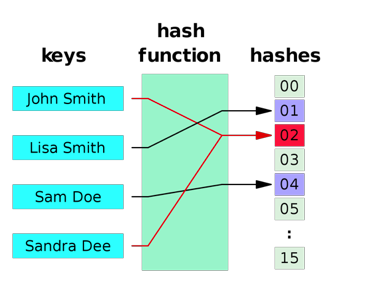
A hash function takes arbitrary data and produces a fixed-length value called a hash. Cryptographic hash functions have additional security properties: it should be difficult to recover the input from its hash, find another input with the same hash as a particular input, or find any two different inputs with the same hash. SHA-256 is a representative function satisfying these conditions. These properties make hashes useful for checking integrity. For example, append a message’s hash before sending it: if the message changes in transit, the mismatched hash reveals the corruption. This does not provide complete integrity protection, however, because Eve can also compute the correct hash of any data. She can forge a message by changing both its content and its hash, leaving Bob unable to tell whether Alice’s message was altered. A keyed hash function solves that problem.
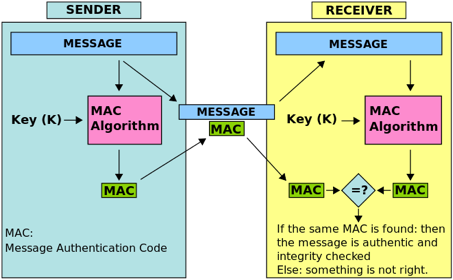
There are several kinds of keyed hash functions; here we will focus on message authentication codes (MACs). A useful way to understand a MAC is as a combination of symmetric-key concepts and hashing. The same message produces different hash values depending on the key. Without that key, Eve cannot change a message and compute the correct replacement value, so she cannot forge or modify it successfully. Alice and Bob share the key and can compute the same value. Because only key holders can produce it, it guarantees the integrity of Alice’s message and also provides a limited form of authenticity by proving possession of the key. Examples include HMAC, CMAC, Poly1305, and SipHash. As an aside, Python 3.x uses SipHash rather than the hash function used in 2.x; changing its key between executions changes dictionary item ordering.
The TLS 1.2 Handshake
We have now covered the primitives that make up a cipher suite. How does TLS put them into place? Before sending actual data, the parties negotiate and prepare a secure channel through a handshake. First, we must identify the other party; negotiating anything else is meaningless without that. Next, we examine the cipher suites both sides support and choose an appropriate one. We then agree on the parameters needed for that suite and generate a session key, completing the TLS channel. Finally, we exchange data through it using encryption and decryption. The following diagram gives a simplified view of the TLS 1.2 handshake.
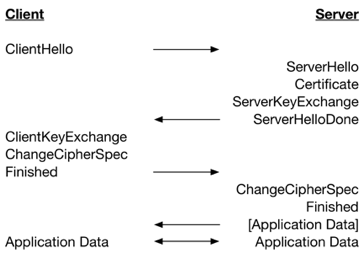
In ClientHello, the client sends its TLS version, supported cipher suites, and related information. The server selects a suite, includes it in ServerHello, and sends that message with its certificate. After validating the certificate, the client creates a session key, encrypts it with the server’s public key, and sends it in ClientKeyExchange. ChangeCipherSpec tells the other party that subsequent messages will be encrypted.
We have covered why TLS is needed, its security goals, the cryptographic building blocks that achieve them, and the TLS 1.2 handshake. Now let’s see what changed in TLS 1.3.
TLS 1.3
TLS 1.3’s improvements fall into three broad categories: speed, simplification, and security.
TLS 1.3: Speed
TLS 1.3 improves speed by reducing round-trip time (RTT). RTT is the time from beginning to send data until beginning to receive the response—the time for a network round trip. TLS needs a handshake to establish a secure channel, and this takes a substantial amount of time. Handshakes cover both first-time connections and reconnections. TLS 1.3 removes one RTT from each compared with its predecessor: an initial connection takes 1-RTT, and reconnections have experimental 0-RTT support.
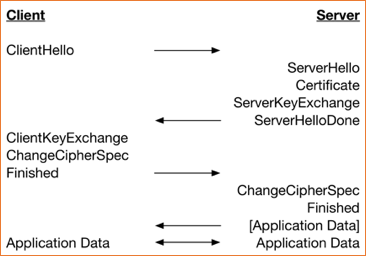
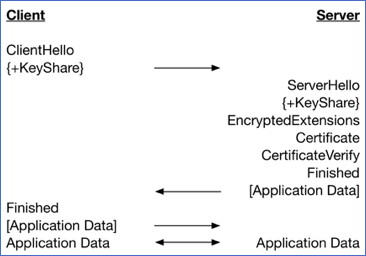
The left diagram shows TLS 1.2; the right shows TLS 1.3. On the left, encrypted application data follows two round trips, client–server–client–server. On the right, Finished and encrypted data travel together after just one client–server round trip.
TLS 1.3: Simplification
Simpler Cipher Suite Management
To reduce the complexity of managing cipher suites, TLS 1.3 separates them into three components that can be combined. The following diagrams illustrate the change.
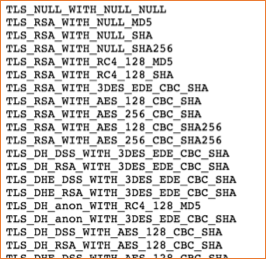
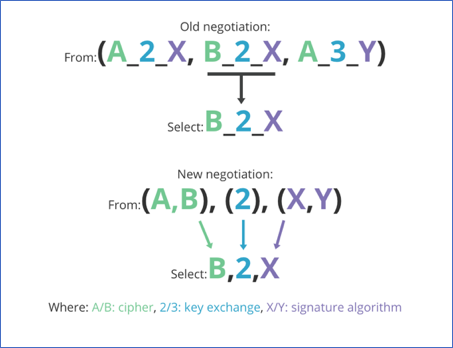
The left shows part of the TLS 1.2 cipher suite list; the right shows TLS 1.3’s composable approach. Previously, every supported combination had to be listed: each suite bundled key agreement, authentication, encryption, and integrity checking under its own code point. This scales poorly. Adding a new key agreement protocol requires many new entries for its combinations with everything else. The right-hand approach separates encryption, key agreement, and authentication. A new key agreement protocol needs only a new entry in the middle group; the other combinations become available automatically. For example, TLS_ECDHE_ECDSA_WITH_CHACHA20_POLY1305_SHA256 previously had code 0xCCA9. In TLS 1.3, it can be represented by the combination <TLS_CHACHA20_POLY1305_SHA256(0x1303), x25519(0x001D), ecdsa_secp521r1_sha512(0x0603)>.
TLS 1.3: Security
Through TLS 1.2, many legacy features remained for compatibility, but their age eventually made some security liabilities. TLS 1.3 strengthens security by removing and consolidating many features supported in 1.2. Its choices appear to favor stronger key lengths (256-bit), elliptic-curve cryptography that delivers stronger security with shorter keys, and forward secrecy to protect communications in the future. Let’s examine the changes by category.
Key Agreement with Forward Secrecy in Mind
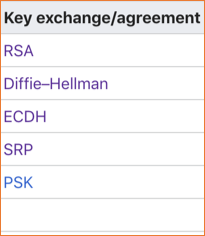
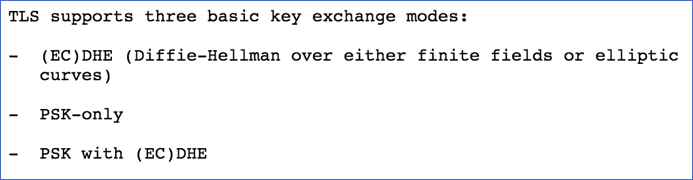
The left lists the key agreement protocols supported in TLS 1.2; the right lists those in TLS 1.3. Techniques such as RSA, which do not guarantee forward secrecy, were removed. Only (EC)DHE, PSK-only, and PSK with (EC)DHE remain. PSK means pre-shared key: a key shared beforehand through a secure method. Strictly speaking, PSK alone does not provide forward secrecy. To combine PSK with forward secrecy, use PSK with (EC)DHE.
Only Strong Signature Algorithms Remain
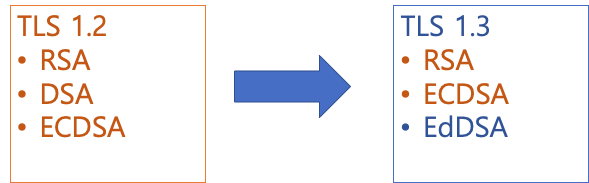
Signature algorithms changed too. TLS 1.2 supported RSA, the Digital Signature Algorithm (DSA), and the Elliptic Curve Digital Signature Algorithm (ECDSA). DSA, which imposed a short 1024-bit key compared with RSA’s support for 2048-bit keys, was removed in TLS 1.3. EdDSA was added, using a newer type of elliptic curve, the Edwards curve, regarded as secure.
Only AEAD Cipher Suites Remain
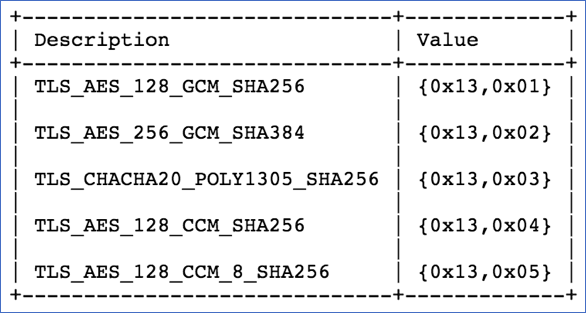
TLS 1.3 changes what a cipher suite means. As discussed under simplification, a TLS 1.2 suite bundled all the primitives needed for a secure channel: key agreement, authentication, encryption, and integrity checking. In TLS 1.3, key agreement and authentication are separate, so the suite covers encryption and integrity checking. The image above lists TLS 1.3’s suites. The many old suites were removed and five new ones defined, named in the form “TLS_AEAD_hash function.” The hash function is used for key generation and is SHA256 or stronger. But what is AEAD?
Authenticated Encryption with Associated Data (AEAD)
The full name is long, so we will use AEAD. It begins with authenticated encryption (AE). Encryption and integrity checking used to be separate, creating a small but important question: in what order should they be applied? Should we encrypt and authenticate separately, then combine the results (Encrypt-and-MAC), encrypt before authenticating (Encrypt-then-MAC), or authenticate before encrypting (MAC-then-Encrypt)? Opinions differed. Some approaches proved vulnerable; others were sound in principle but vulnerable to implementation mistakes. Authenticated encryption removes this confusion by implementing encryption and authentication correctly inside one construction, making it simpler to use. Associated data (AD) needs integrity protection but need not—or must not—be encrypted. Packet headers, for example, must remain readable but protected against forgery. Supply them as associated data to AEAD, and anyone can read them while modifications can still be detected. Common examples include AES_GCM and CHACHA20_POLY1305.
Authenticating the Entire Handshake
Because TLS 1.2 supported many old techniques, it was susceptible to downgrade attacks such as FREAK, where an intermediary forces the use of an outdated, weak technique. To prevent header manipulation from causing such downgrades, TLS 1.3 adds authentication of the received data, including the very first handshake packet, ClientHello.
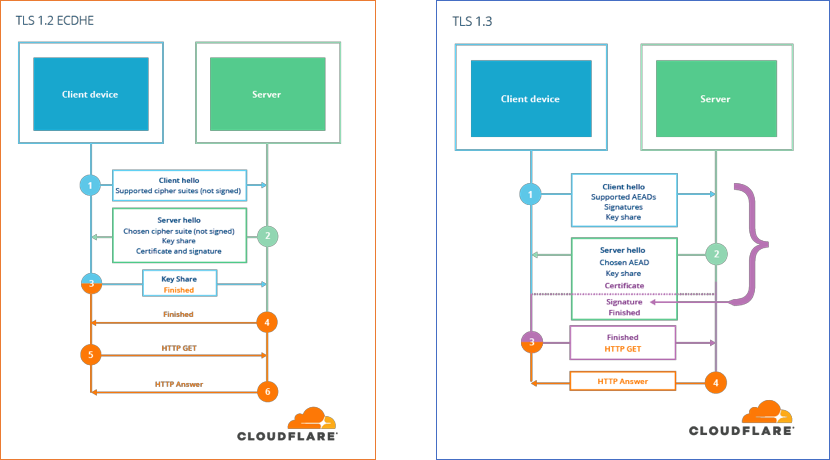
As shown above, TLS 1.2 lacks this authentication of ClientHello, so Eve can alter the header to allow only weak ciphers without either side noticing. In TLS 1.3, the server generates a signature over ClientHello and sends it to the client with ServerHello. The client compares the server’s signature against the data it sent to check that the server received it unchanged.
Encryption Starts Earlier
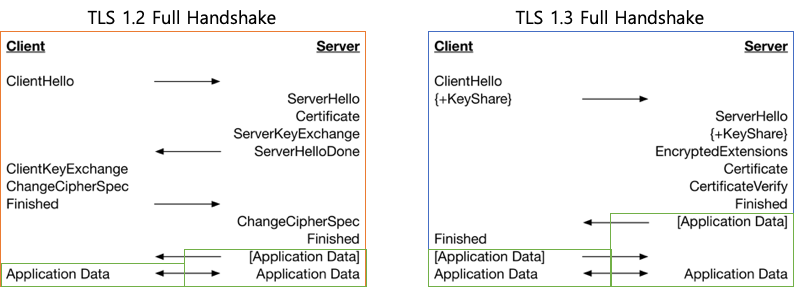
Compared with TLS 1.2, TLS 1.3 reduces the handshake to 1-RTT. It also allows the server to send encrypted application data beginning with its first response, ServerHello.
A Smaller Set of Elliptic Curves
Elliptic-curve cryptography has attracted considerable attention. It defines mathematical operations on special sets called elliptic curves and builds cryptographic techniques on top of them, using a form of the discrete logarithm problem. Compared with RSA, which relies on the difficulty of integer factorization, it provides stronger security per key bit and faster operations. For example, a 256-bit elliptic-curve key offers substantially stronger security than a 2048-bit RSA key, with operations twenty times faster. Choosing a secure elliptic curve is therefore important. The following image lists curves supported by TLS 1.2 and TLS 1.3.
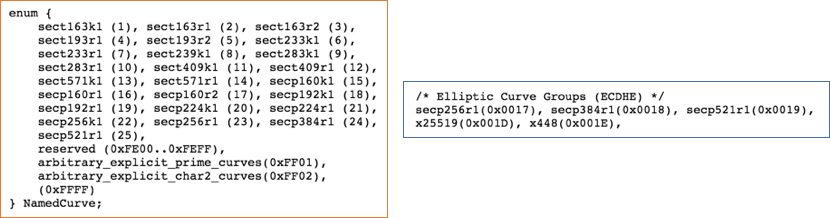
Most of the previously available curves were removed, leaving only a small selection considered secure.
A Brief History of TLS
With that overview in place, let’s briefly look at TLS’s history. Its roots go back to 1994. Netscape, then a leader in web technology, recognized the need for a secure protocol for online payments and introduced Secure Socket Layer (SSL), TLS’s predecessor. As the IETF standardized it internationally, SSL received a new name: Transport Layer Security, or TLS. Its evolution can be viewed as a long battle against security vulnerabilities. The following timeline gives an overview: orange marks vulnerabilities and blue marks SSL/TLS versions. Many vulnerabilities were disclosed after TLS 1.2—the version still most widely used on the internet and discussed above—was released in 2008. In 2014, experts decided they could no longer leave these issues unaddressed and began preparing TLS 1.3. Four years later, in 2018, the new version was finalized.
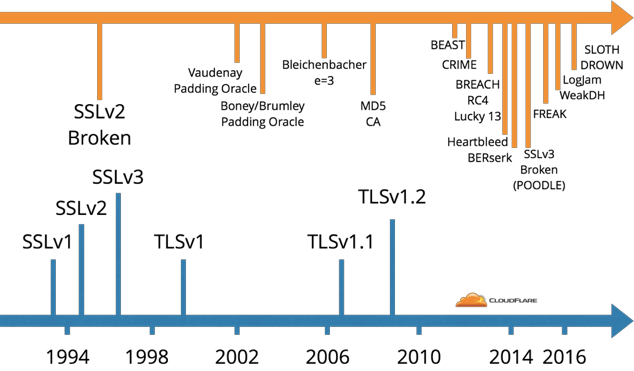
Why Did TLS 1.3 Take So Long?
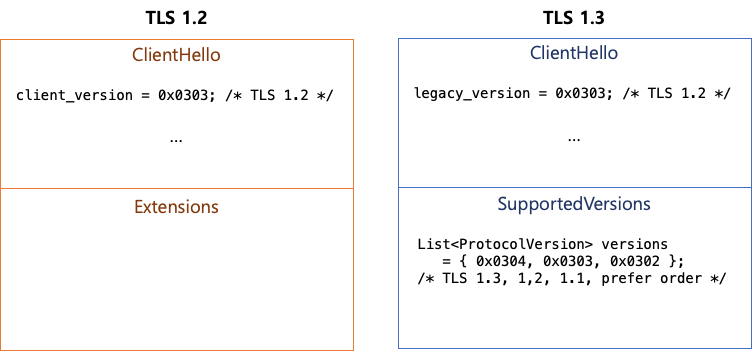
TLS 1.3 took four years because of backward compatibility. The internet includes not only computers but countless routers, firewalls, and other middleboxes. Some implemented TLS incorrectly and could not handle the new version. Putting 0x0304, the value for TLS 1.3, in the header caused them to treat it as an invalid packet or an attack, or otherwise malfunction, because they had never seen that version. To work around this, TLS 1.3 uses the same value as TLS 1.2 in the legacy version field and lists supported versions in a new SupportedVersions extension. This interesting Cloudflare article explains why this change was necessary.
Can We Use TLS 1.3 Today?
Now that we have explored TLS and version 1.3, it is time to use it. Let’s check browser and library support and briefly look at how to test whether a server is configured correctly for TLS 1.3.
Browser Support for TLS 1.3
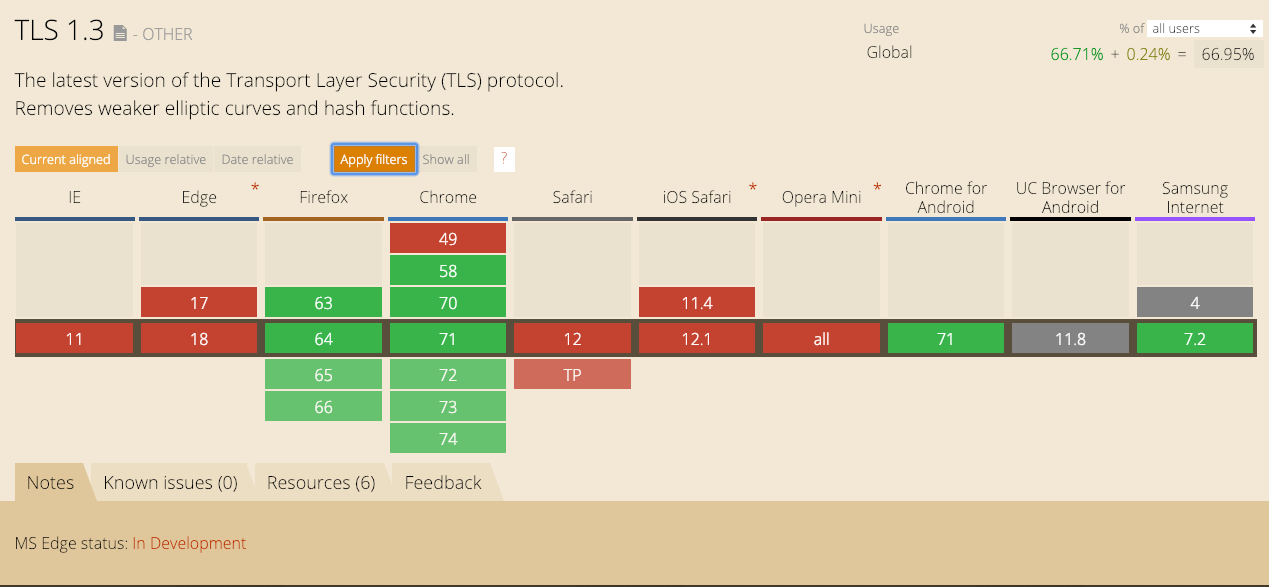
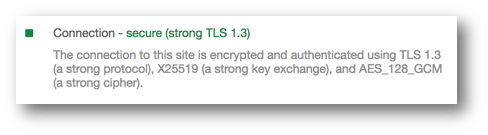
Among major browsers, as of January 2019 only Firefox, Chrome, and Samsung Internet support TLS 1.3. IE, Edge, Safari, and Opera do not yet support it. In Chrome, enable the TLS 1.3 flag at chrome://flags. After enabling it and connecting to a server that supports TLS 1.3, you can confirm its use as shown below.
TLS Library Support
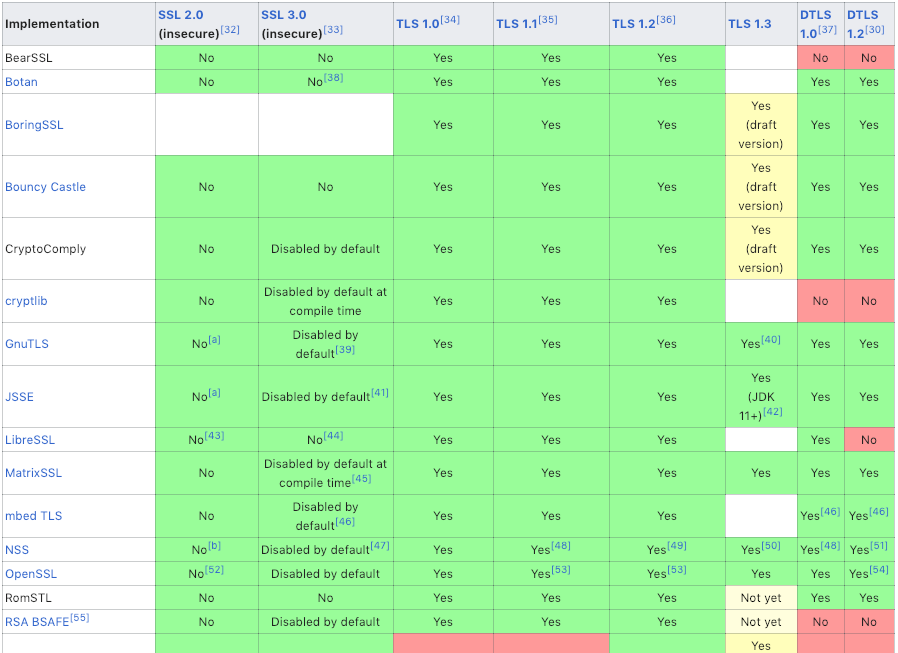
The following image lists major TLS libraries from Wikipedia. Compared with last September, when I first prepared my presentation, many more libraries now support TLS 1.3.
HTTP Server Support
First, use OpenSSL 1.1.1, which supports TLS 1.3. Apache2 supports it from 2.4.36 and nginx from 1.13.0. Go 1.12, the version adding TLS 1.3, is still in beta as of February 2019, so Caddy, which is built on Go, has not yet officially released a supporting version. To use TLS 1.3 in Caddy, build Go 1.12-beta yourself and apply the patch suggested in this comment on Caddy’s TLS 1.3 issue.
Testing TLS 1.3
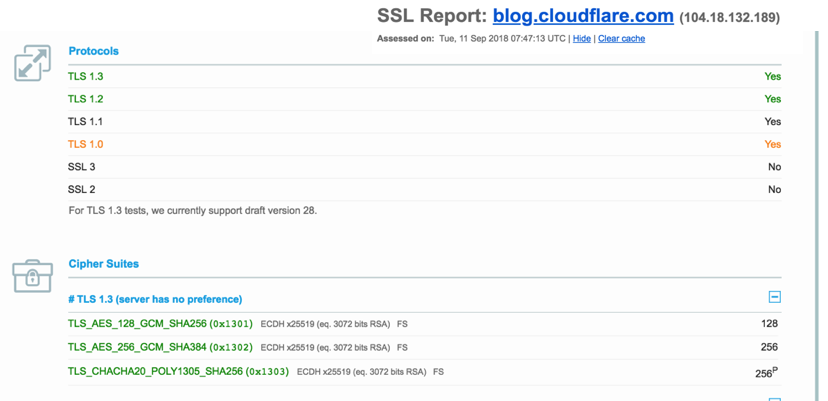
Use SSL Labs’ test to check whether a server supports TLS 1.3. The screenshot below shows the result for Cloudflare’s blog, which supports it.
DJB
Looking at the changes chosen for TLS 1.3, we cannot leave out DJB: cryptographer Daniel Julius Bernstein. A few of his notable achievements are:
- Sued the United States government over restrictions on exporting cryptographic technology.
- Co-developed SipHash to prevent DDoS attacks against hash functions; it is used in Python 3.x and elsewhere.
- Proposed Curve25519, a secure, fast elliptic curve used by default in OpenSSH.
- Developed ed25519, a secure, fast signature algorithm added to TLS 1.3.
- Developed ChaCha20, a symmetric cipher faster than AES particularly on mobile devices, used in Chrome and TLS 1.3.
- Developed Poly1305, a MAC with an IV, used in TLS 1.3.
Closing Thoughts
We have explored why TLS is needed, the security goals it aims to provide, and the techniques it uses to meet them. We briefly examined the TLS 1.2 handshake and the many changes introduced in TLS 1.3. TLS 1.3 is designed to make secure techniques safe to use and to work well on today’s internet. TLS may now be something we take for granted, but it can still feel vague and difficult. I hope this article has made it more approachable. As more people understand and use TLS and its latest version, TLS 1.3, I hope the internet becomes safer.
Note: I reordered, omitted, and added material from the presentation to make it read naturally as an article.
Sources Used for the Slides and Article
Browsers Marking HTTP as “Not Secure” — Chrome
- Emily Schechter. 2018. A milestone for Chrome security: marking HTTP as “not secure”
- Emily Schechter. 2018. Evolving Chrome’s security indicators
Firefox
TLS
- RFC2246: T. Dierks. 1999. The TLS Protocol Version 1.0
- RFC5246: T. Dierks. 2008. The Transport Layer Security (TLS) Protocol Version 1.2
- Agathoklis Prodromou. 2017. TLS/SSL Explained — A brief history of TLS/SSL, Part 2
- Nick Sullivan. 2016. Introducing CFSSL 1.2
- Dokydoky. 2018. HTTPS — 2. HTTPS Cipher Suites, Handshake, and Key Derivation
- IANA. 2005–2018. Transport Layer Security (TLS) Parameters
TLS 1.3
- RFC8446: E. Rescorla. 2018. The Transport Layer Security (TLS) Protocol Version 1.3
- Jay Thakkar. 2018. The IETF has FINALLY published TLS 1.3 as RFC 8446
- WolfSSL. 2018. TLS 1.3 Performance Part 2 — Full Handshake
- Filippo Valsorda. 2016. An overview of TLS 1.3 and Q&A
- Nick Sullivan. 2017. Why TLS 1.3 isn’t in browsers yet
- Nick Sullivan. 2018. A Detailed Look at RFC 8446 (a.k.a. TLS 1.3)
Cryptographic Primitives
- SSL2Buy. Symmetric vs. Asymmetric Encryption — What are differences?
- Tim Taubert. 2016. THE EVOLUTION OF SIGNATURES IN TLS — Signature algorithms and schemes in TLS 1.0–1.3
- Cipher suite, Wikipedia
- Diffie–Hellman key exchange, Wikipedia
- Hash function, Wikipedia
- Authenticated encryption, Wikipedia
- EdDSA, Wikipedia
ChaCha
- Elie Bursztein. 2014. Speeding up and strengthening HTTPS connections for Chrome on Android
- Nick Sullivan. 2015. Do the ChaCha: better mobile performance with cryptography
- Vlad Krasnov. 2016. It takes two to ChaCha (Poly)
Elliptic-Curve Cryptography
- Andrea Corbellini. 2015. Elliptic Curve Cryptography: a gentle introduction
- Andrea Corbellini. 2015. Elliptic Curve Cryptography: breaking security and a comparison with RSA
- Kelly Bresnahan. 2016. Elliptic Curve Cryptography
- RFC4492: S. Blake-Wilson, et al. 2006. Elliptic Curve Cryptography (ECC) Cipher Suites for Transport Layer Security (TLS)
- RFC8422: Y. Nir. 2018. Elliptic Curve Cryptography (ECC) Cipher Suites for Transport Layer Security (TLS) Versions 1.2 and Earlier
- Curve25519, Wikipedia
TLS 1.3 Support
- Apache: Changes with Apache 2.4.36
- Nginx: Change Log v1.14
- Go: Issue — crypto/tls: add support for TLS 1.3
- Caddy: Issue — TLS 1.3
DJB
- Jesse Victors. 2016. TLS 1.3 and the future of cryptographic protocols
- Daniel J. Bernstein, Wikipedia
- Bernstein v. United States, Wikipedia
RFC Standards
- RFC2246: T. Dierks. 1999. The TLS Protocol Version 1.0
- RFC5246: T. Dierks. 2008. The Transport Layer Security (TLS) Protocol Version 1.2
- RFC8446: E. Rescorla. 2018. The Transport Layer Security (TLS) Protocol Version 1.3
- RFC4492: S. Blake-Wilson, et al. 2006. Elliptic Curve Cryptography (ECC) Cipher Suites for Transport Layer Security (TLS)
- RFC8422: Y. Nir. 2018. Elliptic Curve Cryptography (ECC) Cipher Suites for Transport Layer Security (TLS) Versions 1.2 and Earlier
Other Resources
- Transport Layer Security, Wikipedia
- The Heartbleed Bug
- Elie Bursztein. 2017. Understanding the prevalence of web traffic interception
- Sealpath. Protecting the three states of data
- Jean-Philippe Aumasson, translated into Korean by Ryu Gwang, 2018, Serious Cryptography, Hanbit Media