AI-translated. Read the original in KoreanEmbedded slides, videos and images remain in their original language.
Redesigning Business Systems with AI: Building a CRM to Replace Salesforce

Server Engineer, Ad Management
0. What it means to build a new CRM
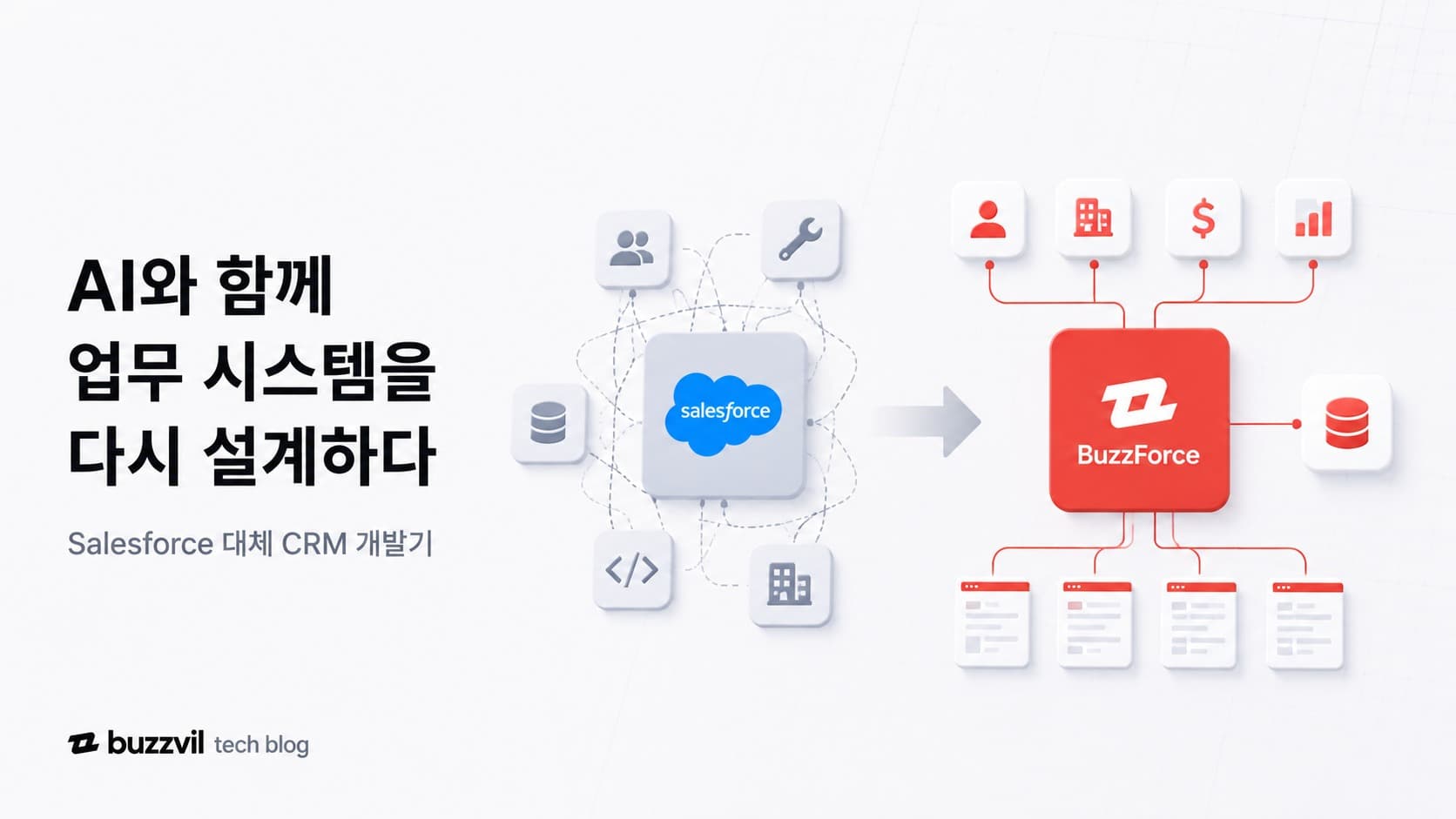
Hello, I’m Frank, Youngmin Koh, a backend engineer in the Ad Management team. I’d like to share our journey from the first discussion about replacing Salesforce in March to moving real work into our in-house CRM, BuzzForce, in June.
Buzzvil ran a long chain of work on Salesforce: acquiring marketing leads, managing the sales pipeline, operating campaigns, and settling payments based on performance. The way people worked kept changing, but customizing an external CRM and integrating it with internal systems increasingly became a bottleneck. BuzzForce was about more than replacing Salesforce. It was about changing and improving how each person worked.
Within a limited schedule, we had to distinguish the workflows worth keeping from the inefficiencies worth fixing. Our design needed to remain backward-compatible with historical data while improving visibility and consistency. And because we were moving an active business system, we had to prepare a safe data migration and a deployment without downtime.
This article covers how we built the case and design foundation for leaving Salesforce, how we divided implementation work with AI, and what BuzzForce brought to Buzzvil after the transition.
1. Where Salesforce was slowing us down
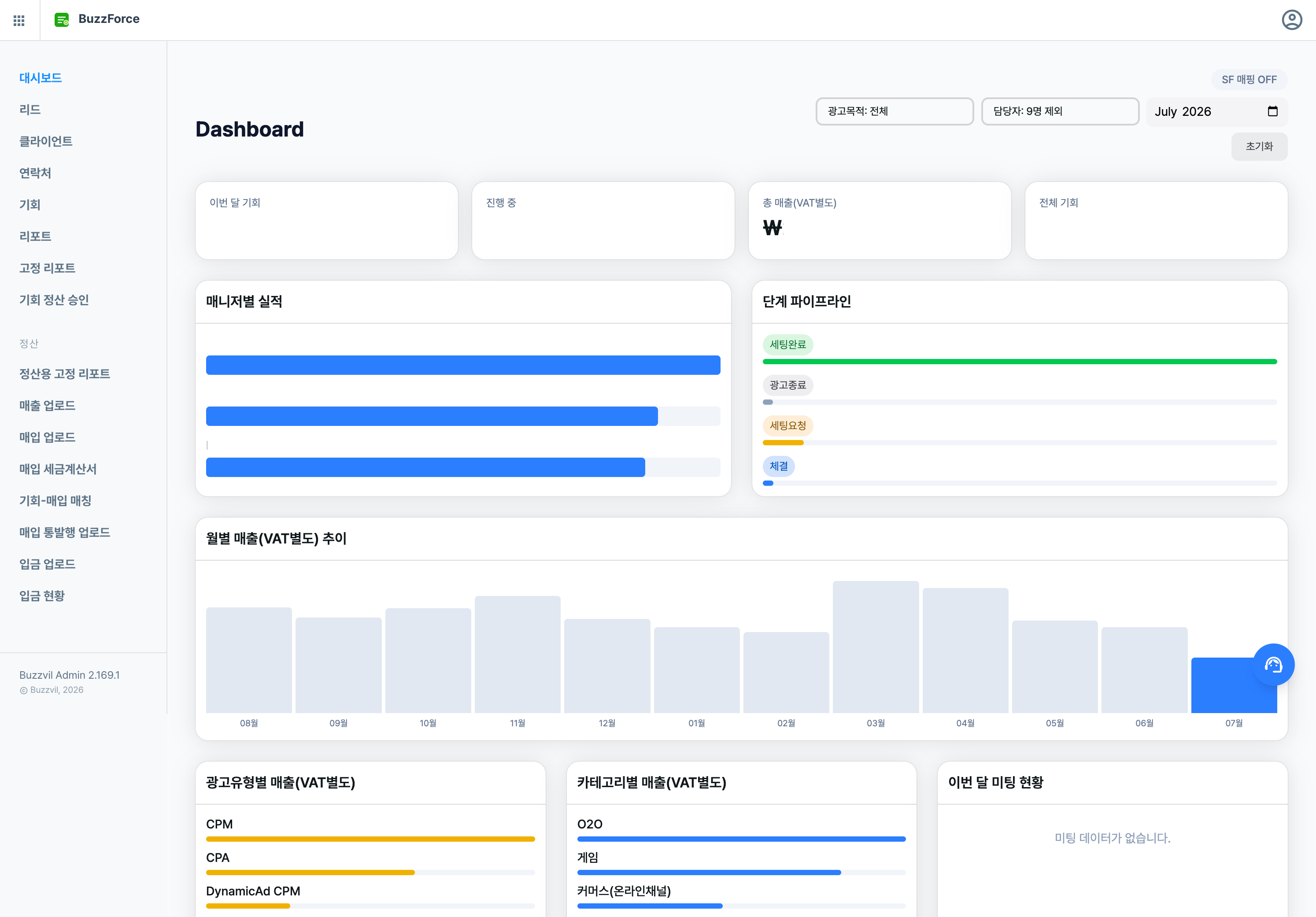
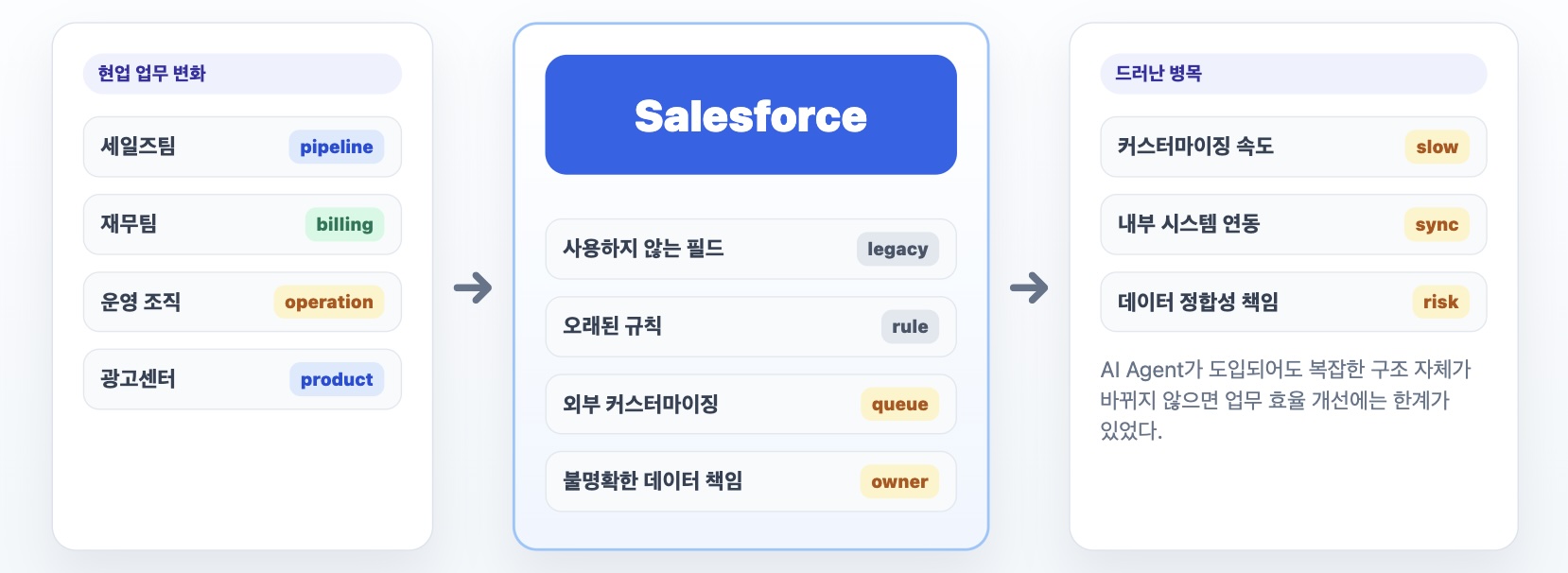
Buzzvil had used Salesforce for more than ten years. During that time, both the teams using it and their ways of working had changed completely. Yet customization still required an outside vendor, and there was no longer a dedicated Salesforce team. Above all, nobody owned a full understanding of the data structure and its continuous improvement. Unused fields and rules had become tangled together. Both Sales and Finance had learned to work around the friction.
When we launched Ad Center, Buzzvil’s self-service platform, we automated integration between Salesforce and our backend systems. Understanding Salesforce’s data model and query patterns took resources, and keeping Ad Center, the ad operations system, and Salesforce consistent was difficult. Atomic transactions were effectively impossible. Whenever an API token became invalid for an unexpected reason, rotating secrets and backfilling data took a long time.
Even after AI agents entered our workflow, Salesforce’s inefficiencies remained a bottleneck, limiting the improvement in overall productivity. The operations teams who used it and the product teams who built on it arrived at the same conclusion: “Let’s build it ourselves.”
Four months before the July license renewal, we began discussing a plan to remove Salesforce and save approximately KRW 100 million in licensing costs.
2. Reducing uncertainty in AI transformation: an ERD and a PoC
We could not simply conclude, “Then let’s build it.” Salesforce’s costs and inefficiencies were clear, but committing to an in-house CRM would be hard to reverse. Once we moved, maintenance, incident response, feature improvements, and data consistency would all become our responsibility.
Development capacity was another concern. Without a dedicated product team, we would have to use AI agents for design and frontend implementation while continuing our existing work and OKRs. At the same time, we would be building a new system for the whole company.
To reduce uncertainty and turn doubts about success into actionable feedback, we set an ERD and a PoC as our first milestones.
An entity-relationship diagram, or ERD, visualizes what data each entity holds and how the entities relate. It let us explain whether BuzzForce’s model could represent Salesforce’s key data and remain flexible enough for future changes.
In particular, we used an AI agent to create an interactive ERD. Clicking an entity highlighted its characteristics, and business scenarios showed which entities participated in each workflow. The diagram turned a vague concern—“Will we run into trouble because our product is too different from a standard CRM?”—into concrete questions such as “Why does BuzzForce store this Salesforce data this way?”
The ERD below is interactive. Click an entity to highlight its relationships, or use the scenario tabs to see which entities participate in each business workflow.
After sharing the ERD, we agreed to build a proof of concept by the end of April, demonstrate it to actual users, and use their feedback to decide whether to complete the transition.
3. What was Salesforce actually doing?
Salesforce is almost synonymous with CRM and sales management, but at Buzzvil it did much more.
At the start of the pipeline, the MC (Marketing & Communication) team ran campaigns in the marketing tool Pardot, strategically acquired leads, and passed them to Sales. The sales team proposed new advertising campaigns in meetings with those new leads or existing clients. Each potential deal was called an Opportunity.
An Opportunity covered the entire advertising sales cycle: proposal, contract, ad operations, and final settlement. After a campaign finished, Finance matched sales and purchase tax invoices to the Opportunity, recording what Buzzvil would receive from the advertiser and what it owed the agency. Settlement had many edge cases, which already generated considerable inefficient communication between Sales and Finance.
We also needed flexible reporting around Opportunities and clients to understand sales performance and make decisions.
In other words, Salesforce handled CRM, marketing, sales reporting, and settlement. Building BuzzForce required us to understand each user’s needs, current workflow, and desired improvements.
4. Form hypotheses with AI, then validate them in interviews
I had never used Salesforce in my own work. Understanding the meaning of each field, its validation rules, and which values users entered versus those calculated automatically was difficult. I used an AI agent to analyze patterns in Salesforce data and work backward to uncover relationships and hidden business rules.
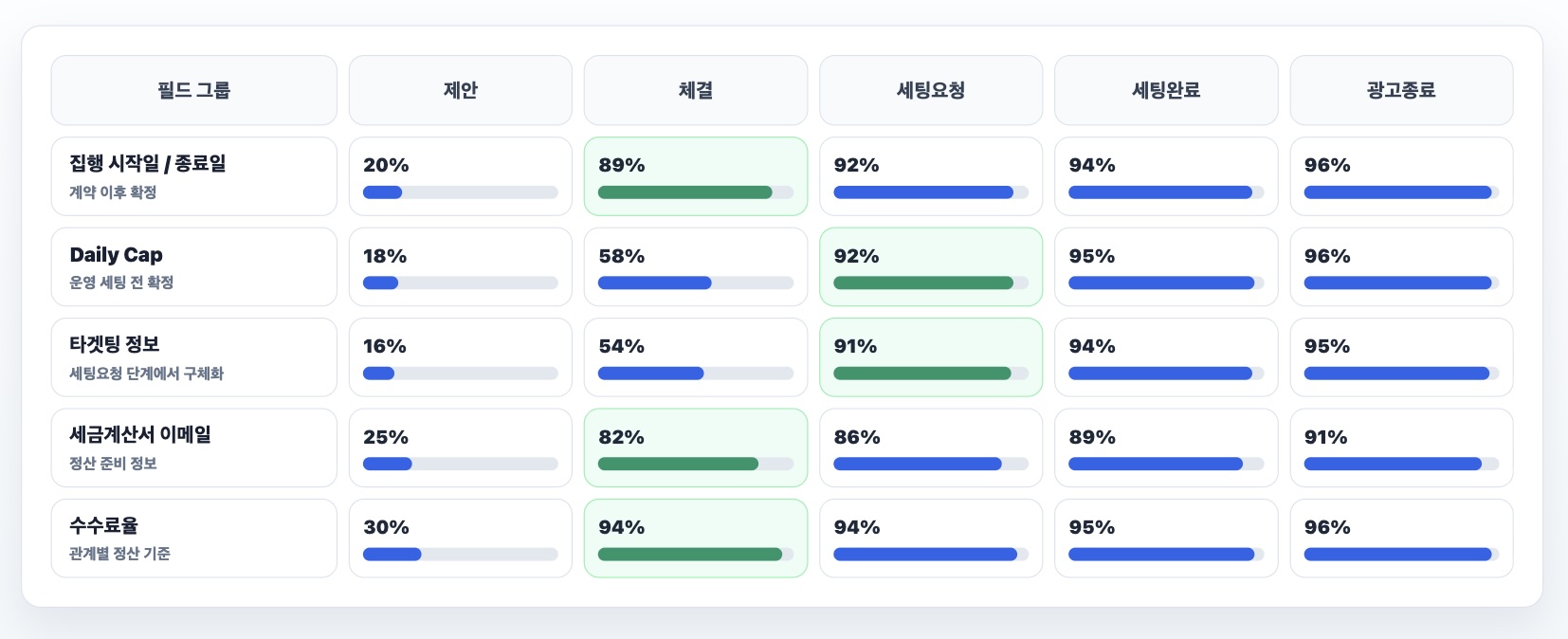
For example, when an Opportunity moved to the contracted stage, the completion rate for campaign start and end dates rose from 20% to 89%. At the setup-request stage, Daily Cap and targeting fields were more than 90% complete. These findings translated directly into validation rules for stage changes in BuzzForce.
We found settlement rules in a similar way. Some agencies ran dozens or hundreds of ads each month and issued one consolidated tax invoice, which had to be allocated across multiple Opportunities. For migration, we created a fallback rule that distributed the amount according to each Opportunity’s commission-rate proportion. This explained most of the historical data. The analysis also led us to introduce a separate OppBilling entity.
The operations team used Salesforce but had not designed it. Interviews alone would probably have struggled to uncover these rules. Insights extracted from the data with AI could feed directly into product design.
But data could not explain everything. Could a stage move backward? In what order did Sales actually enter information across screens? How did Finance decide what to do with exceptional cases? Those use cases could not be inferred from data analysis alone.
I therefore interviewed Sales, MC, and Finance directly. I asked Sales about the real flow from proposal through contract to setup request. I asked MC how they decided when to pass Pardot leads to Sales. I asked Finance in what order they checked sales invoices, purchase invoices, and payment records, and when manual judgment was needed.
AI quickly analyzed the Salesforce database schema and sample data to surface field-completion rates and anomalies. This was useful for forming hypotheses—“This field seems to become final at this stage”—and drafting interview questions. But validating those hypotheses with users, deciding which rules belonged in the product, and explaining the decisions in terms stakeholders could accept remained human work.
AI accelerated analysis. Communication was still necessary to check it against real work and turn it into a clear product responsibility.
5. Redesigning the data behind the screens
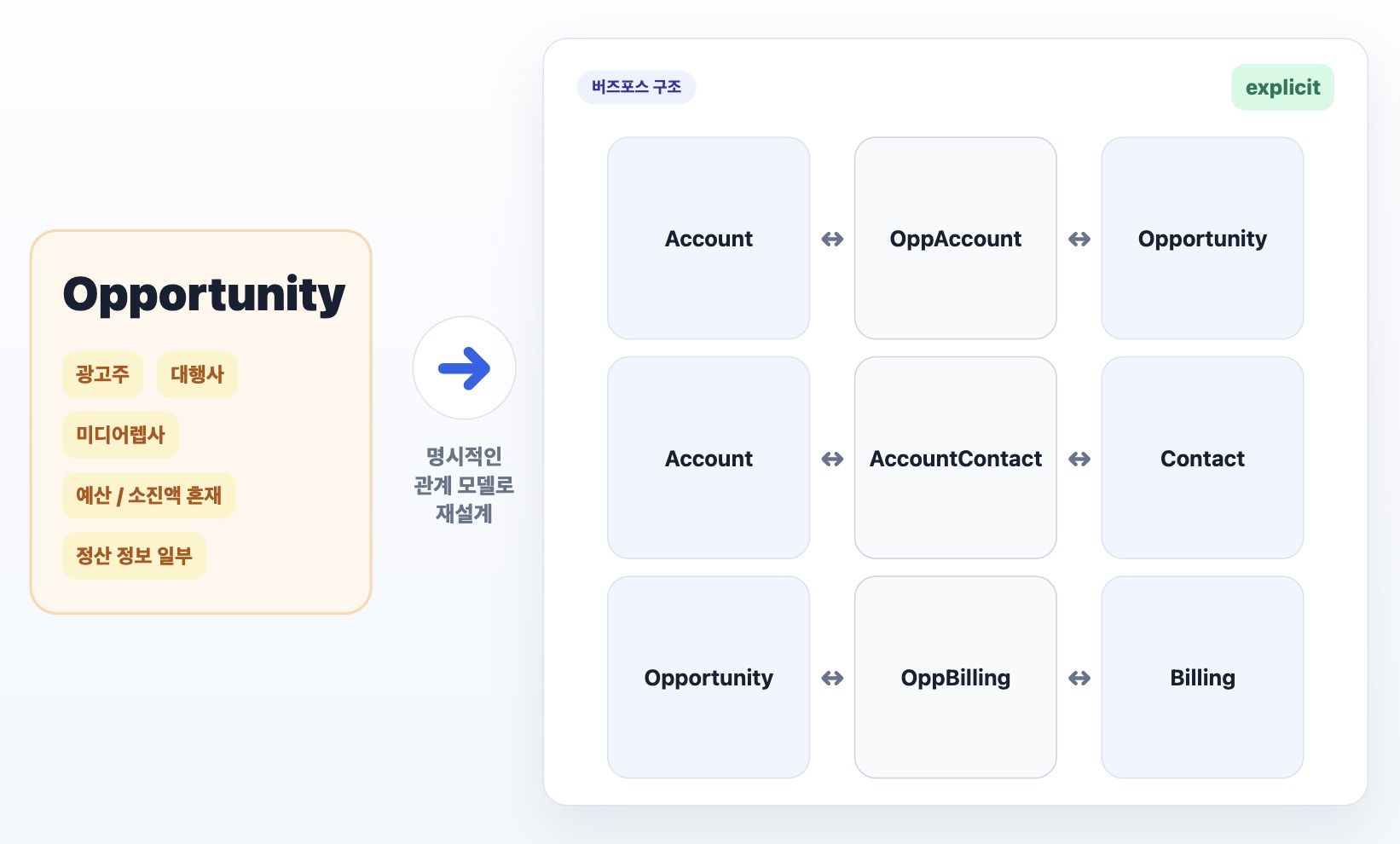
In Salesforce, a single field sometimes carried several meanings, creating a persistent risk of data loss. For example, the “budget” proposed to an advertiser was not distinguished from actual campaign “spend.” To find an Opportunity’s unspent proportion, users also had to check the ad operations platform. We designed BuzzForce’s data model around explicitness to address these longstanding problems.
The relationship between Opportunities and clients is a good example. An advertising Opportunity can involve an advertiser, an agency, and a media representative. Salesforce stored all related clients as fields on the Opportunity table, losing information when more than three clients participated. BuzzForce separates these relationships into an OppAccount table. One Opportunity can connect to multiple clients, each relationship carrying a role such as advertiser, agency, or media_rep, along with a commission rate. This gives us an explicit basis for finding settlement recipients and aggregating reports by advertiser, agency, or media representative.
The same applied to clients and contacts. In practice, one person can be associated with several advertisers or agencies. Clear relationships reduce human error when recording activities or issuing tax invoices. Rather than tie a contact to one client, we introduced an AccountContact join table. It represents an N:M relationship and stores details such as role, is_primary, and is_active.
For settlement, OppBilling was central. When an agency running dozens or hundreds of campaigns issued a single consolidated tax invoice, we needed to distribute and match the amount across Opportunities. A long-running campaign could also go through settlement several times. OppBilling establishes an N:M relationship between Opportunity and Billing, with an allocated amount per Opportunity where needed.
We made extensive use of relationship tables so that every required edge case could be recorded and analyzed without losing data.
6. The bottleneck in AI development was the feedback loop
I had no substantial frontend development experience. I had made small features and bug fixes in frontend repositories, but BuzzForce was my first time building a frontend from A to Z with agents. Since I joined Buzzvil in December 2024, agents had been improving at an accelerating pace. Even before launch, implementing functionality itself was rarely the bottleneck, apart from the highly flexible reporting feature. As the project progressed, the bottleneck became validating and revising the output rather than writing code.
The most dangerous misconception was assuming that because AI could produce a screen quickly, it could also replace the role of a frontend engineer. A frontend colleague would ask questions after implementation: “This is a bulk operation—shouldn’t we have more than a single-item modal?” or “This 4XX error toast is unhelpful; how will users understand what happened?” The agent quickly solved the problem I supplied, but it did not hold on to the product context and run its own feedback loop. Because we had decided to switch directly, without a dual-write period, partly for data-consistency reasons, BuzzForce had to be ready for users to complete their work.
My current team has no QA engineer, so I was accustomed to testing my own features. But BuzzForce’s QA scope was broad, and I did not understand every business context at the outset. That made testing difficult. I began requiring agents to produce test data and an HTML QA guide alongside every implementation task.
Agents had access to the staging database, allowing them to select suitable existing records or create the data needed to test a feature. The QA guide helped me stay focused while developing several features simultaneously. It also became an interface outside the CLI for giving instructions such as “This feature needs to change this way” or “Create data for this edge case.”
Once users began working in the launched product, questions and bugs kept arriving. We had to repeat diagnosis, fixes, and testing quickly. I ran several agents concurrently to handle issues in parallel. Fast development iteration became fast operational iteration after launch.
A new bottleneck emerged: my own context-switching cost. When several agents produced results simultaneously, I had to recall the background of each task, judge whether the result was right, and give the next instruction. It felt like a CPU spending more time switching contexts than doing actual computation. The mental load was substantial too.
For a similar project in future, I plan to build a framework that lets agents run more of the feedback loop themselves: checking user scenarios, acceptance criteria, and test data. I came to feel that the next bottleneck in AI development is not faster coding but how independently the feedback loop can run.
* I often use the STICC Framework when assigning work to AI agents. Describing a task through Situation, Task, Intent, Concern, and Calibration produces much more complete results than a vague prompt. Prompt engineering may already feel like a thing of the past, but conveying the implicit knowledge in my head to an agent still matters. Working through STICC has often revealed edge cases I had not considered. My Buzzvil colleague Lucas introduced it to me—thank you.
7. What BuzzForce left us with
BuzzForce convinced me that questioning everything is an important habit in the age of AI transformation. With AI, an individual can carry through work that would once have been difficult even to begin. The starting question should therefore be: “What have we treated as so obvious that we never questioned it?”
Once the question is asked, dividing work with AI makes completion possible. AI can handle rapid implementation and repetition and help with human context switching. People must communicate domain knowledge in a form agents can understand and discover real user needs through interviews. Persuading the people around us and moving the project forward remains a human responsibility too.
BuzzForce officially launched on June 15, after which work moved over. Sales and Finance now perform their existing work without Salesforce. Reporting improvements, integration with the existing ad operations system, feature enhancements, and bug fixes continue. As of early July, settlement for ads run in June is also taking place in BuzzForce.
We have not yet conducted a formal satisfaction survey or quantitative analysis, but an interesting difference emerged in support channels and user feedback. Sales tended to say, “We can continue our existing work without problems.” Finance more clearly said, “Our work has become much more efficient.”
I think the difference comes from how the teams use the product. Most Sales features and menus are organized around data and entities. After meeting an advertiser, a salesperson creates a client and an Opportunity. As emails and meetings establish the campaign schedule, they update its stage; ad operations then uses the Opportunity to run the campaign. For Sales, BuzzForce largely records and retrieves events that happen outside it.
Finance, in contrast, uses BuzzForce around actions and use cases: “Match a purchase tax invoice to an Opportunity” or “Upload a sales tax invoice.” Their work is less about creating new data than connecting and validating data scattered across systems and documents. In Salesforce, these use cases were spread around Opportunity detail pages, creating considerable friction. In BuzzForce, we gave each use case its own page and URL and added automation.
This difference showed me how much satisfaction with a business system depends on the unit of work we turn into a product. People feel the change more strongly when they can complete more work inside the platform, connect naturally to work outside it, and understand and carry out their work as use cases. I think non-engineers will also find it easier to improve their work with agents if they can define it in use-case terms.
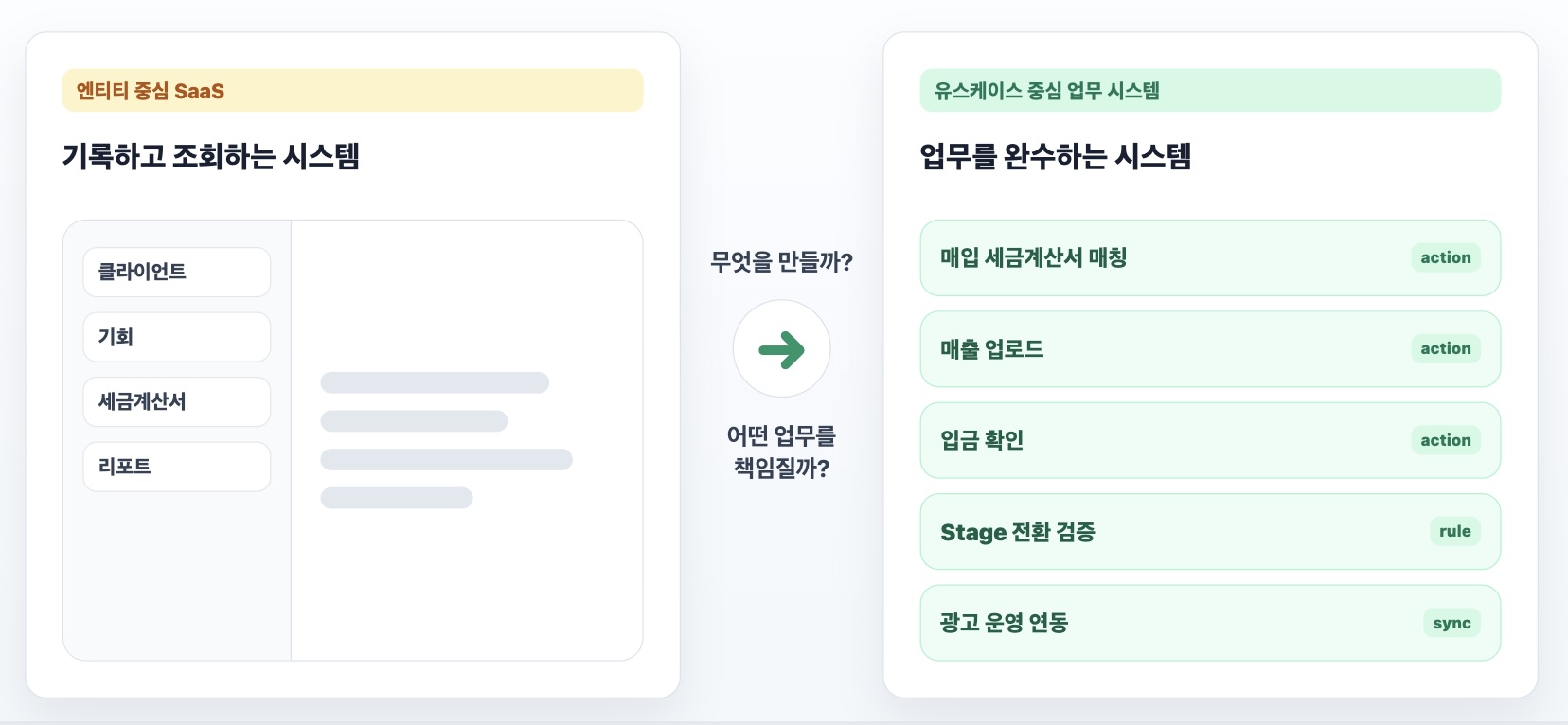
For Sales, BuzzForce still resembles Salesforce in many ways. To make a bigger improvement, we need a deeper understanding of their actual workflows and then to turn those workflows into use cases in the product. I have wondered whether moving beyond the traditional UI, where entity names become menu names, could produce a greater change. There is still plenty to do before such a shift, however, so I have not yet explored that question deeply.
For the remaining half of the year, I plan to devote about 20–30% of my time to improving sales and operations efficiency. First, I want to strengthen integration between BuzzForce and the ad operations system, reducing the manual intervention currently required to run ads. I also want to provide an interface that helps us find sales bottlenecks and analyze their causes faster. Connecting BuzzForce data to our analytics systems also makes LLM-based analysis straightforward.
BuzzForce gave me experience in questioning established habits and turning work into use cases. The faster we can build almost anything, the more important it becomes to define what to build and which work it should take responsibility for. I want to keep growing as an engineer who asks important questions at Buzzvil and turns them into real change.