AI-translated. Read the original in KoreanEmbedded slides, videos and images remain in their original language.
Buzzflow, Buzzvil’s ML Platform (1): Developing and Managing Models

MLOps Engineer
Introduction
Hi, I’m BK, an MLOps engineer at Buzzvil. Our advertising platform team uses a variety of machine learning models to optimize ad performance. In this two-part series, I’ll introduce buzzflow, our platform for developing, managing, and deploying those models.
This installment covers development and management: pipelines, the model registry, and related capabilities. A later post will explain how we deploy the models developed on the platform.
BB: Before Buzzflow
Before buzzflow, we lacked clear best practices for writing machine learning pipelines. Everyone used a different style, making reviews and follow-up work harder. We also used both MLflow and SageMaker Model Registry, which needed consolidation.
Anyone with permissions could freely create and modify pipelines, so production pipelines sometimes differed from the versions tracked in GitHub.
We use AWS SageMaker Pipelines for machine learning workflows, and its SDK introduced another difficulty. From a pipeline developer’s perspective, different ML frameworks used different parameters—or different names for parameters that performed the same function.
For example, Processor, used for processing, and Estimator, used for training, expose essentially the same network settings in different forms. Processor accepts a NetworkConfig object, while Estimator takes those settings directly.
class Processor(object):
    """Handles Amazon SageMaker Processing tasks."""
    def __init__(
        self,
        ...
        network_config: Optional[NetworkConfig] = None, # processor는 NetworkConfig를 입력으로 받습니다.
    ):
        ...

...

class NetworkConfig(object):
    def __init__(
        self,
        enable_network_isolation: Union[bool, PipelineVariable] = None,
        security_group_ids: Optional[List[Union[str, PipelineVariable]]] = None,
        subnets: Optional[List[Union[str, PipelineVariable]]] = None,
        encrypt_inter_container_traffic: Optional[Union[bool, PipelineVariable]] = None,
    ):
class EstimatorBase(with_metaclass(ABCMeta, object)):
    """Handle end-to-end Amazon SageMaker training and deployment tasks."""

    def __init__(
        self,
        ...
        # 그러나 Estimator는 NetworkConfig를 풀어낸 형태로 입력을 받습니다.
        security_group_ids: Optional[List[Union[str, PipelineVariable]]] = None,
        subnets: Optional[List[Union[str, PipelineVariable]]] = None,
        encrypt_inter_container_traffic: Optional[Union[bool, PipelineVariable]] = None,
        enable_network_isolation: Union[bool, PipelineVariable] = None,
    ):
These differences required extra SDK learning and added cognitive load during development.
To summarize, we faced four problems:
- No shared conventions for SageMaker Pipelines.
- Cognitive overhead from the SageMaker Pipelines SDK.
- Insufficient control over pipeline modification permissions.
- Fragmented model registries.
Here is how buzzflow addressed them.
AB: After Buzzflow
Defining pipelines
Our first goal was to separate model code from pipeline definitions and provide a consistent way for everyone to write pipelines. We also wanted an easier interface over the SageMaker SDK.
We realized pipeline definitions did not necessarily need to be executable code. Buzzvil’s data platform already used YAML, so using the same format would bring consistency. Model logic remains code, while the pipeline connecting it is written in YAML.
variables:
  project_dir_relative_path: projects/prod/project_name
  common_dir_relative_path: ${variables.project_dir_relative_path}/common
  common_dir_local_path: /opt/ml/processing/input/code/common
  query_dir_relative_path: ${variables.project_dir_relative_path}/query
  ...
We use the third-party OmegaConf library to parse YAML. Features such as variable interpolation reduce repeated definitions and improve usability. As shown above, frequently repeated values can be referenced by field name, much like variables.
Next, we analyzed the SageMaker Pipelines SDK and unified parameter names and behavior. We built abstraction wrappers around SDK functionality and generate actual pipelines from those wrappers. For example, both Processor and Estimator use a NetworkPolicy class for network settings. Users consistently specify those settings in a network field.
# pipeline.yaml
network:
  security_group_ids:
  subnets:
# data_model.py

class ProcessorConfig(pydantic.BaseModel):
    ...
    network_config: NetworkPolicyConfig = Field(NetworkPolicyConfig(), alias="network")

...

class EstimatorConfig(pydantic.BaseModel):
    ...
    network_config: NetworkPolicyConfig = Field(NetworkPolicyConfig(), alias="network")
The wrappers are implemented with Pydantic, which validates required fields, data formats, and other input constraints. This helps identify problems before creating a real pipeline.
Once a user writes a YAML definition, the wrappers generate the pipeline. We also wanted to leave open the possibility of replacing SageMaker Pipelines with another workflow orchestrator. The design allows MLOps engineers to change the code that generates pipelines from wrappers without requiring users to rewrite their YAML.
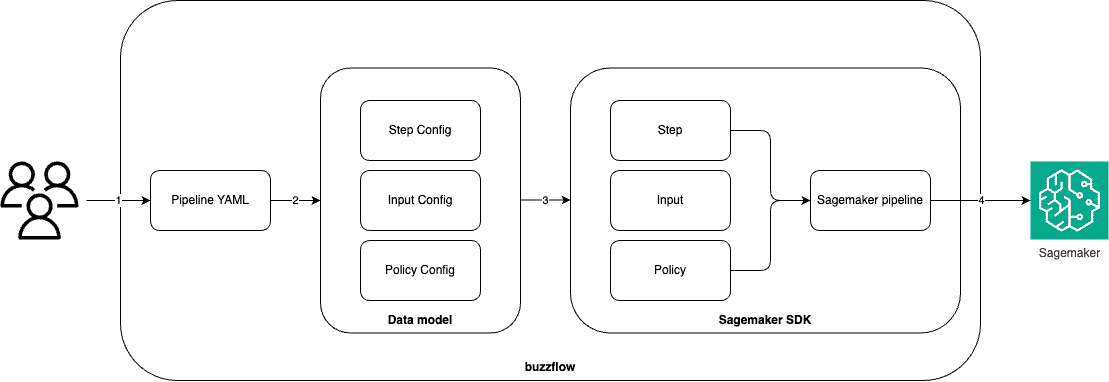
Pipeline creation follows these steps:
- The user writes a YAML definition.
- buzzflow parses it, creates data models, and validates the input.
- It creates the actual pipeline components from those models.
- It combines the components and applies the pipeline to SageMaker.
With consistent conventions established, we consolidated functionality shared across projects into a common package, reducing duplication and improving reuse. Query execution is one example. Shared packages are made available automatically during pipeline creation, so users do not have to add them to their pipeline specifications.
# global_common/query.py

def run_athena_query(athena_query: str, save_path=None, region="us-west-2"):
    ...


def load_query(query_file_path: str, **kwargs):
    ...
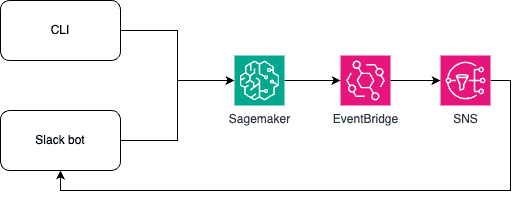
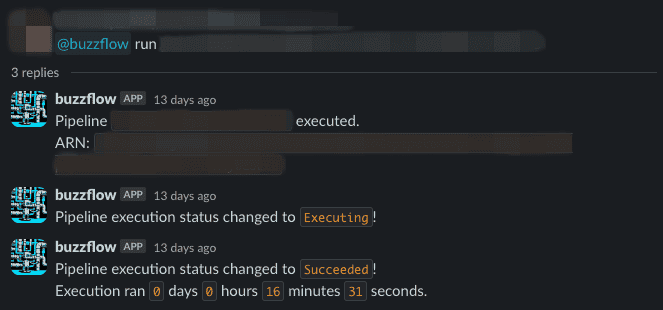
We also built a CLI and Slack bot so users can create and run pipelines without opening the AWS console. They can write code locally, then create and execute a pipeline. The Slack bot integrates with AWS EventBridge and Simple Notification Service (SNS) to provide real-time pipeline status notifications.
Debugging pipelines in local mode
SageMaker pipeline steps take time to provision instances and download containers, slowing the feedback loop during development. Each step also requires an instance configuration. Since instance types have different prices, choosing an appropriate type for CPU, memory, and disk usage matters.
buzzflow therefore offers local mode for easy pipeline creation and testing on a developer’s machine. Built on SageMaker’s local mode, it combines Prometheus and cAdvisor to show each step’s resource usage, helping model developers choose suitable instances.
Users write the same YAML definition and run the CLI with a local-mode flag. Instead of applying the pipeline to SageMaker, buzzflow runs it locally with Docker. When the pipeline finishes, it displays metrics collected by cAdvisor and Prometheus.
The model registry
To consolidate our model registries while retaining the option to move away from SageMaker, we chose MLflow. Using MLflow normally requires host settings and other configuration. For convenience, buzzflow provides an experiment manager package that connects developers to the registry without making them handle those settings themselves.
from experiment_manager.mlflow_manager import MLFlowExperimentManager


@MLFlowExperimentManager(experiment_name="")
def some_logic(param1, param2, ...):
  ...
  mlflow.log_param()
  mlflow.log_metric()
  ...

if __name__ == "__main__":
    some_logic(param1, param2)
Access control
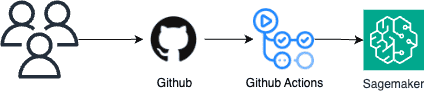
buzzflow separates research and production projects so changes to research code cannot affect production pipelines. Pipelines created locally through the CLI by ordinary users can access only development databases, S3 resources, and related systems.
Changing a production pipeline requires a pull request and review by colleagues. GitHub Actions automatically creates the pipeline when an approved change reaches the repository’s main branch. Where appropriate, tests can also be required before merging.
Scheduled execution and monitoring
As ML pipeline use cases grew, we needed recurring execution. AWS EventBridge makes simple schedules easy, but could not handle our cases where input parameters must change dynamically at execution time. We therefore use Airflow to trigger ML pipelines.
Integration with our internal data platform supports more than simple cron schedules: for example, a model pipeline can run when a data pipeline finishes.
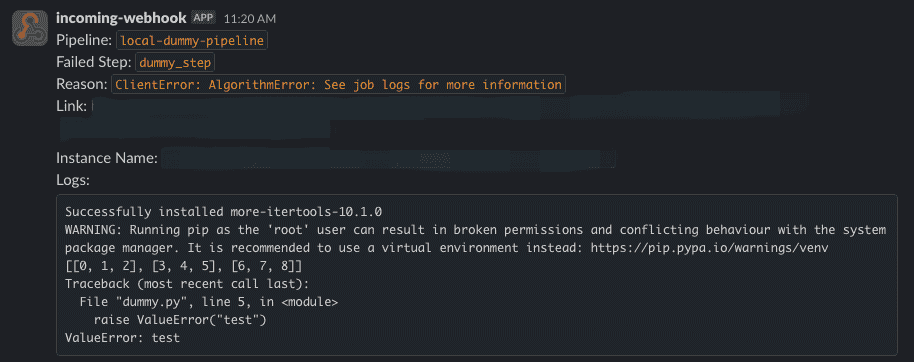
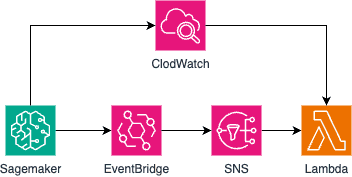
Monitoring production pipelines is equally important. We added log retrieval so failure notifications include the relevant logs. EventBridge detects a pipeline failure, SNS triggers a Lambda function, and that function retrieves CloudWatch logs.
Documentation
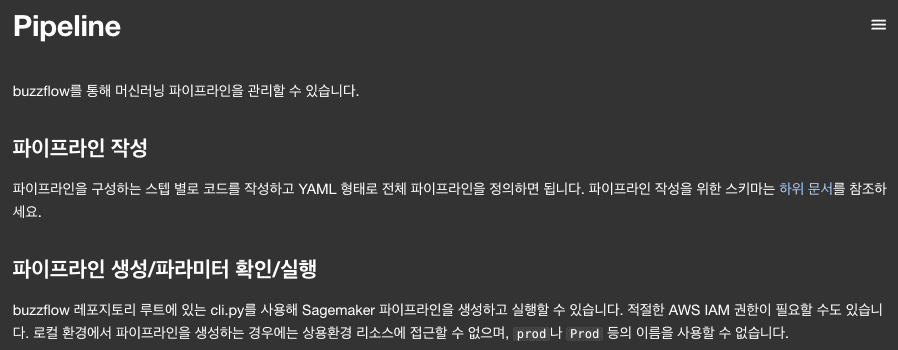
Finally, we documented the information needed for pipeline work in Buzzvil’s internal tools, so developers can refer to it while building pipelines.
Closing thoughts
This post described the situation before our ML platform, the basic goals we set, and how we achieved them. In the next post, I plan to cover deploying models trained through the platform.
Thanks for reading!