AI-translated. Read the original in KoreanEmbedded slides, videos and images remain in their original language.
Applying Probabilities in Elasticsearch Searches

Software Engineer

This post explains two effective ways to apply probabilities to individual documents in Elasticsearch searches, with a brief performance comparison and discussion of their tradeoffs. I assume you can write basic Search API queries using constructs such as term and bool.
Introduction
Buzzvil caches ads in Elasticsearch for fast serving. With high requests per second, we keep all ads in an inverted index so matching ads can be found quickly when a request arrives.
The ad server needs to control each ad’s randomness for various reasons. Suppose there are ads A1 and A2 and requests R1 and R2. Analysis of R1 may require allocation probabilities of 20% and 80%, while R2 requires 70% and 100%. This dynamic information is not known in advance and cannot be pre-indexed. Basic queries such as term and range therefore cannot achieve the goal; we need other Elasticsearch features.
Assumptions
To focus on the essentials, let’s simplify the situation. Each ad has an alloc_rate field from 0 to 100, meaning “allocate this ad with an alloc_rate% probability on every request.” A value of 100 always allocates it; a value of 10 gives it a 10% chance for each request.
Elasticsearch
Assume the Elasticsearch index is configured as follows, storing the domain-defined range of 0–100.
{
  "settings": { ... },
  "mappings": {
    "properties": {
      ...,
      "alloc_rate": {
        "type": "short",
        "index": true
      },
      ...
    }
  }
}
Approach 0: range
This approach is wrong, but it is an easy trap to fall into—I did—so we will cover it first. Generate a random value from 0 to 100 in application code and pass it as a constant in the Elasticsearch query. A Python ad server might implement it as follows.
query = {
    "range": {
        "alloc_rate": {
            "gt": random.randint(0, 99)
        }
    }
}
es_client.search(query)
What goes wrong? Suppose there are three ads, all with alloc_rate 10. If randint() exceeds 10, all three are always allocated; if it is 10 or below, none are allocated. Their outcomes move together.
Approach 1: script
The first valid approach uses a script query.
{
  "script": {
    "script": "doc['alloc_rate'].value > Math.random() * 100"
  }
}
The query is intuitive: generate a random value in [0, 1) for each document—each indexed ad—and compare it with alloc_rate. Generating a fresh value per document solves approach 0’s problem. However, as the warning at the top of the script query documentation notes, script queries are slow. The script performance documentation suggests several mitigations, but none appears suitable for our case.
In interval notation,
[0, 1)includes 0 but excludes 1, while(0, 1]excludes 0 but includes 1.
Approach 2: function_score
The function score query addresses the problems of both approaches 0 and 1.
As the official
random_scoredocumentation explains, you may need to setseedandfield. We inject a server-generated seed into every ad-allocation query.
{
  "function_score": {
    "functions": [
      {
        "random_score": {
          "field": "_seq_no",
          "seed": ${some_random_value}
        }
      },
      {
        "field_value_factor": {
          "field": "alloc_rate",
          "modifier": "none",
          "factor": 0.01,
          "missing": 0
        }
      }
    ],
    "score_mode": "sum",
    "boost_mode": "replace",
    "min_score": 1
  }
}
function_score lets us control how document scores are calculated. We use it to generate a random score per document and compare that value with alloc_rate. Approach 1 already satisfies the functional requirement, so this approach provides the same behavior through a different mechanism.
Let’s explain each part of the query, then put them together.
function_score.functions
function_score currently offers four types of scoring function. You can use a single one, such as function_score.script_score, or supply several in the function_score.functions array and choose how to combine their outputs with score_mode.
script_score- Documentation
- Like a script query, it lets you define a Painless script to calculate each document’s score.
- Like a script query, its performance is poor.
random_score- Documentation
- Generates a random value in
[0, 1).
field_value_factor- Documentation
- Uses a particular document field as a score.
- Decay functions:
gauss,linear,exp- Documentation
- Score a document according to how far a field’s value is from a chosen reference point.
- The distance calculation determines whether the function is
gauss,linear, orexp.
function_score.score_mode
Each function in function_score.functions produces a score. This setting determines how those scores are combined. The equivalent Python code follows. For clarity, boost_mode is omitted from the doc.score calculation here; its section below gives the full formula.
for doc in documents:
  doc.score = score_mode(f(doc) for f in function_score.functions)
The documentation lists the available score_mode options. Here we use sum, adding all function scores.
function_score.boost_mode
The result of function_score.score_mode is not quite the final score; it also passes through function_score.boost_mode. As the documentation shows, function_score.query can contain another query. If omitted, it is equivalent to { "match_all": {} }. Even a basic Elasticsearch term query calculates scores, so the matching documents from query already have scores. We may therefore need to combine the query score with the score_mode result. That is what boost_mode does. In Python, it looks like this.
for doc in documents:
  query_score = ... # `function_score.query`에서 `doc`의 score

  doc.score = boost_mode(
    score_mode(f(doc) for f in function_score.functions),
    query_score,
  )
The documentation lists the available boost_mode options. We use replace to ignore function_score.query’s score and use only the result of function_score.functions.
function_score.min_score
Once boost_mode has produced the final document score, this option determines whether to exclude the document. Setting min_score to 1 excludes documents whose final score is below 1.
Putting It Together
Now we can explain the whole query. Approach 2 is an optimization of approach 1, so its meaning should be the same. We need to rearrange the inequality into a form function_score can express. Approach 1 uses:
(alloc_rate / 100) > rand, where rand returns a value in [0, 1).
Add (1 - rand) to both sides:
(alloc_rate / 100) + (1 - rand) > rand + (1 - rand)
Simplifying the right side gives:
(alloc_rate / 100) + (1 - rand) > 1
Since rand returns [0, 1), the left-hand term (1 - rand) lies in (0, 1]. The endpoints differ slightly, but it is almost the same range as rand.
Map the expression to the Elasticsearch query: "min_score": 1 handles the > 1 part. In functions, random_score corresponds to (1 - rand), while field_value_factor represents (alloc_rate / 100). Because alloc_rate ranges from 0 to 100, we use a factor of 0.01 to scale it to 0–1.
A Clarification
In fact, "min_score": 1 means >= 1, not > 1. Since (1 - rand) is in (0, 1], the formula appears to allow allocation even when alloc_rate is 0: substituting gives 0 / 100 + 1 >= 1, which is true. In the actual implementation, however, we use rand, not (1 - rand). Its range is [0, 1), so that problem cannot occur.
The query therefore evaluates (alloc_rate / 100) + rand >= 1.
Aside: How Likely Is random_score to Return Zero?
random_score is uniformly distributed, so every representable value in [0, 1) is equally likely. If there are N possible values, zero occurs with probability 1/N. Mathematically, the interval contains infinitely many real numbers. But the Elasticsearch implementation derives its random value from a 24-bit integer, so N is 2 ^ 24 = 16,777,216. Zero therefore occurs with a probability on the order of 1 / 10,000,000.
Approach 3: function_score with Linear Decay
Approach 2 already implements the requirement with good performance. However, a linear decay function can replace field_value_factor to provide the same behavior and support another useful case.
{
  "function_score": {
    "functions": [
      {
        "random_score": {
          "field": "_seq_no",
          "seed": ${some_random_value}
        }
      },
      {
        "linear": {
          "alloc_rate": {
            "origin": 100,
            "scale": 50,
            "offset": 0,
            "decay": 0.5
          }
        }
      }
    ],
    "score_mode": "sum",
    "boost_mode": "replace",
    "min_score": 1
  }
}
For example, linear maps an alloc_rate of 0 to score 0, 100 to score 1, and 20 to score 0.2. The documentation illustrates this well. Expressed as a relationship between alloc_rate and score, it looks like the following. For now, focus on i and ii.
        ┌─ 0                     i) alloc_rate < 0 or alloc_rate > 200
        │
score = ┼─ alloc_rate / 100      ii) 0 <= alloc_rate <= 100
        │
        └─ 2 - alloc_rate / 100  iii) 100 < alloc_rate <= 200
Like approach 2, it therefore evaluates (alloc_rate / 100) + rand >= 1.
Another Use Case
What if allocation should be allowed at 0 and blocked at 100—the reverse of alloc_rate? Budget consumption can behave this way: 0% means nothing has been spent, while 100% means the budget is exhausted. At 0%, the ad should appear in search results; at 100%, it should be excluded to prevent further spending. The allocation condition is:
1 - budget / 100 > rand
No matter how we rearrange the inequality, Elasticsearch does not support negative scores, so field_value_factor alone cannot implement it. The linear graph in the documentation has a negative slope to the right of the origin. Set the origin to 0, and a budget value of 0 produces score 1, while 100 produces score 0.
{
  "function_score": {
    "functions": [
      {
        "random_score": {
          "field": "_seq_no",
          "seed": ${some_random_value}
        }
      },
      {
        "linear": {
          "budget": {
            "origin": 0,
            "scale": 50,
            "offset": 0,
            "decay": 0.5
          }
        }
      }
    ],
    "score_mode": "sum",
    "boost_mode": "replace",
    "min_score": 1
  }
}
Performance Comparison
Let’s compare approach 3’s linear decay with approach 1’s script on part of a real production ad-allocation query. First, a caveat: Elasticsearch performance varies with access patterns and data structure. Our workload has relatively few live ads and vastly more reads than writes.
The results below use Kibana’s Query Profiler.
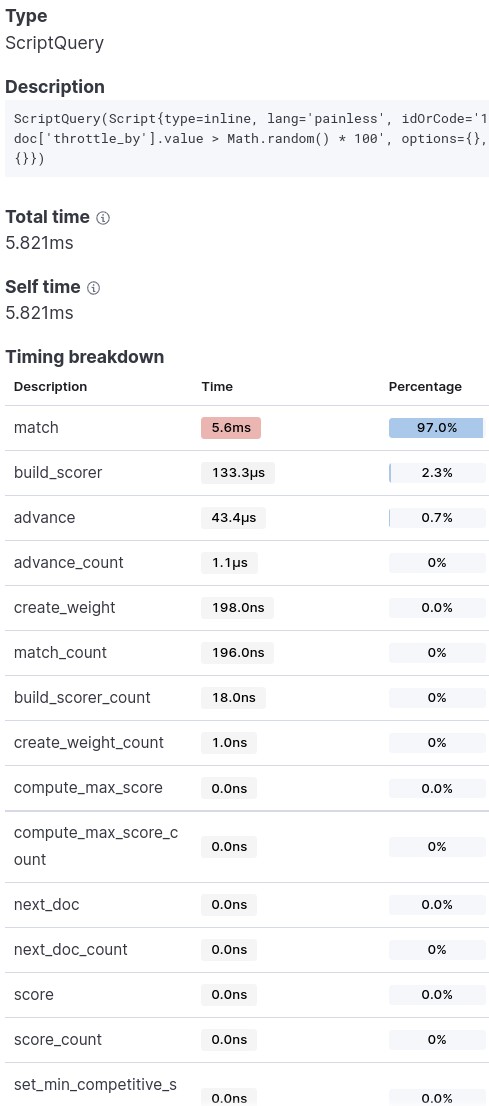
Approach 1: Script
The script query accounted for 33% of total query time, making it the slowest component.

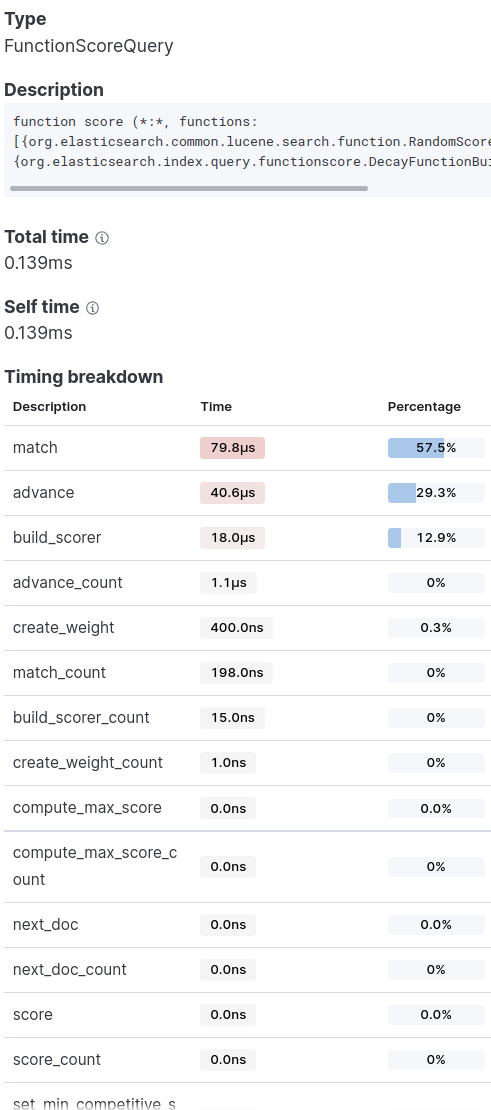
Approach 3: Linear Decay
It was more than 40 times faster than the script and became one of the least time-consuming query components.

Tradeoffs
In the comparison between script and function_score, function_score consistently performs better. Its drawback is that each document’s score is calculated in [0, 1). We use a filter context that does not rely on scoring, so that drawback does not affect us.
Closing Thoughts
Customizing function_score.query also lets us implement the more complex probability scenarios described in the introduction efficiently. Our production ad-allocation server uses this pattern for almost every probability query.
As noted in the performance section, Elasticsearch results can vary substantially with index configuration and access patterns. In some cases, a script can even be faster than a combination of standard queries. I recommend testing different queries and index configurations against your own use case before adopting one.