AI-translated. Read the original in KoreanEmbedded slides, videos and images remain in their original language.
HTTP Connection Pools in Go, Explained
Data Engineer
Hello, I'm Raf, a data engineer at Buzzvil. Our Go microservices make HTTP requests when using AWS SDKs for services such as Elasticsearch and DynamoDB, or integrating with external services such as ad networks and app publishers. While optimizing DynamoDB latency, I took a close look at HTTP connection management.
This post examines http.Transport to explain how Go's http.Client manages connections, which parameters help use them effectively, and how to trace the client's internals.
Let's start with a simple example that sends a GET request to a website using http.Client, with a connection pool configured to ten. If you do not need to tune HTTP parameters, you can simply use http.Get().
What do http.Client and http.Transport each do?
The declaration of http.Client in Go's net/http package includes this explanation:
A Client is higher-level than a RoundTripper (such as Transport) and additionally handles HTTP details such as cookies and redirects.
This suggests that the client handles details such as preparing headers rather than performing communication directly. http.Client holds a transport through the http.RoundTripper interface. The documentation for http.Transport says:
Transport is an implementation of RoundTripper that supports HTTP, HTTPS, and HTTP proxies. By default, Transport caches connections for future re-use.
Transport therefore sends and receives requests and manages the connection pool. Let's focus on it rather than the client.
http.Transport
Shared fields and parameters for connection management
Here are the fields of http.Transport relevant to the connection pool.
Figure 1 diagrams those fields.
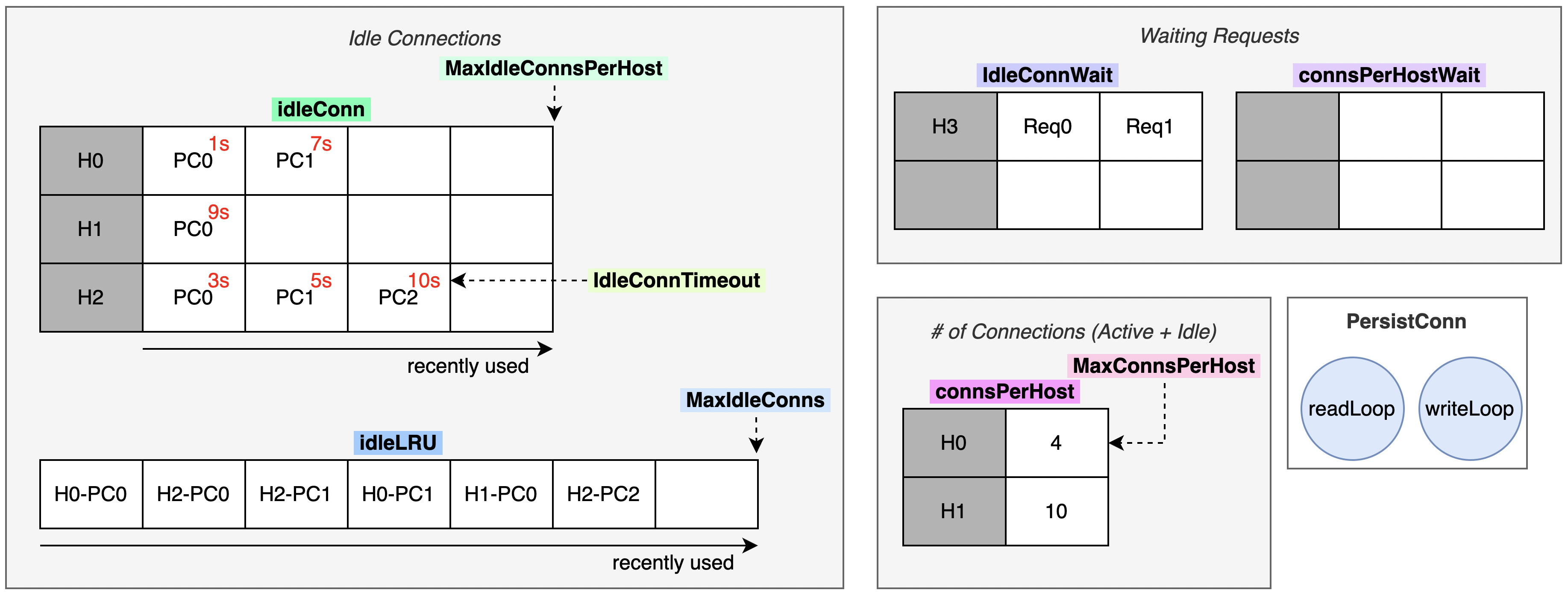 Figure 1) Shared connection-pool fields
The bold labels are all fields of http.Transport. As Go users will know, fields beginning with a lowercase letter are private and inaccessible from application code, while uppercase fields are public. PersistConn at the bottom right is a struct holding one connection and two goroutines, writeLoop and readLoop. In the other diagrams, “PC” also means PersistConn.
The Idle Connections box on the left contains pool-related fields. idleConn is a map from host information (connectMethodKey) to a slice of PersistConn objects. Each connection has a timeout; red numbers indicate the time remaining before removal. Connections toward the end of the slice were used more recently. IdleConnTimeout configures the timeout, while MaxIdleConnsPerHost sets the maximum number of idle connections per host.
idleLRU is a queue used to control the total pool size. Connections farther to the right were used more recently. MaxIdleConns controls the total number of idle connections.
The Waiting Requests box at the top right represents requests that could not obtain a connection from the pool. idleConnWait holds requests waiting while a goroutine creates a connection, with a per-host collection like idleConn. connsPerHostWait queues requests when all permitted connections are in use.
In the # of Connections box, MaxConnsPerHost limits the total connections allowed for a host. connsPerHost tracks the current count for enforcing that limit.
The pool from a request's perspective
We have briefly seen the shared fields and configuration parameters. Now let's follow how an HTTP request obtains, creates, and returns a connection.
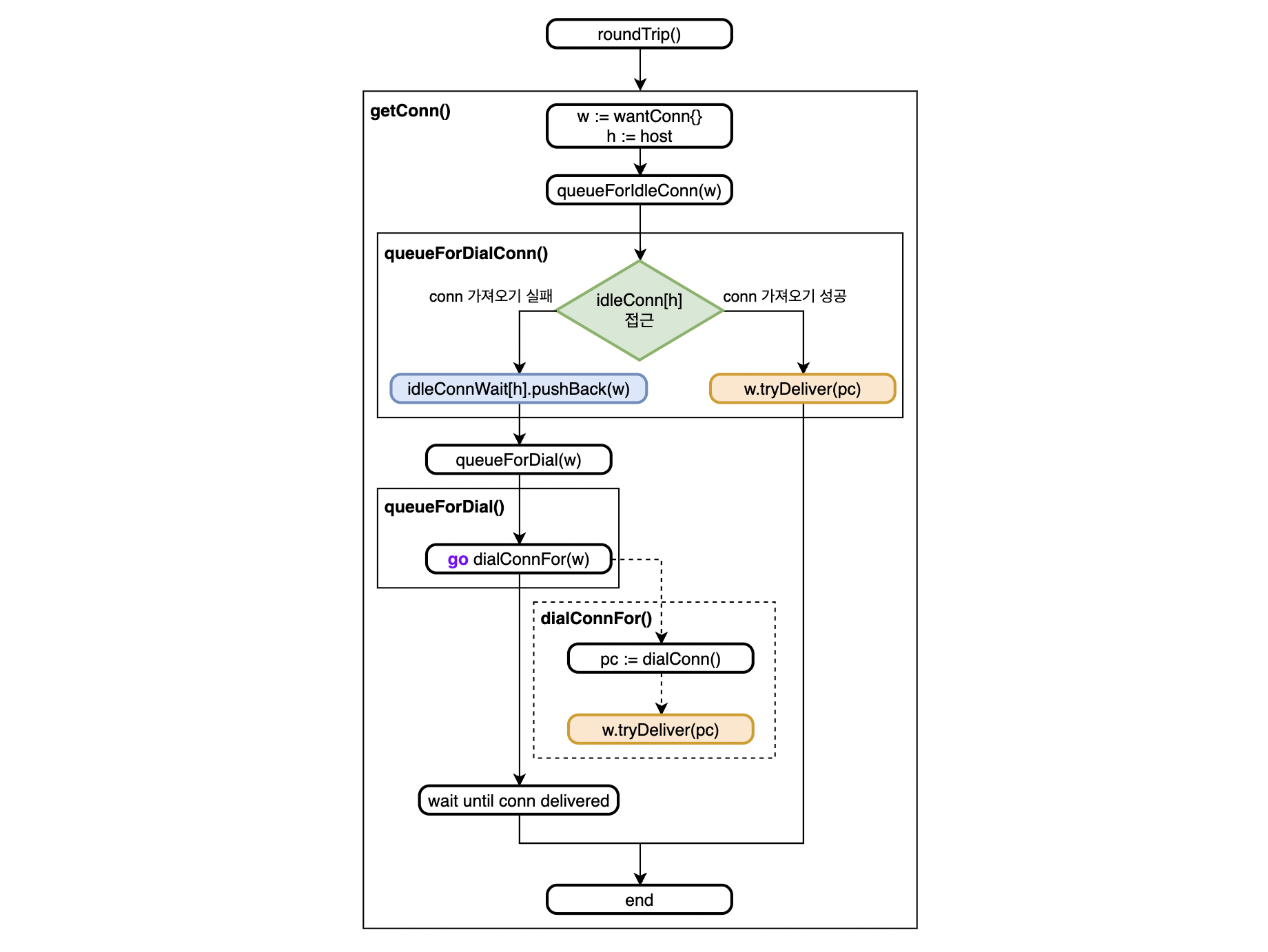 Figure 2) Obtaining a connection
Figure 2 starts at Transport.roundTrip(), called by http.Client.Do(). roundTrip() calls getConn(), which creates a wantConn object. That object can hold a PersistConn, and another goroutine can deliver one through tryDeliver().
Next, getConn() passes the object to queueForIdleConn(). This accesses the shared idleConn map and tries to obtain a connection for the required host. It takes the most recently used connection—the one at the end of the slice—and passes it to wantConn.tryDeliver(). That is the path when a pooled connection is available.
If none is available, a new PersistConn must be created in a goroutine. First, the waiting object is added to idleConnWait. Establishing a connection, including handshakes, can take time. This queue allows another idle connection to be delivered promptly if one becomes available in the meantime.
Then queueForDial() launches a goroutine to create a connection and deliver it through wantConn.tryDeliver(). The goroutine running getConn() waits until a PersistConn arrives. Once it does, getConn() returns and the request is sent through that connection.
While dialConnFor() is creating a connection, another returned connection may reach wantConn first. In that case, the newly created connection cannot be delivered to that request and must be returned to the pool.
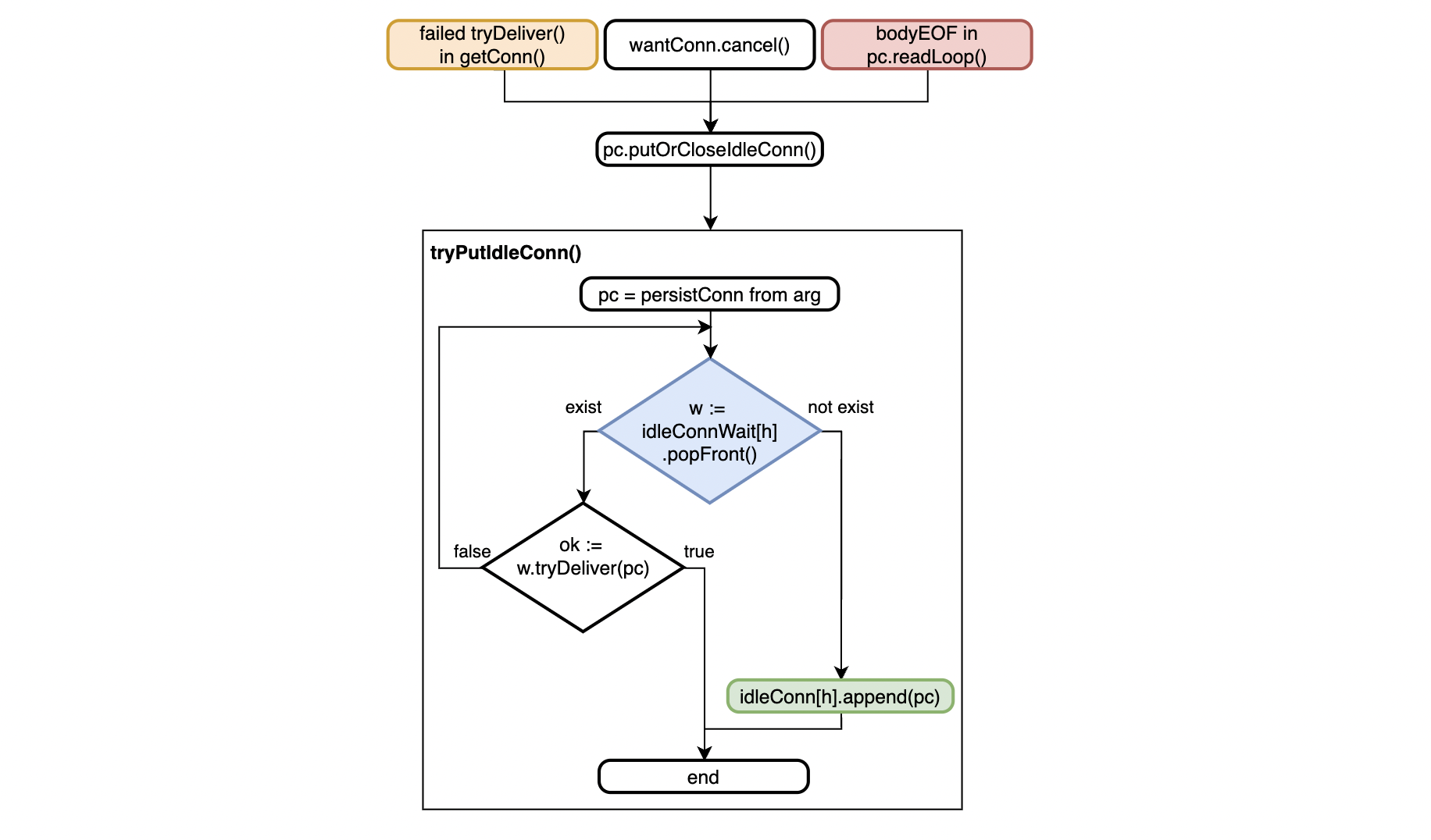 Figure 3) Returning a connection
Figure 3 shows tryPutIdleConn(). It is called when: 1) dialConnFor() fails to deliver a connection to wantConn; 2) a connection arrives but the request's context is cancelled; or 3) after request processing, application code calls res.Body.close(), allowing the PersistConn read-loop handling to finish. Without res.Body.Close(), the connection cannot become idle and remains alive, potentially leaking memory.
Before returning a connection to the pool, tryPutIdleConn() takes waiting wantConn objects from idleConnWait and tries tryDeliver() on them. This lets a waiting request obtain a connection promptly rather than waiting for its new connection to be created. If there are no waiting requests, the connection is stored in idleConn and its idle timeout is set.
Parameters for using the pool effectively
Go manages and reuses connections in this way. Tuning the parameters in Figure 1 can make the pool more effective. Their defaults are:
MaxIdleConns: Maximum idle connections overall; default 100.MaxIdleConnsPerHost: Maximum idle connections per host; default 2.IdleConnTimeout: Idle connection timeout; default 90 seconds.MaxConnsPerHost: Maximum active and idle connections per host; default 0, meaning unlimited.
The default MaxIdleConnsPerHost retains only two idle connections per host. This quickly releases idle connections and recovers memory when traffic falls, but can hurt latency when requests to a host suddenly increase. If requests need connections faster than active connections return to the pool, new ones must be created. Connection establishment then enters the request's critical path, increasing latency and negating the pool's benefit. If your service talks to a known, fixed set of hosts, I recommend considering a different MaxIdleConnsPerHost value.
httptrace.ClientTrace
After getConn() obtains a connection, the actual communication remains. Let's examine that alongside httptrace.ClientTrace, which lets us instrument stages of an HTTP request.
It provides the following callback functions for tracing.
The comments in the httptrace package documentation explain when each callback runs. But without a detailed understanding of HTTP communication, I struggled to know their order. I initially registered every trace and inferred the sequence from logs.
To help others in the same position, I diagrammed where traces run. Figure 4 covers obtaining a connection; Figure 5 covers communicating with the server. Each timeline shows a goroutine's actions. Dashed arrows indicate launching another goroutine or transferring data through a channel. Underlined labels are httptrace.ClientTrace callbacks, and thick timeline segments indicate waiting on a channel.
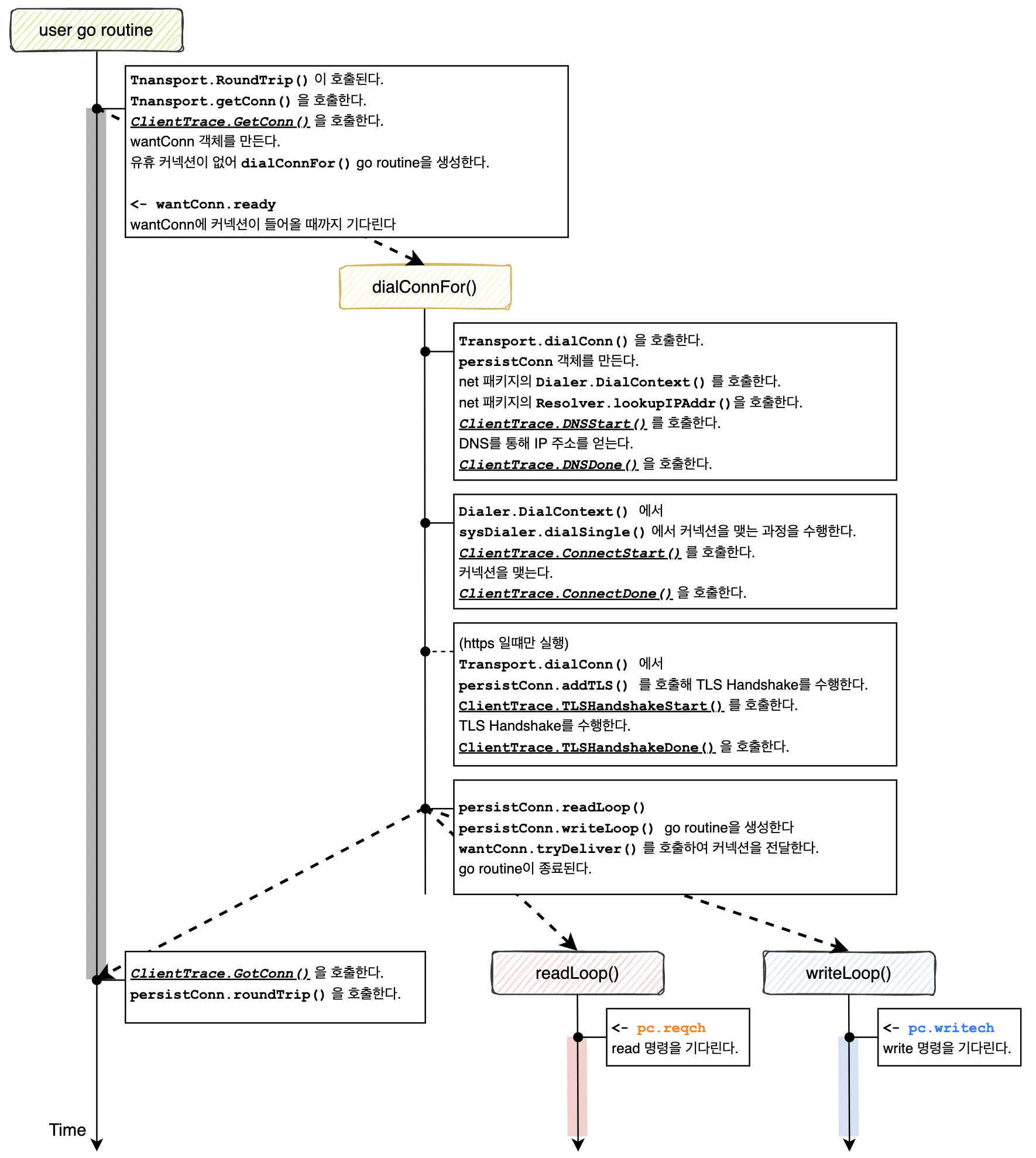 Figure 4) Traces during connection acquisition
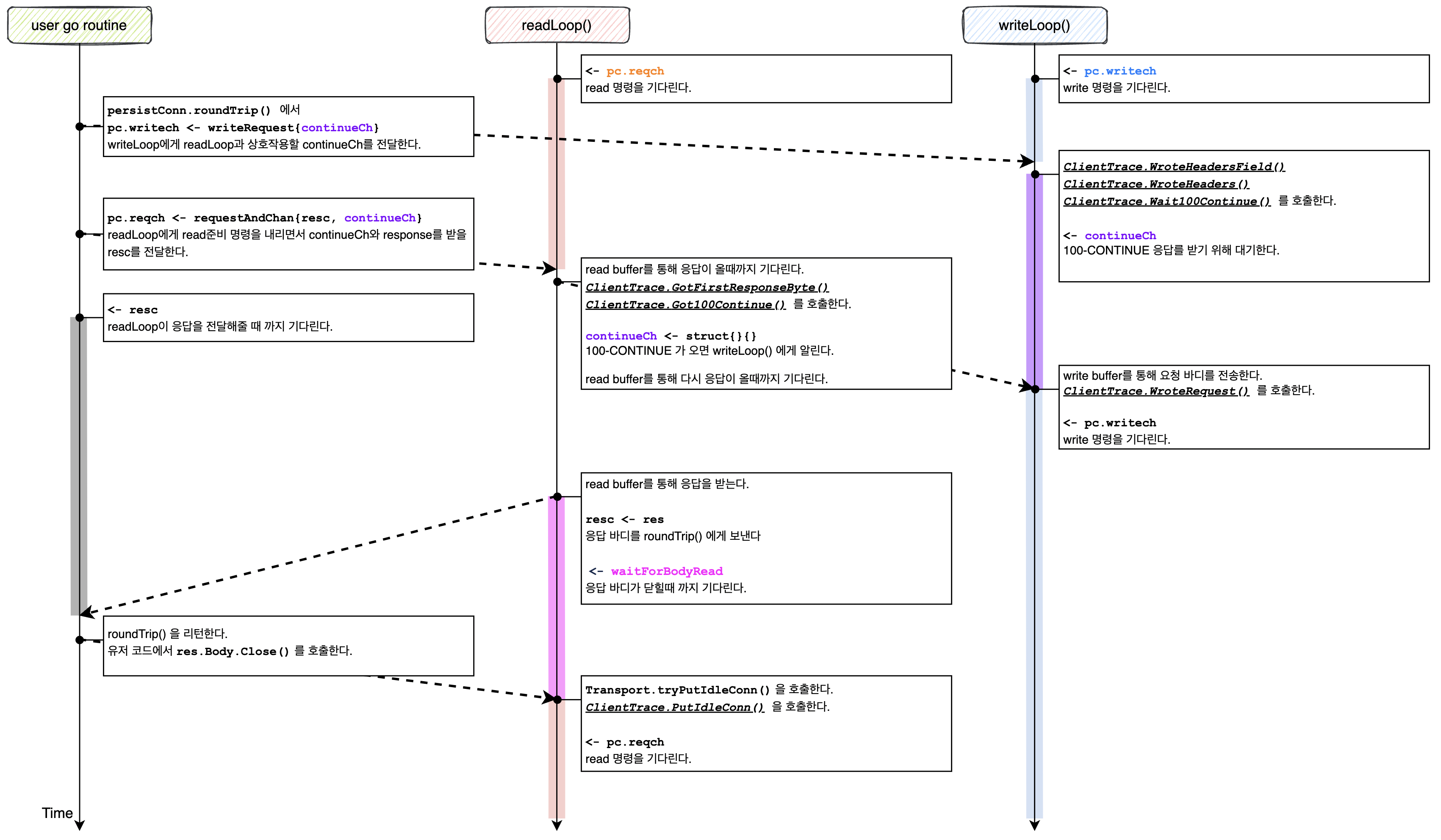 Figure 5) Traces during communication
The most useful callbacks for me were TLSHandshakeStart() and TLSHandshakeDone(). They revealed that TLS handshakes had a substantial effect on latency. A service using DynamoDB normally handled requests in around 10 ms, but sometimes exceeded 100 ms. Adding traces showed that much of that time was spent in the handshake.
Here is how to use httptrace.ClientTrace.
As shown, we can inject a context into http.Request to add tracing. Rather than repeating that logic wherever requests are created, we can separate it through an http.RoundTripper implementation, as below. If redirects or similar behavior may produce multiple actual HTTP requests, tracing before and after RoundTrip() also reveals the duration of each one.
At Buzzvil, we connect these callbacks to Datadog and inspect them as flame graphs. Open-source alternatives include OpenTelemetry and Jaeger. See also Introducing Buzzvil's Backend Stack.
Closing thoughts
httptrace.ClientTrace helped us identify bottlenecks in connection establishment and HTTP requests. Tuning http.Transport for our service's request patterns also let us make better use of the connection pool.
I originally descended into http.Transport while trying different ways to optimize DynamoDB latency. In the next post, I will share how we resolved intermittently slow responses caused by a hidden HTTP request inside the AWS SDK.
I have not examined every detail of the HTTP package, so this explanation may have gaps. If you notice something that differs from your understanding, please leave a comment on the GitHub Gist or message me through my LinkedIn profile.