AI-translated. Read the original in KoreanEmbedded slides, videos and images remain in their original language.
Breaking Down asyncio, Part 1: Coroutines and the Event Loop

Software Engineer
This series introduces asyncio’s components and how to use them. Our eventual goal is to implement the graceful shutdown process we use in production, explaining the asyncio concepts needed along the way over several posts. Some details are specific to Python, but coroutines and Futures are common asynchronous-programming concepts. You can also think of this as learning those concepts through Python.
- (This post) Breaking Down asyncio, Part 1: Coroutines and the Event Loop
- Breaking Down asyncio, Part 2: Using Futures
- Breaking Down asyncio, Part 3: Handling SIGTERM (CTRL+C) Correctly
- (WIP) Breaking Down asyncio, Part 4: Graceful Shutdown with APScheduler
Introduction
The event loop is a central component of Python’s asyncio, and the coroutine is its basic unit of execution. In this post, we will define a small hypothetical requirement and implement it to explain what coroutines are and how to run them on an event loop. I assume you can follow the basic async and await examples in the official Python documentation.
Requirements
- Create a job every ten seconds. Each job takes a random amount of time.
- A new job must be created every ten seconds, whether or not the previous job takes longer than ten seconds.
- Jobs run concurrently.
The key requirement is a new job every ten seconds, regardless of how long the previous one takes. Since the requirements are short, I recommend trying to implement them before reading the code below and thinking about the difficulties you encounter.
Implementation
How can we implement this using only asyncio, without external libraries? I’ll show the complete code first, then explain it step by step.
import asyncio
from datetime import datetime
from random import randint

async def run_job() -> None:
    delay = randint(5, 15)
    print(f'{datetime.now()} sleep for {delay} seconds')
    await asyncio.sleep(delay)  # 5~15초 동안 잠자기
    print(f'{datetime.now()} finished ({delay} sec)')

async def main() -> None:
    while True:
        asyncio.create_task(run_job())
        await asyncio.sleep(10)

asyncio.run(main())

# 2022-03-27 00:55:59.585462 sleep for 13 seconds
# 2022-03-27 00:56:09.590352 sleep for 14 seconds
# 2022-03-27 00:56:12.588084 finished (13 sec)
# 2022-03-27 00:56:19.598264 sleep for 13 seconds
# 2022-03-27 00:56:23.593074 finished (14 sec)
# 2022-03-27 00:56:29.605253 sleep for 6 seconds
# 2022-03-27 00:56:32.602354 finished (13 sec)
# 2022-03-27 00:56:35.608464 finished (6 sec)
In the sample output, the 14-second sleep begins before the 13-second sleep finishes. That happens because the while loop proceeds to its next iteration without waiting for the first run_job() to finish its thirteen seconds of work. The key is asyncio.create_task.
Why Use asyncio.create_task? Why Not Just await run_job()?
The simple await run_job() approach does not work because main() cannot regain control until run_job returns. If run_job() takes eight seconds, await asyncio.sleep(10) begins only after those eight seconds. The iteration then takes eighteen seconds, violating the requirement to create a job every ten seconds.
To keep creating jobs every ten seconds regardless of their duration, we need a closer understanding of await and the event loop. You can think of await as performing two actions. First, it registers the coroutine after it—more precisely, the Awaitable object—for execution on the event loop. Second, it yields control to the event loop, expecting to regain it when that coroutine finishes. The event loop returns control once the registered coroutine completes or raises an error. Passing control among coroutines this way achieves cooperative multitasking.
We need the first action, but not the second. This is where asyncio.create_task() comes in. It registers the supplied coroutine with the event loop and returns a Future through which we can retrieve the result when the coroutine finishes. That Future is also Awaitable, so prefixing it with await would yield control and wait for completion. We deliberately omit await because that is not what we need here. We can therefore continue to the ten-second wait for the next while-loop iteration without first handing control over to await the job’s completion.
Strictly speaking,
asyncio.create_task()returns a Task object. A Task inherits from Future, so it is Awaitable too.
Why Not Call run_job() Without await?
Since await involves waiting, could we simply replace asyncio.create_task(run_job()) with run_job()? Try it and you will see no output, along with RuntimeWarning: coroutine 'run_job' was never awaited. The reason is simple: run_job is a coroutine function, not an ordinary function. Calling run_job() only creates and returns a coroutine object; it does not execute it.
This may seem unusual, but Python already has a familiar equivalent. Open a shell and run (print(n) for n in [1, 2, 3]). You will see something like <generator object <genexpr> at ...>, but no numbers. Only when you iterate—for example, with list(print(n) for n in [1, 2, 3]) or next(print(n) for n in [1, 2, 3])—do numbers appear.
Likewise, the coroutine object returned by run_job() represents work that can run later, not work executing immediately. As explained above, the coroutine must be registered with the event loop to run. Merely creating it does not execute it; registration through asyncio.create_task, await, or a similar mechanism is necessary.
The number-printing expression above is called a generator expression, and the object it returns is a generator iterator. A function returning a generator iterator is called a generator. Using
yieldinside a function makes it a generator automatically.
Terminology: Coroutines and Futures
We have introduced several terms—Awaitable, coroutine, Future, and Task—so let’s organize them before continuing. Their hierarchy is shown below.
             ┌──Coroutine
             │
Awaitable◄───┤
             │
             └──Future◄────────Task
An object must be Awaitable to be used with await. All three kinds can therefore be awaited until execution finishes. A coroutine, however, does not run until registered with the event loop, so it needs to be awaited or wrapped in a Future or Task.
Concurrent Execution
The code above meets our concurrency requirement. Where and how does that concurrent execution happen? The “where” is naturally the event loop. The interesting question is how the event loop makes it happen, which requires understanding its cooperative multitasking.
Asyncio has an important constraint: one running event loop per thread. No matter how many coroutines run concurrently on that loop, they ultimately run on a single thread. There is an exception, which we will discuss below. Implementations may differ, but CPython keeps registered coroutines in an internal queue and executes them one at a time in turn. How can taking turns create the impression of simultaneous execution? The answer lies in await and in what a coroutine is.
Coroutines vs. Ordinary Functions
First, compare coroutines with ordinary functions—routines or subroutines—in terms of how control flows.
     Caller            Function                 Caller            Coroutine
┌─────────────┐    ┌─────────────┐         ┌─────────────┐     ┌─────────────┐
│             │    │             │         │             │     │             │
│      │      │    │             │         │      │      │     │             │
│      │      │    │             │         │      │      │     │             │
│      ▼      │    │             │         │      ▼      │     │             │
│      │      │    │             │         │      │      │     │             │
│ call └──────┼────┼───────┐     │         │ call └──────┼─────┼──────┐      │
│             │    │       │     │         │             │     │      │      │
│             │    │       │     │         │             │     │      ▼      │
│             │    │       │     │         │             │     │      │      │
│             │    │       │     │         │      ┌──────┼─────┼──────┘      │
│             │    │       │     │         │      │      │     │      suspend│
│             │    │       │     │         │      ▼      │     │             │
│             │    │       │     │         │      │      │     │             │
│             │    │       │     │         │      └──────┼─────┼──────┐      │
│             │    │       │     │         │ resume      │     │      │      │
│             │    │       │     │         │             │     │      ▼      │
│             │    │       │     │         │             │     │      │      │
│             │    │       │     │         │      ┌──────┼─────┼──────┘      │
│             │    │       │     │         │      │      │     │      suspend│
│             │    │       │     │         │      ▼      │     │             │
│             │    │       │     │         │      │      │     │             │
│             │    │       │     │         │      └──────┼─────┼──────┐      │
│             │    │       │     │         │ resume      │     │      │      │
│             │    │       │     │         │             │     │      ▼      │
│             │    │       │     │         │             │     │      │      │
│      ┌──────┼────┼───────┘     │         │      ┌──────┼─────┼──────┘      │
│      │      │    │      return │         │      │      │     │      return │
│      │      │    │             │         │      │      │     │             │
│      ▼      │    │             │         │      ▼      │     │             │
│             │    │             │         │             │     │             │
└─────────────┘    └─────────────┘         └─────────────┘     └─────────────┘
An ordinary function is placed on the stack when called, takes control, and executes its body. On completion, it returns control to its caller and leaves the stack. A coroutine, however, can yield control before it finishes. You can therefore think of an ordinary function as a special case of a coroutine whose entry and return points are fixed at the beginning and end.
How the Event Loop Runs Coroutines
               Eventloop
                   │
  Coroutine 1      │
                   │
┌─────────────┐    │
│             │    │
│             │    │
│await        │    │      Coroutine 2
└─────────────┘    │    ┌─────────────┐
       :           │    │             │
       :           │    │             │
       :           │    │await        │
┌─────────────┐    │    └─────────────┘
│             │    │           :
│             │    │           :
│await        │    │           :
└─────────────┘    │           :
       :           │    ┌─────────────┐
       :           │    │             │
       :           │    │             │
       :           │    │return       │
┌─────────────┐    │    └─────────────┘
│             │    │
│             │    │
│return       │    │
└─────────────┘    │
                   │
                   ▼
The event loop alternates between two coroutines
The example shows how the event loop alternates between two registered coroutines containing two and one await expressions respectively. As noted earlier, executing await hands control to the event loop. The current coroutine is suspended, allowing another to continue.
This resembles an operating system’s process scheduler, but the crucial difference is preemption. Most process schedulers can take control away from a process. The event loop cannot: unless the running coroutine yields through await or return, the loop has no way to take control and run another coroutine. That is why guidance warns against running blocking code such as requests inside a coroutine.
A Diagram of the Implementation’s Sample Output
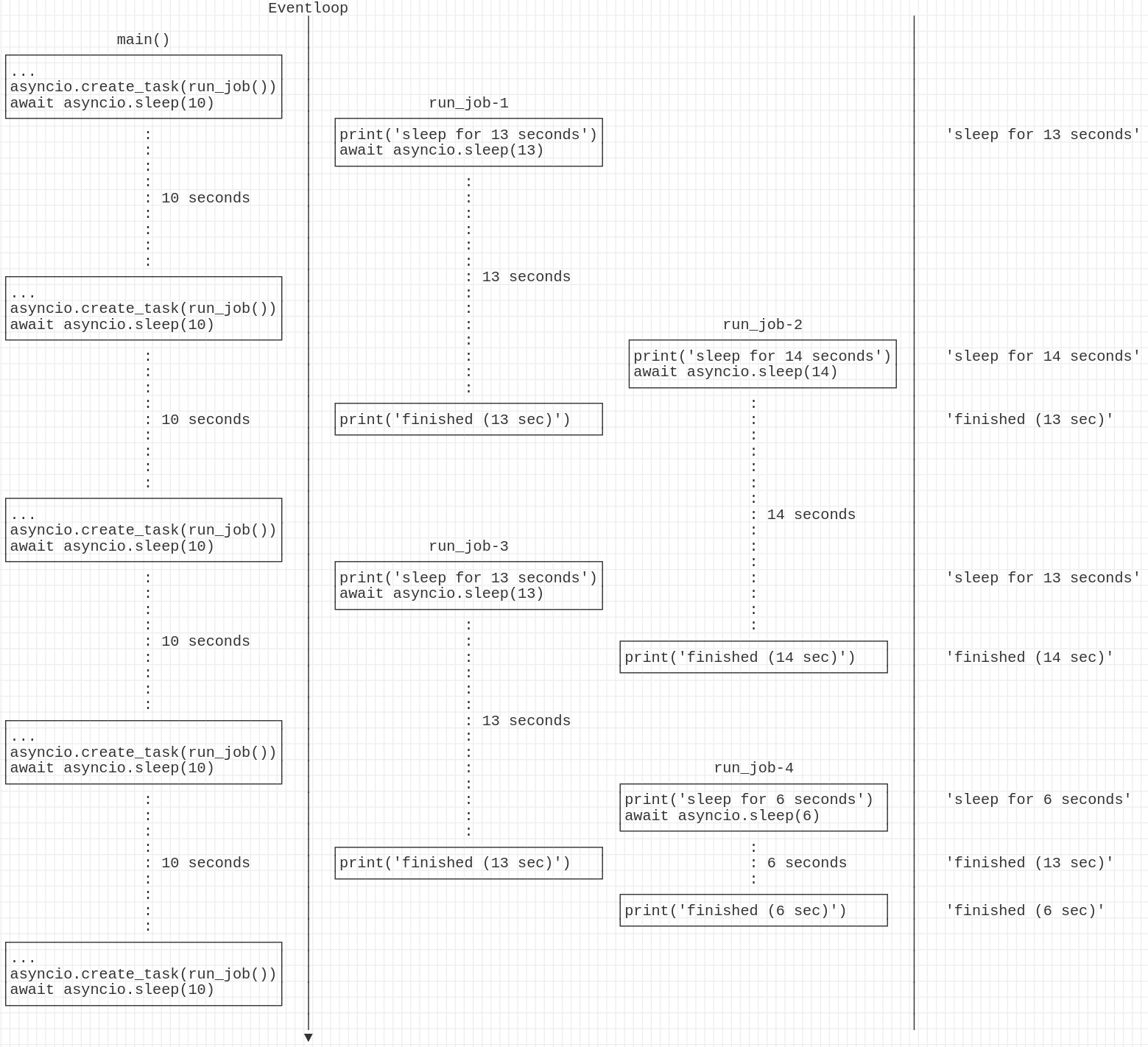
The main() coroutine awaits only asyncio.sleep, so it runs every ten seconds. It registers run_job() coroutines with the event loop through asyncio.create_task, so they begin as soon as main() pauses. Each job also yields control through await while sleeping. No matter how large its delay, it therefore does not hold up the other coroutines.
Other Ways to Run Concurrently
The official Python documentation describes functions such as gather and wait. They require the coroutines or Futures to wait for as arguments, so their number must be known in advance. One use case is reading MySQL and Redis concurrently: make each operation a coroutine, then use gather or wait to wait for both. With as_completed(), you can run several coroutines concurrently and receive results in completion order. None of these three functions suits this post’s infinite-loop case, because we do not know how long the program will run.
Event Loops and Multiple Threads
Not every coroutine must run on the same event loop. The constraint “one running event loop per thread” also means that creating another thread allows another event loop. With run_coroutine_threadsafe, you can choose the thread in which a coroutine runs. With run_in_executor, you can run a function on another thread without creating another event loop. Once other threads are involved and variables are shared between them, you need to consider synchronization: the synchronization primitives provided by asyncio are not thread-safe.
Closing Thoughts
This post explored asyncio’s foundations: event loops and coroutines. The next post will take a closer look at Futures and how to use them.