AI-translated. Read the original in KoreanEmbedded slides, videos and images remain in their original language.
Building a Self-Service Data Platform with Airflow

Data Engineer

Introduction
Hi, I’m Bernard, a data engineer at Buzzvil. In this post, I’ll introduce how our team built a self-service data platform: a platform where anyone can produce and consume the data they need without depending on a particular team.
Previously, when server engineers or analysts requested a pipeline, data engineers built it for them. As Buzzvil’s services and analytical domains diversified, operating and maintaining every pipeline created a growing cognitive burden. Other teams also found it inconvenient to depend on data engineers whenever they needed timely access to data. We therefore began building a self-service platform that could make better use of each domain’s expertise.
Buzzvil’s data infrastructure
First, here is a brief overview of our main data infrastructure components.
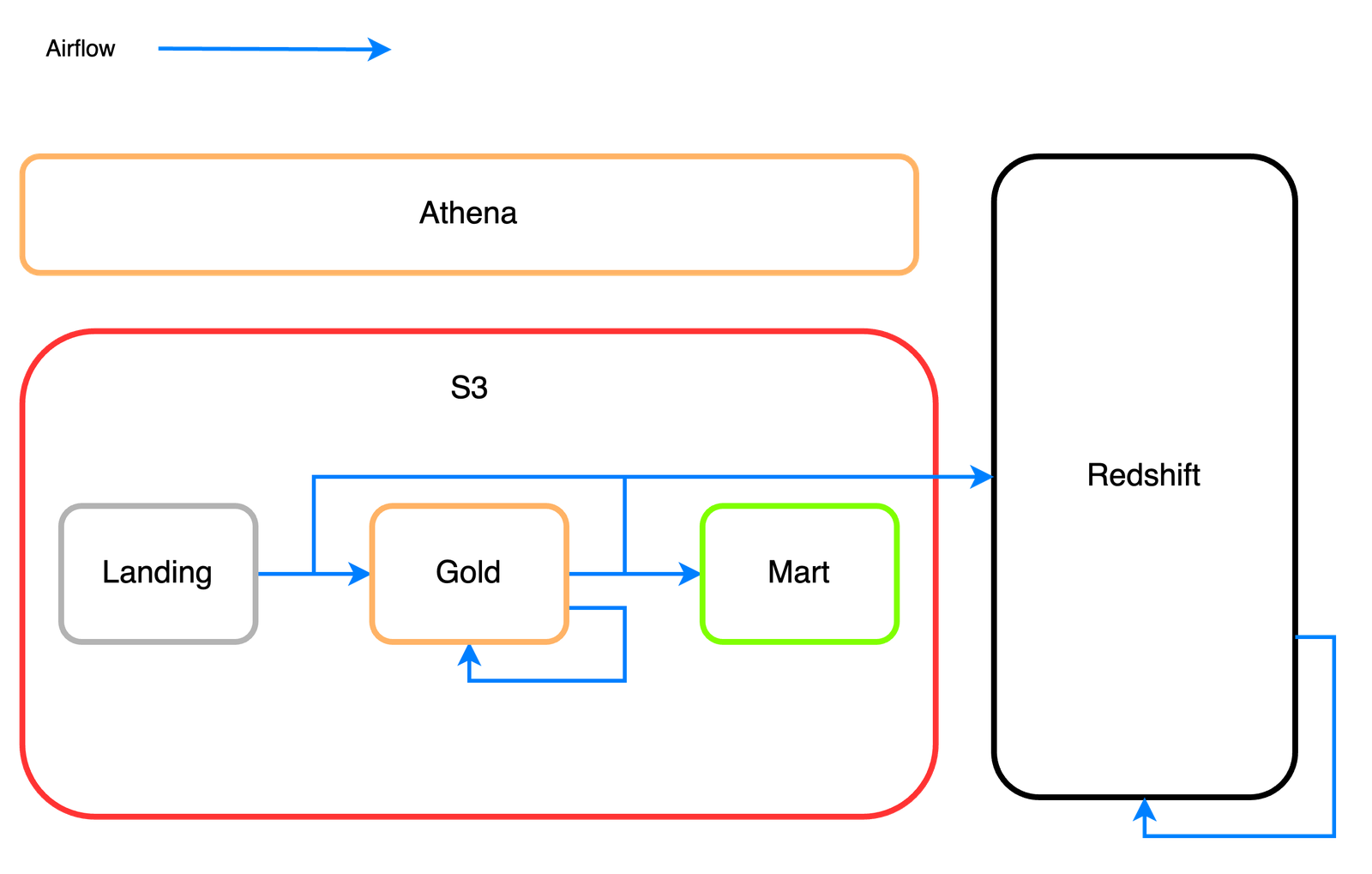
- Athena/S3
S3 is AWS’s storage service. It scales well and offers relatively low costs for the volume stored. Buzzvil initially stores all data in S3 and uses it as our single source of truth. Our S3 data falls into these categories:
- landing: data first collected from operational systems
- gold: data processed for storage, compression, and basic preprocessing
- mart: aggregated business metrics that are frequently queried
Athena is an interactive query service for analyzing S3 data with standard SQL. It is serverless, so there is no infrastructure to manage, and charges apply to queries executed. Its Trino-based query engine is strong at processing large datasets. We use Athena to preprocess and query data volumes that are difficult to handle in Redshift.
- Redshift
Redshift is AWS’s data warehouse service. Massively parallel processing lets it run even complex queries quickly. Its familiar RDBMS-style query experience makes it easier to use than Athena for our purposes. Because we pay for on-demand cluster capacity rather than per volume scanned, as with Athena, individual query costs are less of a concern. We therefore use Redshift for ad hoc business queries and dashboards.
- Airflow
Airflow is an open-source data pipeline management tool developed at Airbnb. Its scheduling features and detailed web UI monitoring have led many companies to adopt it. We mainly use it to synchronize operational data into analytical systems and to aggregate and schedule data marts.
Self-service for analysts and engineers
Creating a pipeline normally requires learning the components above. Suppose an analyst wants to aggregate and schedule an Athena table containing daily active user data. They must consider several questions.
-
How should the data be partitioned?
- Partitioning divides stored data so a query can read only part of it. Filtering on partition columns reduces cost and improves performance. This is especially important for Athena, which charges according to data scanned.
- At Buzzvil, we commonly partition using hourly prefixes such as
/year=2023/month=05/day=29/hour=12. Daily or monthly partitions are used where appropriate. - Partition columns can be mapped directly to storage prefixes through queries, or discovered automatically using AWS Glue crawlers.
-
How do we ensure source data is complete?
- A data mart may be aggregated before its source data is complete. For example, user activity data used to calculate DAU might arrive late.
- Airflow sensors can address this. ExternalTaskSensor lets a DAG wait for a successful run of another DAG. An upstream DAG that checks whether all source data has arrived can enforce completeness before aggregation.
-
Is the pipeline idempotent?
- An idempotent pipeline produces the same result when run repeatedly with the same input. This makes recovery from failures easier: simply rerun it. Achieving this requires deleting previously generated data before processing it again.
Even with a guide, this is a steep learning curve. We abstracted these concerns into templates that generate Airflow DAGs from simple YAML files. Users can create pipelines quickly without separately learning Airflow, Athena, and Redshift. Here is an example:
---
pipeline_key: dau
pipeline_type: athena_process
pipeline_dag_configs:
  start_date: 2023-03-01 15:00:00
  schedule_interval: "0 15 * * *"

upstream_dependencies:
  - dag_id: check_data_athena_ad_request__24hr_kst_existence

athena:
  process_query: |
        SELECT DISTINCT
            viewer_id                 AS viewer_id,
            DATE_TRUNC('day', date)   AS kst_at
        FROM
            ad_request
        WHERE
            partition_timestamp >= TIMESTAMP'{var[start_time]}' AND
            partition_timestamp < TIMESTAMP'{var[end_time]}' AND

  output_bucket: "buzzvil-example-bucket"
  output_prefix: buzzvil/gold/dau/year={var[year]}/month={var[month]}/day={var[day]}

table: m_dau
  columns:
  - name: viewer_id
    type: STRING
  - name: unit_id
    type: BIGINT
Configuration fields in the YAML file
pipeline_key: The pipeline name, used to generate Airflow’s dag_id.pipeline_type: The pipeline type. Use athena_process to schedule Athena table creation. Other types schedule Redshift tables or unload MySQL data into S3. Choose the type that matches the pipeline’s purpose.pipeline_dag_configs: DAG settings such as start_date and schedule_interval. For daily active users, “0 15 * * *” schedules execution at midnight in Korea.upstream_dependencies: Dependencies on upstream DAGs. Here, the upstream DAG verifies that the source table contains all data for the latest 24-hour period.athena.process_query: The query to run in Athena. We customized it with Jinja templating for parameterized variables. var[start_time] and var[end_time] are populated from Airflow’s data_interval_start and data_interval_end.athena.output_bucket: The S3 bucket that stores the query results.athena.output_prefix: The S3 prefix for those results. Jinja templating fills {var[year]}, {var[month]}, and {var[day]} from the interval start date.athena.table,athena.columns: The Athena table schema.
The YAML file becomes the following DAG:
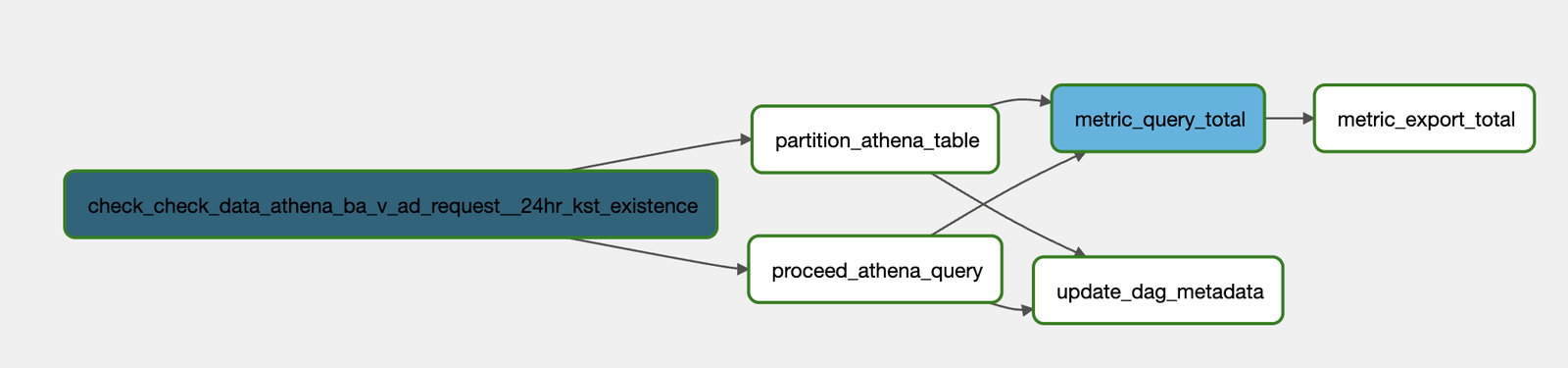
Tasks in the DAG
check_data_athena_ba_v_ad_request__24hr_kst_existence: Checks that the source table, ba_v_ad_request, contains a complete 24 hours of data.
procced_athena_query: Runs an Athena CTAS query based on the supplied SQL and stores the generated data in S3. To ensure idempotency, it first deletes any existing data at that location.
partition_athena_table: Manually maps the YAML file’s output_prefix to partition columns. This mapping is included in the scheduled pipeline.
metric_query_total, metric_export_total, update_dag_metadata: Collect DAG statistics.
The generated DAG handles the pipeline concerns through these abstractions. Users no longer need to learn Airflow’s many features or implement all the supporting work required to query an Athena table themselves.
-
How should the data be partitioned?
- Specify the prefix in YAML, and
partition_athena_tableautomatically schedules the mapping. Users provide the prefix rather than working out the mapping implementation.
- Specify the prefix in YAML, and
-
How do we ensure source data is complete?
- Enter the
upstream_dependencyvalue in YAML, and the dependency on another DAG is added automatically. Users do not need to understand Airflow sensors.
- Enter the
-
Is the pipeline idempotent?
- Before saving query results to S3,
proceed_athena_querydeletes files at the target path. The pipeline applies idempotency automatically without requiring users to implement it.
- Before saving query results to S3,
Code structure
The example above schedules an Athena table. We also need pipelines for Redshift tables, S3-to-MySQL synchronization, and other purposes. Similar pipeline patterns kept recurring, so we used the factory pattern to reduce repetitive code and automate DAG creation and management.
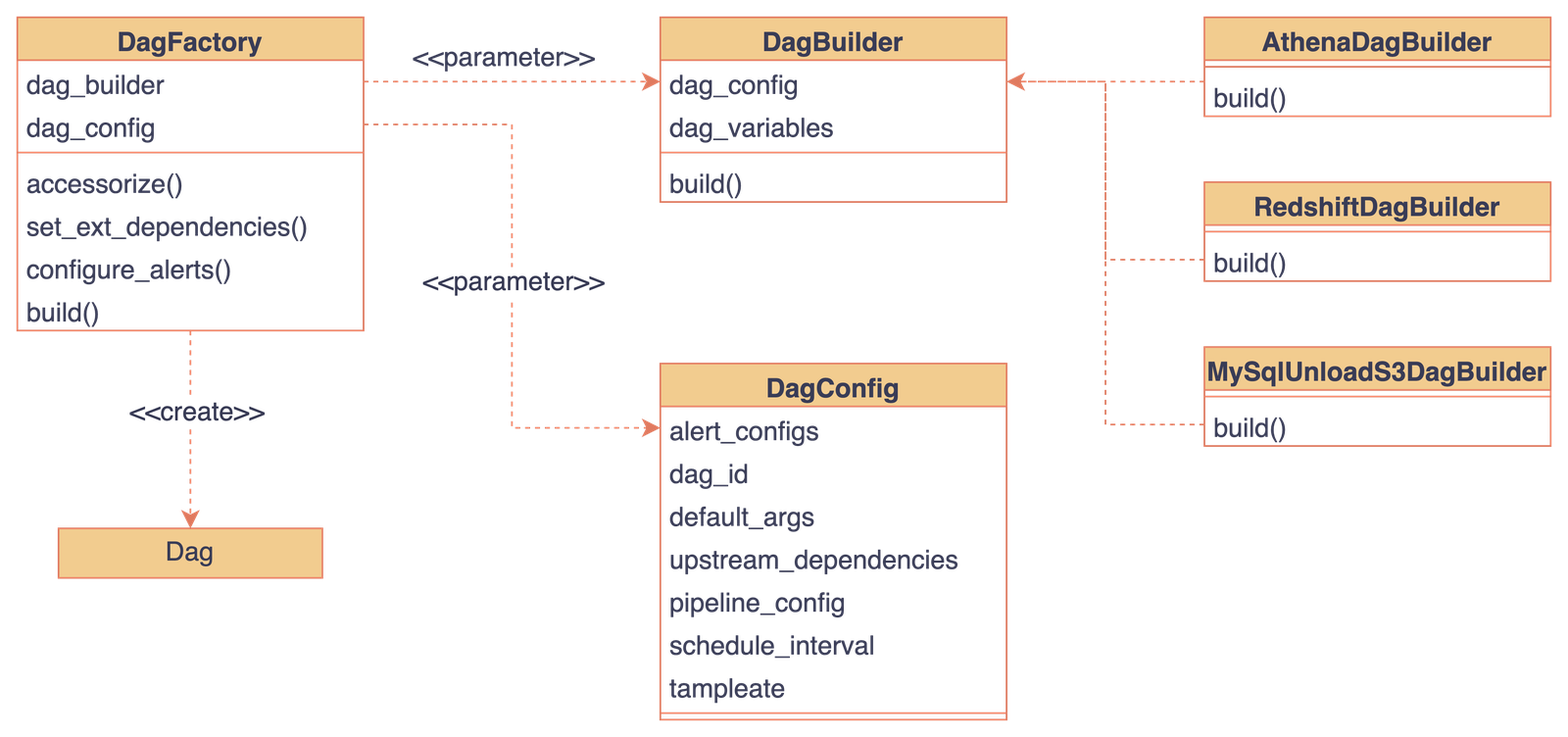
We created an abstract base class, DagBuilder, and use its interface to add pipeline types. This lets us add or modify pipelines without changing existing code. For example, a MySQL-to-S3 pipeline can be added by implementing MysqlUnloadS3DagBuilder. DagConfig receives the specification needed to configure the DAG. Finally, DagFactory combines the builder and configuration to create it.
Our internal Airflow Git repository has a folder for each pipeline type. Users add YAML files under the type they need. Each file is turned into a DAG using that folder’s DagBuilder.
Airflow Pipeline
├── ...
├── athena_process
│   ├─- dau.yaml # athena_process_dau라는 dag로 변경됨.
│   ├── mau.yaml
│   ├── example_1.yaml
│   └── example_2.yaml
└── mysql_unload_s3
    ├── example_1.yaml # mysql_unload_s3_example_1 dag로 변경됨
    ├── example_2.yaml
    └── example_3.yaml
Closing thoughts
Managing every internal pipeline is difficult for data engineers. Understanding the data context required for each one takes substantial time, and repetitive work can become demotivating. We built a self-service platform to address this. It lets teams use their own domain expertise while data engineers concentrate more on improving platform capabilities. I hope this helps other teams facing similar challenges.